
TP-Link ER605
4.4Editor score
Five Gigabit Ports
Up to 20 VPN Connections
Advanced Firewall Policies
This guide compares the top 10 Dual Wan Router options for enterprise and home use, evaluating port configurations, VPN support, security features, and
A Dual Wan Router ensures your network stays online even if one internet connection fails. These devices support multiple WAN ports for failover and load balancing, critical for businesses and power users.
We evaluated ten models based on port flexibility, security suites, VPN capabilities, and real-world reliability. Our analysis covers budget-friendly options to enterprise-grade systems with cloud management.
Each pick highlights key specs and ideal use cases. Prices fluctuate often, so verify current listings before purchasing. Read on to find the perfect Dual Wan Router for your needs.
4.4Editor score
4.4Editor score

4.2Editor score
This side-by-side comparison highlights the key specifications and capabilities of each router to help you decide which Dual Wan Router fits your specific network requirements.



The TP-Link ER605 stands out as a top contender in the Dual Wan Router market. With a 4.4 rating, it delivers robust wired performance for small businesses.
We may earn a commission when you buy through this link, at no additional cost to you.
Its five Gigabit ports allow flexible WAN configurations. You can connect up to three internet sources simultaneously. This setup optimizes bandwidth usage effectively.
While it lacks built-in Wi-Fi, this keeps costs low. The device focuses purely on routing and security. Advanced firewall features ensure your data remains protected.
If you need reliable failover without breaking the bank, this model is ideal. It handles VPN connections well. We highly recommend it for budget-conscious users.
The ER605 offers three WAN ports. This allows load balancing across multiple ISPs. Your network stays online if one line fails.
Support up to 20 IPsec VPN connections. This enables secure remote access for staff. Data encryption keeps sensitive info safe.
We may earn a commission when you buy through this link, at no additional cost to you.
The Peplink B-One delivers enterprise-grade connectivity. It achieves 1Gbps throughput with dual WAN ports. This makes it perfect for demanding branch offices.
We may earn a commission when you buy through this link, at no additional cost to you.
SpeedFusion technology ensures smooth video calls. If your primary internet drops, backup connections take over instantly. You won't experience interruptions during critical meetings.
The integration with Starlink is a major plus. You can load balance fiber with satellite. However, the cost is higher than standard routers.
Choose this if reliability is non-negotiable. The Wi-Fi 6 support adds wireless value. It is a robust solution for business environments.
SpeedFusion creates a bonded connection. It combines multiple internet sources seamlessly. This reduces lag and keeps you connected.
The router supports Starlink connections. You can back up cable with satellite. This is ideal for remote locations.
We may earn a commission when you buy through this link, at no additional cost to you.
The NETGEAR PR60X offers blazing-fast 10G ports. This router is designed for high-performance networks. It handles massive data transfers with ease.
We may earn a commission when you buy through this link, at no additional cost to you.
Cloud management via Insight simplifies administration. You can monitor your network from anywhere. The security features include IPSec and WireGuard.
The price reflects its premium capabilities. It is not a budget choice. But for SMEs needing robust infrastructure, it delivers.
Invest in this if speed is priority. The VLAN support ensures secure segmentation. It represents the top tier of routing.
Hardware supports 10G ports. You can connect to high-speed fiber. This future-proofs your network setup.
Remote access is seamless. Manage multiple sites from one dashboard. This reduces IT overhead significantly.
We may earn a commission when you buy through this link, at no additional cost to you.
The Cudy R700 brings advanced control to you. It supports OpenWRT for custom configurations. This is great for tech-savvy users and labs.
We may earn a commission when you buy through this link, at no additional cost to you.
With five GbE ports, connectivity is flexible. You can segment VLANs effectively. The VPN suite includes WireGuard and OpenVPN.
Security is a strong suit. It prevents DoS attacks and filters domains. However, the interface is less intuitive for beginners.
Pick this if you want enterprise features. The price is competitive for the specs. It is ideal for home labs or offices.
Full support for community packages. Customize firewall rules as needed. This unlocks advanced routing possibilities.
Server and client capabilities built-in. Route traffic through encrypted tunnels. Protect remote access effectively.
We may earn a commission when you buy through this link, at no additional cost to you.
The Omada ER707-M2 supports over 1000 clients. It is built for high-density environments. The 2.5G WAN ports boost bandwidth.
We may earn a commission when you buy through this link, at no additional cost to you.
Cloud access centralizes management. You control multiple sites from a single interface. The warranty period is excellent for businesses.
USB ports allow storage or LTE backup. This adds versatility to the hardware. But it works best within the Omada ecosystem.
Choose this for growing offices. The session limits are high. It ensures stability during peak usage times.
Supports 500,000 concurrent sessions. Perfect for crowded networks. Keeps connections stable under load.
Centralized app interface. Monitor and control remotely. Simplifies multi-site administration.
We may earn a commission when you buy through this link, at no additional cost to you.
The ASUS RT-BE88U leads in wireless performance. It uses WiFi 7 for massive speeds. The wired ports are also 10G.
We may earn a commission when you buy through this link, at no additional cost to you.
A quad-core CPU handles heavy loads. You can run demanding applications smoothly. AiMesh lets you extend coverage easily.
This device is a powerhouse. It is suitable for enthusiasts. The security features are commercial-grade.
If you want the latest tech, buy this. It integrates seamlessly with other devices. It is an investment in future-proofing.
Up to 7.2 Gbps. Multi-Link Operation improves efficiency. Reduces latency for gaming and VR.
Trend Micro powers security. Blocks threats proactively. Scans for vulnerabilities automatically.
We may earn a commission when you buy through this link, at no additional cost to you.
The ASUS ExpertWiFi EBG15 targets commercial users. It offers Layer 7 firewall protection. VLANs add security to network segments.
We may earn a commission when you buy through this link, at no additional cost to you.
Remote management via the app is convenient. Bluetooth setup simplifies initial configuration. However, user feedback is varied.
IPS intrusion prevention blocks malware. The USB port allows a mobile backup. This is good for small businesses.
It provides essential business features. But check reviews before buying. It is a functional option for specific needs.
Inspects packets deeply. Blocks malicious traffic effectively. Enhances network security layer.
Assign VLANs to ports. Isolates sensitive devices. Reduces risk of breaches.
We may earn a commission when you buy through this link, at no additional cost to you.
The D-Link DSR-250V2 meets strict standards. It is TAA and NDAA compliant. This makes it suitable for government work.
We may earn a commission when you buy through this link, at no additional cost to you.
VPN support is extensive with 75 tunnels. Failover ensures continuity during outages. The warranty lasts a lifetime.
However, user reviews are mixed. Some find it hard to configure. Performance is decent for the price.
Use this for compliance needs. It protects sensitive data well. Verify requirements before purchasing to ensure fit.
Follows NDAA and TAA standards. Essential for secure agencies. Ensures hardware trust.
Uses IPSec and SSL. Protects remote connections. Secures sensitive information.
We may earn a commission when you buy through this link, at no additional cost to you.
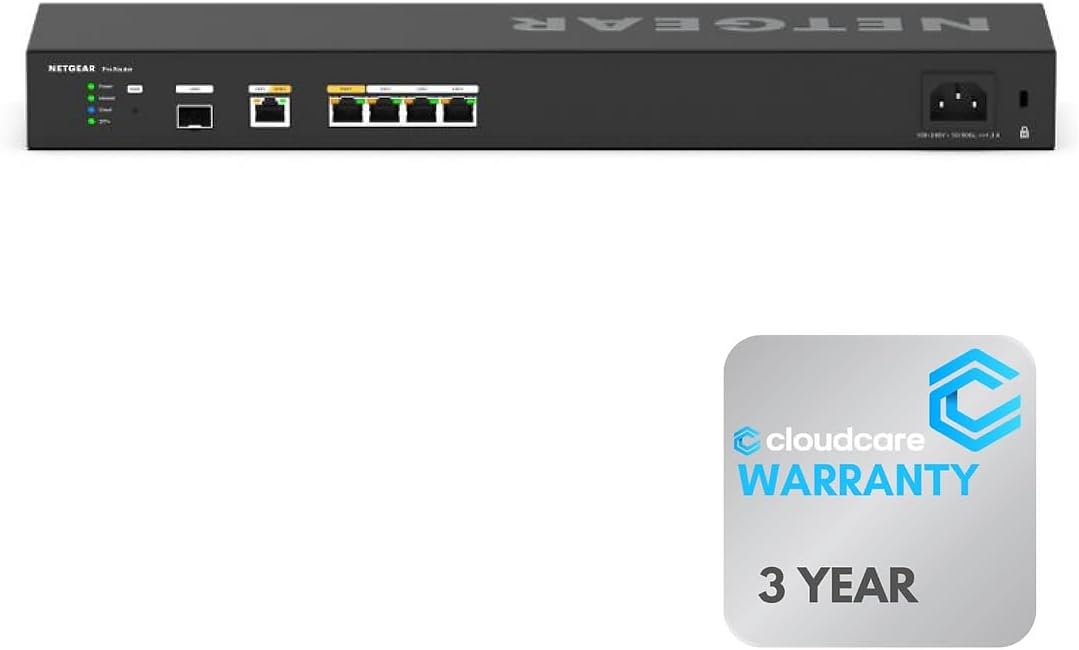
This variant of the PR60X comes from Cloud Care. It offers six 10G ports. The rack-mount design fits professional setups.
We may earn a commission when you buy through this link, at no additional cost to you.
Insight cloud management is included. You can monitor remotely. The warranty support is comprehensive via the seller.
It is a solid choice for enterprises. The extra ports provide redundancy. Just note the added cost.
Buy for high-end networking. It ensures top performance. Ideal for dense or secure environments.
Saves space efficiently. Organizes professional equipment. Fits standard server racks.
Includes CarePlus protection. Simplifies claims. Ensures long-term support.
We may earn a commission when you buy through this link, at no additional cost to you.
The Linksys LRT224 is a classic business option. It supports up to 50 tunnels. The firewall throughput is robust for its class.
We may earn a commission when you buy through this link, at no additional cost to you.
Failover keeps you online reliably. It manages dual WAN lines well. It is a stable choice for offices.
User reviews reflect decent reliability. The interface is straightforward. However, it lacks modern cloud features.
Opt for this on a budget. It meets core business needs. Good for small teams needing VPNs.
Supports 50 IPsec tunnels. Allows secure remote access. Handles multiple users.
Load balancing ensures uptime. Switches to backup instantly. Reduces connectivity downtime.
We may earn a commission when you buy through this link, at no additional cost to you.
Choosing a Dual Wan Router depends on your bandwidth needs, security requirements, and management preferences.
Look for routers with multiple Gigabit or Multi-Gigabit ports. Ensure they support your internet speeds. High-speed WAN ports are vital for performance.
Choose enough ports for your devices. Avoid bottlenecks by selecting high throughput.
Verify support for protocols like IPSec and OpenVPN. Firewalls should block malicious traffic effectively. Enterprise-grade encryption is crucial for remote access.
Prioritize strong security suites to protect data. Ensure they meet compliance needs.
Dual WAN routers should offer automatic failover. Load balancing optimizes traffic distribution across lines. This minimizes downtime if one ISP fails.
Ensure seamless switching between connections. Prioritize reliability for business continuity.
Cloud management allows remote monitoring from anywhere. Local management gives more control. Decide based on your IT resources.
Cloud offers convenience for distributed networks. Local is better for strict on-premise needs.
Some routers include Wi-Fi while others do not. Check if you need wireless connectivity or just routing. Wi-Fi adds flexibility for devices.
Choose models with Wi-Fi if you lack APs. Otherwise, focus on wired routing.
Ensure the router supports your client count. Enterprise models handle thousands of sessions. Avoid underpowered hardware for growing networks.
Match device capacity to your needs. Plan for future growth in client numbers.
Check warranty periods and customer service. Reliable support reduces risk of downtime. Look for lifetime warranties if possible.
Prioritize brands with strong support. Ensure assistance is available when needed.
Government agencies require specific standards like TAA. Verify compliance before purchasing. This ensures regulatory adherence.
Check NDAA or TAA for secure environments. Compliance protects against legal issues.
Connect your WAN cables properly. Ensure ISPs are active. Access the web interface to configure settings.
Update firmware regularly. This fixes security vulnerabilities. Enable automatic updates for convenience.
Monitor traffic logs occasionally. Check for anomalies. Reboot the device if issues arise.
A Dual Wan Router connects to two internet lines. It balances traffic and switches to a backup if one fails. This ensures reliable connectivity for businesses.
Some models include Wi-Fi while others are wired only. Check specifications for wireless capabilities. Add separate access points if needed.
Load balancing distributes traffic across connections. It optimizes bandwidth usage. This improves speed and stability.
Failover switches to a backup line if the primary fails. This keeps your network online. It is automatic and seamless.
Businesses need VPNs for remote access. Dual Wan Routers often support them. Check for required protocols like IPSec.
Yes, some models support Starlink connections. This allows satellite backup. Check compatibility for your specific router.
The TP-Link ER605 leads as the best value. For high-speed needs, the NETGEAR PR60X offers 10G power.
Prioritize security and failover for business. Ensure the router matches your specific requirements.
Prices fluctuate frequently. Verify current listings before purchasing. The best model fits your current setup.