
NexiGo N60 1080P Webcam
4.3Editor score
Full HD 1080p video
Built in noise cancelling mic
Privacy cover included
This guide compares the top external webcams for Mac including 4K and 1080p models with autofocus privacy covers and mic quality for seamless video calls.
Finding the right external webcam for your Mac can transform your video call experience significantly. A quality camera ensures you look professional and clear during meetings streaming sessions or online classes without requiring complex setups or additional lighting equipment.
We evaluated ten top rated models based on image quality audio performance ease of use and compatibility with macOS systems. Our comparison includes options ranging from budget friendly picks to premium 4K cameras designed for professionals and content creators alike.
Each product listing highlights key features pros and cons to help you make an informed decision quickly. Please note that prices and availability can change frequently so check the current listings before making your final purchase decision online.
4.3Editor score

4.6Editor score

4.6Editor score
The following table provides a side by side overview of all ten webcams evaluated in this guide. Use it to quickly compare key specifications such as resolution field of view microphone type and privacy features across different models and price points.




The Acer 4K Webcam stands out as the top choice for Mac users seeking premium quality without a prohibitive price tag. With a rating of 4.6 stars it delivers true 4K resolution that ensures every detail is captured clearly during video calls.
We may earn a commission when you buy through this link, at no additional cost to you.
Its standout feature is the Sony 1/2 inch CMOS sensor which provides exceptional low light performance and natural color reproduction. The Phase Detection Autofocus ensures your face stays sharp even when you move around during a meeting.
While it lacks dedicated software for advanced tweaks the hardware excellence makes up for it. The all metal unibody design not only looks sleek on your desk but also dissipates heat efficiently for long streaming sessions.
If you need a reliable camera that looks professional and performs flawlessly on macOS this is the ideal pick. It balances high end features with ease of use making it perfect for professionals and creators alike.
The large sensor captures more light for brighter clearer images even in dimly lit rooms without extra lighting.
Crafted from aerospace grade aluminum this webcam feels durable and matches the aesthetic of Apple devices perfectly.
We may earn a commission when you buy through this link, at no additional cost to you.
The Anker PowerConf C200 offers incredible value for Mac users who want sharp video without spending a fortune. Rated at 4.4 stars it provides 2K resolution which is significantly sharper than standard 1080p cameras.
We may earn a commission when you buy through this link, at no additional cost to you.
Its AI noise cancellation feature is a strong point filtering out background distractions like keyboard clicks or air conditioning. This ensures your voice comes through clearly even in busy environments.
The customizable viewing angles allow you to frame yourself exactly how you want via software. This flexibility is rare in this price range and helps you maintain a professional appearance on calls.
For budget conscious buyers looking for reliable performance this webcam is a smart choice. It strikes a great balance between image quality features and affordability for everyday video conferencing.
AI powered noise cancellation ensures your voice is clear by filtering out ambient background noise effectively.
Software allows you to select from multiple viewing angles to find the perfect shot for your workspace.
We may earn a commission when you buy through this link, at no additional cost to you.
The EMEET C960 4K brings premium imaging capabilities to Mac users with a focus on clarity and detail. Rated 4.5 stars it uses a genuine 4K CMOS sensor to deliver true ultra clear video without false upscaling.
We may earn a commission when you buy through this link, at no additional cost to you.
Its dual omnidirectional microphones capture natural sounding audio from multiple directions. This makes it excellent for group meetings where people may be seated around the table.
Auto light correction adjusts to your environment ensuring you look good even if your lighting changes. The narrow field of view keeps the focus on you rather than cluttered backgrounds.
If you need a high performance camera for important business meetings this model delivers professional results. The build quality and sensor size make it a reliable tool for serious users.
A real 4K sensor ensures crisp detailed images without relying on digital upscaling techniques.
With a tripod thread and adjustable axis you can mount it anywhere for the perfect angle.
We may earn a commission when you buy through this link, at no additional cost to you.
The NexiGo N60 is an excellent entry level webcam for Mac users needing basic reliable performance. With a rating of 4.3 stars it delivers sharp 1080p video at a price that fits any budget.
We may earn a commission when you buy through this link, at no additional cost to you.
Setup is incredibly simple requiring no drivers or software. Just plug it into a USB port and you are ready to start using within minutes on any macOS system.
The built in noise cancelling microphone helps reduce background noise effectively. While the build is mostly plastic it feels sturdy enough for daily use.
For students or casual users who just need a clear picture for Zoom or Teams this is the perfect choice. It offers essential features without unnecessary complexity or high costs.
Ready to use in under a minute with no drivers or apps required for immediate connectivity.
An included physical cover ensures your camera is securely blocked when you are not in use.
We may earn a commission when you buy through this link, at no additional cost to you.
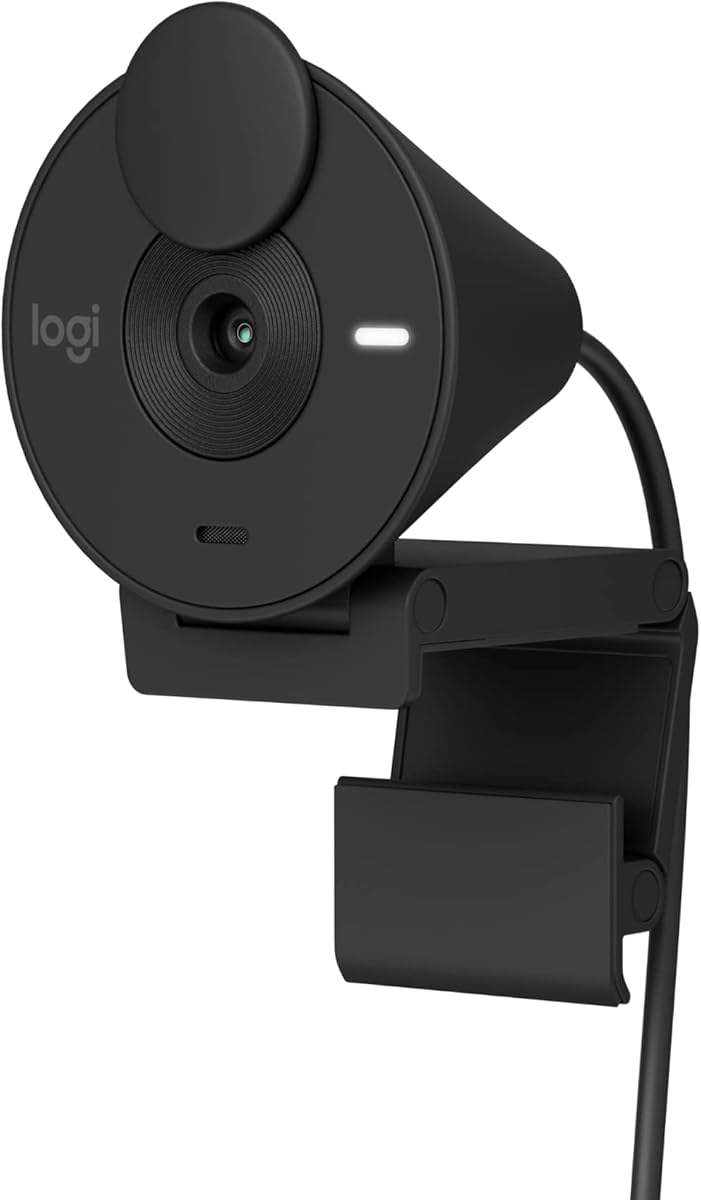
The Logitech Brio 100 offers a clean modern look that matches MacBooks and white monitors perfectly. Rated 4.4 stars it is ideal for users who value aesthetics alongside reliable video performance.
We may earn a commission when you buy through this link, at no additional cost to you.
RightLight technology automatically boosts brightness to reduce shadows on your face. This helps you look well lit even in challenging lighting conditions during important calls.
The integrated slide cover provides a quick and easy way to protect privacy. You can physically block the lens with a simple motion when you step away from your desk.
If you want a camera that blends seamlessly into a clean workspace this is a strong contender. It delivers consistent quality and peace of mind with its privacy cover.
The white finish and sleek profile complement modern office setups and Apple devices perfectly.
Automatic light balance reduces shadows so you look your best in various lighting conditions.
We may earn a commission when you buy through this link, at no additional cost to you.
The Logitech Brio 301 is designed for professionals who need certification and reliability. With a 4.4 rating it is certified for Zoom and Teams ensuring seamless integration with corporate environments.
We may earn a commission when you buy through this link, at no additional cost to you.
RightLight 2 technology compensates for poor lighting so you look clear and sharp. This is crucial for maintaining a professional image during late night or early morning meetings.
The spin privacy shutter gives you instant control over visibility. Simply rotate the lens to block it when you need a quick break or private time.
For work from home professionals seeking a trusted name this model provides consistency. Its certifications and app support make it a safe bet for business use.
Certified for Zoom and Teams to ensure compatibility and optimal performance with corporate tools.
A spin shutter allows you to block the camera lens instantly with a simple rotation.
We may earn a commission when you buy through this link, at no additional cost to you.
The Logitech C920e is a robust business grade webcam designed for enterprise environments. Rated 4.6 stars it is TAA compliant and certified for Microsoft Teams ensuring it meets strict workplace standards.
We may earn a commission when you buy through this link, at no additional cost to you.
The dual omnidirectional microphones capture clear audio from a one meter range. This ensures everyone can hear you naturally without needing a separate microphone.
Its 78 degree field of view balances framing between individual users and shared projects. It is a practical choice for hybrid meetings where you might need to show physical items.
If you need a durable reliable camera for daily business use this is a solid investment. Its compliance certifications and sturdy build make it ideal for office deployment.
TAA compliant and certified for Teams to meet enterprise standards and procurement requirements easily.
A 78 degree view allows you to frame individuals or share documents with ease.
We may earn a commission when you buy through this link, at no additional cost to you.
The Logitech C922x is a favorite among streamers and content creators on Mac. With a 4.6 rating it offers unique features like background removal software that works without a green screen.
We may earn a commission when you buy through this link, at no additional cost to you.
Stereo audio with dual mics captures natural sound during calls and recorded videos. This is a significant upgrade over mono mics for those who produce recorded content.
HD autofocus and light correction ensure your image stays sharp and bright even in low light. It is designed for high quality recording and streaming on various platforms.
If you create content for YouTube or Twitch this camera provides the versatility you need. Its software features set it apart from standard conference webcams in this price range.
Virtual background software allows you to replace your background without needing a physical green screen.
Stereo audio recording provides a more immersive and natural sound for your videos and streams.
We may earn a commission when you buy through this link, at no additional cost to you.
The Logitech C920S combines proven performance with essential privacy features for Mac users. Rated 4.6 stars it is widely trusted for its clear video and easy plug and play setup.
We may earn a commission when you buy through this link, at no additional cost to you.
Its glass lens delivers sharp crisp images that look vibrant and detailed. This helps you look professional on video calls and in recorded content alike.
The included privacy shutter gives you physical control over the lens. This simple feature offers peace of mind when you are not actively using the camera.
For a reliable everyday camera that works with almost any platform this is a great choice. It balances performance features and price perfectly for the average user.
Glass optics ensure your video looks sharp and detailed with vibrant colors during every call.
A sliding cover provides physical privacy protection so you know when the camera is off.
We may earn a commission when you buy through this link, at no additional cost to you.
The Acer 4K Webcam offers top tier resolution for users who prioritize visual detail. Rated 4.4 stars it uses a genuine Sony sensor to deliver balanced and true to life visuals.
We may earn a commission when you buy through this link, at no additional cost to you.
Its all metal body ensures fast heat dissipation for reliable 24/7 video performance. This makes it ideal for long gaming sessions or live streaming events.
Phase Detection Autofocus ensures crisp clear 4K video without blurriness. The lightweight design means you can take it anywhere easily for remote work or travel.
If you need high quality streaming capabilities without breaking the bank this is a solid option. It delivers premium hardware features in a compact and durable package.
The all aluminum body dissipates heat quickly ensuring reliable performance even during long sessions.
Weighing just 57 grams this camera is ultra portable and easy to take anywhere.
We may earn a commission when you buy through this link, at no additional cost to you.
Choosing the right webcam for your Mac involves considering several key factors to ensure optimal performance. This guide breaks down the essential elements you should evaluate before making your purchase.
Resolution determines the clarity and detail of your video. For professional meetings 1080p is standard but 4K offers sharper images for streaming or large screens.
Prioritize 4K if you need maximum detail or 1080p for general calls to save on cost and bandwidth.
Webcams with larger sensors or light correction technology perform better in dim environments. Look for features like RightLight or auto light adjustment to avoid grainy footage.
Ensure the camera has low light correction if you do not have perfect studio lighting at your desk.
Built in microphones vary in quality. Dual mics with noise cancellation help filter out background distractions and ensure your voice is clear.
Check for noise cancelling features if you do not plan to use an external microphone.
Autofocus keeps you sharp as you move. Phase detection autofocus is faster and more accurate than standard fixed focus systems.
Choose Phase Detection Autofocus if you move frequently during calls or want a professional look.
Privacy covers or shutters allow you to physically block the lens when not in use. This is essential for security and peace of mind.
Always choose a model with an integrated physical cover to prevent unauthorized access.
A wider field of view captures more of the room while a narrower one focuses on you. 78 degrees is standard for individual calls.
Select a view that matches your setup narrow for solo calls wide for groups.
Metal bodies offer better heat dissipation and durability compared to plastic. This is crucial for long streaming sessions or daily professional use.
Opt for aluminum builds if you plan to use the camera for extended periods.
Some brands offer software for adjustments like background removal or angle control. Check compatibility with macOS before buying.
Verify software features are available for Mac if you need advanced customization options.
Connect your webcam to an available USB port on your Mac. If your Mac has only USB C ports use the included adapter for USB A models. macOS should detect the camera automatically and you can select it in System Settings.
Clean the lens with a microfiber cloth regularly to remove fingerprints and dust. Avoid using harsh chemicals which may damage the lens coating. Store the webcam in a safe place when not in use to prevent physical damage.
Update your macOS and any camera software to ensure compatibility. Restart your computer if the camera is not recognized. Adjust your seating and lighting to get the best possible image quality.
Most modern webcams work with Macs running macOS 10.14 and above. If your Mac has only USB C ports you may need an adapter for USB A cameras. Check compatibility specs before buying.
For standard video conferencing 1080p is sufficient and saves bandwidth. Choose 4K if you need maximum detail or plan to use the camera for content creation and streaming.
Phase Detection Autofocus locks on to your face faster and more accurately than standard autofocus. This ensures your image stays sharp even if you move around during a call.
Built in microphones with noise cancellation are good for general meetings. For noisy environments or professional recordings an external microphone might still be preferred for clarity.
Check if the camera has low light correction enabled. Ensure your room has adequate lighting from the front not the back. Adjust brightness settings in your video conferencing software.
Yes many models like the Logitech C922x support streaming with features like background removal. Ensure the resolution and frame rate match your streaming platform requirements.
Physical privacy covers or shutters are the most reliable privacy feature. They block the lens when not in use preventing unauthorized access and giving you peace of mind.
Most modern webcams are plug and play and do not require drivers. However some advanced features may need proprietary software. Check the product details for driver requirements.
We have reviewed ten top external webcams for Mac ranging from budget friendly to premium 4K options. Each model offers unique strengths in resolution audio and build quality to suit different needs.
Prioritize 4K resolution and autofocus if you need professional clarity. For casual use consider budget friendly options like the NexiGo N60 that still deliver solid performance.
Remember to check current prices and availability before buying as these change frequently. We hope this guide helps you find the perfect webcam for your Mac and improve your video call experience.