
Thrustmaster T-Flight Hotas One
4.4Editor score
Detachable throttle design
Plug and play setup
Adjustable resistance stick
Discover the top flight sticks for Xbox Series X in 2026. This guide compares real controls from Thrustmaster and Turtle Beach to help you choose the right
Finding the right flight stick for your Xbox Series X can transform your gaming experience from simple joystick use to true cockpit immersion. Whether you are simulating commercial aviation or engaging in high-speed dogfights, having precise physical controls matters for realism and performance in modern flight simulation titles.
This comprehensive guide evaluates ten distinct flight control systems available for the Xbox Series X platform. We analyzed build quality, button layout, compatibility with popular simulators, and overall ergonomics to determine which options offer the best value and performance for pilots of all skill levels.
Each product pick highlights specific strengths and ideal use cases to help you match a controller to your gaming habits. Please note that prices and availability fluctuate frequently on retailer sites so always verify current listings before making your final purchase decision for your home cockpit setup.
4.4Editor score
4.5Editor score

4.2Editor score
The following table provides a side-by-side overview of the key specifications and features for each of the ten flight control systems reviewed in this guide to help you compare them quickly.


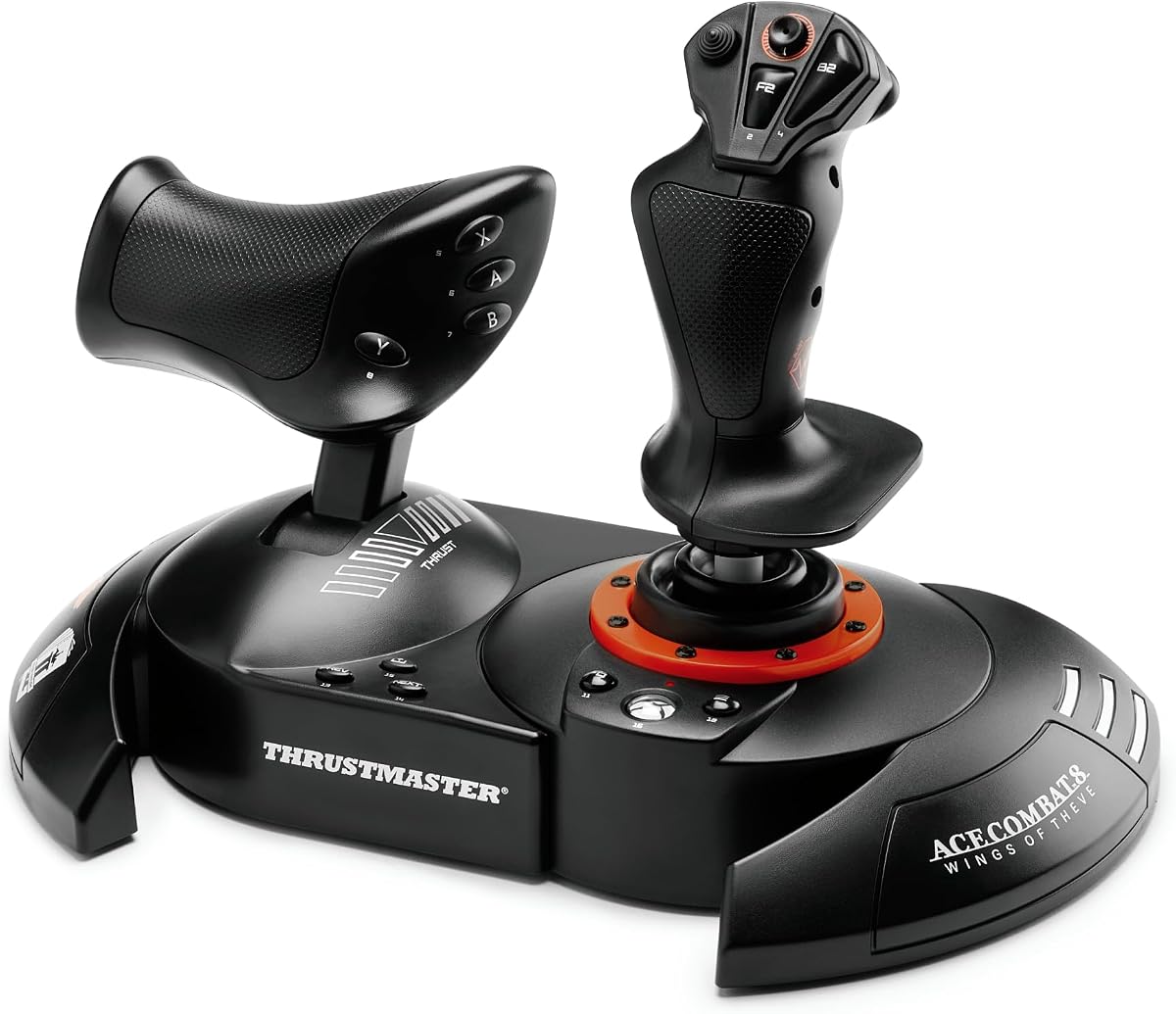
The Thrustmaster T-Flight Hotas One stands out as a highly accessible entry point into flight simulation on the Xbox Series X. With a solid rating from users and a realistic design, it offers the core functions needed for immersive gameplay without overwhelming new pilots with complexity.
We may earn a commission when you buy through this link, at no additional cost to you.
Its ergonomic design features adjustable resistance which allows players to customize the stick feel to their preference. The detachable throttle module is a key strength as it enables versatile setups whether you play at a desk or on a couch with the throttle positioned separately.
While it lacks advanced features like vibration or Hall Effect sensors found in higher-end models the trade-off is acceptable for beginners. The simplicity ensures that focus remains on learning flight mechanics rather than configuring complex settings during active missions.
This controller is ideal for anyone seeking a reliable and affordable way to enhance their flight gaming experience on Xbox. It balances functionality and ease of use effectively making it a top recommendation for those starting their journey in digital aviation.
The detachable throttle allows for flexible positioning that suits both desk-based and lap-based gaming scenarios comfortably.
Adjustable resistance and intuitive button placement help new pilots adapt quickly to the physical control layout.
We may earn a commission when you buy through this link, at no additional cost to you.
The Thrustmaster T.FLIGHT HOTAS NEO ACE COMBAT 8 edition brings official licensing and advanced precision to Xbox flight combat. Its inclusion of Hall Effect technology ensures that control inputs remain accurate over time without the wear and tear common in traditional potentiometer systems.
We may earn a commission when you buy through this link, at no additional cost to you.
Vibration feedback adds a layer of immersion by making you feel missile impacts and turbulence directly through the grip. This feature enhances situational awareness during intense missions and distinguishes this controller from more basic flight sticks on the market today.
The dual rudder system provides flexibility allowing users to control rotation via the stick or throttle lever depending on their preference. This level of customization supports aggressive combat maneuvers while maintaining comfort during extended gaming sessions across multiple titles.
Pilots focused on combat simulations will find this controller delivers the responsiveness and feedback needed to dominate the skies. It is a premium choice for those who value precision and immersion in their flight simulation setup on the Xbox platform.
Proprietary Hall Effect technology guarantees surgical precision that won't decrease over time even after intense dogfighting.
Built-in vibration motor lets you feel missile impacts and turbulence directly in your palm during combat.
We may earn a commission when you buy through this link, at no additional cost to you.
The Turtle Beach VelocityOne Flightstick distinguishes itself with an integrated OLED flight management display that shows real-time data. This feature is rare in this price range and provides pilots with immediate visual feedback without needing to look at a separate monitor.
We may earn a commission when you buy through this link, at no additional cost to you.
With 27 programmable buttons and an ambidextrous design this controller accommodates a wide variety of aircraft configurations comfortably. The touchpad navigation sensor adds modern control flexibility allowing for full cursor navigation within menu systems and maps efficiently.
While it is a standalone stick without a throttle module it offers extensive customization through its configuration wheel and lighting options. The high precision non-contact main axes ensure smooth movement which is critical for maintaining control during delicate landing sequences.
This flight stick is perfect for gamers who want advanced feedback features and high customization without entering the full cockpit price tier. Its unique display technology makes it a standout choice for tech-savvy pilots on the Xbox Series X platform.
The integrated OLED display provides immediate access to critical flight metrics during active simulation sessions.
With 27 programmable buttons and RGB lighting you can tailor the controller to your specific cockpit setup.
We may earn a commission when you buy through this link, at no additional cost to you.
The Turtle Beach VelocityOne H.O.T.A.S. system offers an extensive array of controls with 73 programmable inputs and 15 axes. This level of detail is designed for serious simulation enthusiasts who need every possible function accessible at their fingertips for complex flight profiles.
We may earn a commission when you buy through this link, at no additional cost to you.
A full-color display provides real-time flight data and quick performance tuning which helps pilots adjust settings mid-flight without breaking immersion. The swappable dual throttle detents deliver tactile thrust reference points that are crucial for precise speed management during takeoff and landing phases.
Despite the rich feature set the higher price and complexity mean this is best suited for dedicated simulation enthusiasts rather than casual players. Adjustable left or right-handed grip design ensures comfort during long sessions for users with different hand sizes or preferences.
This system represents a premium investment for those seeking professional-grade control and feedback on Xbox. It transforms your setup into a functional cockpit environment that mirrors real-world aircraft systems with remarkable accuracy and depth.
The full-color display keeps critical flight parameters visible and adjustable during active simulation flights.
Swappable throttle detents provide physical reference points for accurate thrust management in flight.
We may earn a commission when you buy through this link, at no additional cost to you.
The Thrustmaster T.Flight Full Kit X provides a complete solution for Xbox flight simulation by including both the joystick throttle and rudder pedals. This all-in-one approach simplifies the purchase decision and ensures that all components are optimized to work together seamlessly on your desk.
We may earn a commission when you buy through this link, at no additional cost to you.
The TFRP rudder pedals feature the S.M.A.R.T. sliding rail system which allows for smooth and precise steering control during turns and landings. This physical feedback adds a layer of realism that is impossible to achieve with stick controls alone especially in commercial aviation scenarios.
Installation is straightforward thanks to the plug-and-play design that configures all functions for immediate use upon connection. The detachable throttle on the joystick allows for customized positioning which helps users find a comfortable layout regardless of their desk size.
This kit is an excellent choice for pilots who want a full three-axis control system without building individual components separately. It balances cost and functionality effectively making it a strong recommendation for those aiming to build a realistic flight deck at home.
The included rudder pedals with slide rails provide essential yaw control for realistic turning and landing.
Detachable throttle and adjustable resistance let you customize the setup to fit your desk and play style.
We may earn a commission when you buy through this link, at no additional cost to you.
The Thrustmaster TCA Sidestick Airbus X Edition offers an authentic replica of the controls found on Airbus airliners for Xbox gamers. Officially licensed by Airbus it brings a professional cockpit aesthetic and functional layout that appeals to fans of commercial flight simulation specifically.
We may earn a commission when you buy through this link, at no additional cost to you.
With 21 action buttons featuring tact switch technology this sidestick provides quick and responsive input for essential flight functions. The swappable joystick head button modules allow for significant customization ensuring that you can tailor the control surface to your specific needs.
The design includes Xbox-specific configurations for the guide and share buttons which streamlines access to console features during flights. This thoughtful integration means you do not have to reach for the standard controller when you need to pause or capture gameplay moments.
Pilots who prioritize commercial aviation realism will find this controller matches their preferred aircraft type perfectly. It is a specialized tool that elevates the experience of flying airliners on Xbox without compromising on ergonomic comfort or control accuracy.
The sidestick is designed to mimic the exact layout found on Airbus A320 type airliners for realism.
Swappable joystick head modules and remappable buttons allow you to tailor the stick to any mission.
We may earn a commission when you buy through this link, at no additional cost to you.
The Thrustmaster TCA Sidestick X Airbus Edition enhances the standard stick with an enhanced throttle including a built-in thrust reverser mechanism. This addition provides a critical control for landing operations without requiring extra hardware and maintains a compact profile on your desk.
We may earn a commission when you buy through this link, at no additional cost to you.
Contactless magnetic sensor technology ensures an unlimited lifespan and optimal precision by eliminating potentiometers that wear out over time. This technical advantage makes the controller highly durable and suitable for frequent and intense flight simulation sessions on the Xbox platform.
Rudder control is handled by rotating the sidestick handle which can be locked or unlocked depending on whether you use separate pedals. This flexibility supports various cockpit configurations and gives pilots control over how they manage aircraft rotation during taxiing or landing rolls.
This version is ideal for pilots who want all the benefits of the Airbus replica with added landing controls in a single device. The combination of precision and specific aviation features makes it a compelling choice for serious simulation enthusiasts on Xbox.
Built-in thrust reverser mechanism on the throttle provides essential landing control without extra hardware.
Contactless magnetic sensor technology ensures precision and unlimited lifespan without wear over time.
We may earn a commission when you buy through this link, at no additional cost to you.
The Thrustmaster T.Flight Hotas One Microsoft Flight Simulator Edition is designed specifically to pair with the popular simulation title on Xbox. This official license ensures optimized compatibility and button mapping that aligns with the specific needs of the simulator out of the box.
We may earn a commission when you buy through this link, at no additional cost to you.
With 10-bit accuracy and five axes including the Z-axis this controller delivers the precision needed for navigating complex flight maps and procedures. The dual system headliner allows you to operate the rudder via the joystick Z-axis or the rocker lever on the throttle for versatile control.
Its removable gas controller adds versatility allowing you to place the product on your lap or detach the throttle for desk use. This adaptability makes it a practical choice for pilots who switch between different gaming environments or prefer lap setups.
This edition is a solid recommendation for dedicated Microsoft Flight Simulator fans who want a controller tailored to the game. It balances cost and specialized features well ensuring you have the necessary tools for realistic flight training without overspending.
Official Microsoft Flight Simulator license ensures seamless integration and optimized button mapping for the game.
Dual rudder system lets you choose between stick axis or throttle lever for aircraft rotation control.
We may earn a commission when you buy through this link, at no additional cost to you.
The Thrustmaster TCA Yoke & Quadrant Boeing Edition brings the iconic controls of the Boeing 787 Dreamliner into your home cockpit. This officially-licensed set transforms your setup into a true flight simulator experience that mirrors the authentic look and feel of a real airliner.
We may earn a commission when you buy through this link, at no additional cost to you.
The PENDULUM mechanism replicates the pendular movement of a real aircraft delivering smooth and responsive control that ranges over 8.3 inches. This physical motion adds a tactile element to your gameplay that enhances the sense of presence and realism during takeoff and landing maneuvers.
Constructed with a 100 percent metal internal structure the yoke ensures durability and a balanced professional weight. The included throttle quadrant with autopilot functions controls altitude airspeed and heading providing a comprehensive command center for complex commercial flights.
This system is the ultimate choice for commercial aviation enthusiasts seeking maximum realism on Xbox. While it requires a significant investment in space and cost the authentic design and high-quality materials make it a standout premium option for serious sim pilots.
The PENDULUM mechanism replicates real airplane movement for smooth responsive flight stick feedback.
A 100 percent metal internal structure ensures durability and a professional feel during flight.
We may earn a commission when you buy through this link, at no additional cost to you.
The HORI Fighting Stick Alpha is included in this list as a specialized alternative for users who prefer a compact high-durability input device. While not a traditional flight stick it offers an officially licensed Xbox design with an openable chassis for easy maintenance and customization.
We may earn a commission when you buy through this link, at no additional cost to you.
Assignable buttons and a dedicated profile button allow you to store different settings and configurations on the device itself. This level of customization ensures that you can adapt the stick to different game types quickly without needing external software or console menus.
The chassis design supports swapping out top housing artwork which adds a personal touch to your gaming setup. It is compatible with Xbox Series X and S as well as Windows 10 providing versatile utility across multiple platforms for different genres.
While it does not replace a dedicated flight controller for simulation it serves as a robust input device for those who value build quality and modularity. Its official Microsoft license guarantees seamless integration with your Xbox console for reliable performance.
The chassis opens easily for maintenance and customization allowing you to swap parts and artwork.
Profile and lock modes enable quick switching between game configurations without leaving the game.
We may earn a commission when you buy through this link, at no additional cost to you.
Selecting the right flight stick involves evaluating several critical factors that influence performance, comfort, and immersion. This guide breaks down the essential elements to consider so you can make an informed decision for your setup.
Always verify that the controller is explicitly listed as compatible with Xbox Series X or Xbox Series S. Many older PC-only sticks may lack the necessary drivers or hardware connections to work on the console. Official Microsoft licenses ensure that the device will connect via USB without complex configuration.
Look for plug-and-play support to ensure your system recognizes the controller immediately upon connection. This feature saves time and frustration when setting up your cockpit.
Materials like metal internal structures or reinforced plastics contribute to the longevity of the device. High-end models often use Hall Effect sensors which do not degrade over time like traditional potentiometers. This technical difference is crucial for pilots who plan to use their controller daily.
Choose a model with sturdy construction that can withstand frequent inputs and potential pressure during intense gaming sessions. Durable builds ensure your investment lasts longer and remains accurate.
The number of axes determines how many degrees of freedom your controller offers for maneuvering the aircraft. Look for systems with at least five axes including Z-axis rotation to manage complex flight mechanics accurately. Higher precision allows for smoother turns and better control during landing approaches.
Precision is critical when navigating tight spaces or executing difficult maneuvers. Ensure the stick feels smooth and accurate during calibration.
A good flight stick should have enough programmable buttons to handle essential in-game functions without using keyboard shortcuts. Remappable buttons allow you to assign specific actions like gear down or weapon release to comfortable locations. This customization reduces finger strain and improves reaction times.
Check the layout against your game of choice to ensure the most used functions are accessible. The more flexible the layout, the easier it is to use.
Decide whether you prefer a fixed throttle or a detachable module that can be positioned separately. Detachable throttles offer flexibility for different desk setups or lap play scenarios. Some premium models include extra features like thrust reversers or trim controls within the throttle unit.
A modular design helps you find the most comfortable position for your hands. Ensure the connections are solid to prevent slipping during intense maneuvers.
Vibration feedback and haptic systems add a layer of realism by providing physical responses to events like turbulence or gunfire. While not essential for all players these features can significantly enhance the immersion of the simulation experience. Some models also include displays to show real-time flight data.
If you value sensory feedback look for controllers with integrated motors or visual displays. These add-ons justify higher price points for serious enthusiasts.
Flight sticks range from affordable entry-level units to expensive full-cabin systems. Consider what features you truly need versus what is optional. A mid-range model often provides the best balance of features and cost for most users. Avoid overspending on features you will not use.
Review the included components carefully to ensure you are not buying a stick that requires extra purchases for full functionality. Budget accordingly for any missing pedals or rudder units.
Some manufacturers offer companion software or apps that allow for detailed customization of settings and mappings. This support ensures that you can update profiles or fix issues without waiting for system updates. Check if the brand supports the specific simulators you enjoy playing on Xbox.
A strong ecosystem means better long-term support and compatibility with new games released. Always verify app availability for the console version you own.
Begin by connecting the controller to your Xbox Series X via the USB port provided. Once connected the console should recognize the device automatically and map the standard buttons. If necessary navigate to the settings menu to assign any specific buttons that require manual configuration.
Take time to calibrate the stick in the settings menu to ensure the axes respond accurately to your movements. Some models include dedicated apps or software tools that help fine-tune the tension and range of motion for your preference. Regular calibration keeps the inputs consistent over time.
Maintain your controller by keeping it in a clean and dry environment free from dust and debris. Avoid applying excessive force to the buttons or stick beyond their designed range of motion. Periodically inspect the cables and connections to ensure they remain secure during gameplay.
Most dedicated flight sticks work with major simulation titles on Xbox but some specific games may require extra configuration. Always check the product description to ensure compatibility with your preferred software. Officially licensed controllers usually have better support across the ecosystem.
A joystick typically resembles a fighter jet control and allows movement in all directions with a single hand. A yoke mimics a steering wheel found on commercial airliners and provides pitch and roll control through rotation and tilt. The choice depends on the type of aircraft you simulate.
Yes many flight sticks include integrated throttle controls directly on the stick handle or base. These combined units save desk space and offer convenient access to speed controls. However standalone throttles often provide more detailed trim and power management.
Most modern flight sticks support both Xbox and PC platforms via USB connections. Always check the system requirements on the manufacturer's website to confirm PC drivers. This versatility allows you to use the same hardware across multiple gaming systems.
Stick drift often occurs due to sensor wear or calibration issues which can be resolved by recalibrating the axes in settings. Using a controller with Hall Effect sensors can also prevent drift over time. If the issue persists the unit may need servicing or replacement.
Rudder pedals add realistic yaw control that is essential for landing and taxiing accurately. While not mandatory they significantly improve the immersion and precision of your flight experience. Pedals work best when paired with a dedicated throttle and stick setup.
Choosing the right flight stick for your Xbox Series X can significantly enhance your simulation experience and make gameplay more engaging. The Thrustmaster T-Flight Hotas One offers a great entry point while the VelocityOne Flightstick provides advanced feedback for those wanting more customization.
Prioritize features that align with your preferred style whether it is combat precision or commercial realism. Consider your budget and the space you have available for a cockpit setup. A balanced approach ensures you get the most enjoyment from your purchase.
Remember that prices and availability change frequently so verify current listings before purchasing to get the best deal. By selecting a controller that meets your specific needs you can enjoy a realistic and immersive flight experience on your console.