
Netgate 1100
4.1Editor score
Includes pfSense+ software
Silent compact operation
Three Gigabit Ethernet ports
This guide compares ten top hardware firewalls for businesses, evaluating security features, performance, and ease of management to help you choose the right
Hardware firewalls provide essential network security by filtering traffic before it reaches internal devices. They are crucial for protecting sensitive data and maintaining operational continuity in modern business environments.
We compared ten leading models based on throughput, user capacity, and security features. Each product was evaluated for its ability to handle diverse network loads while delivering robust threat detection capabilities.
Every pick highlights key strengths and ideal use cases for different organization sizes. Note that pricing and availability may fluctuate, so verify current details before making your final purchasing decision.
4.1Editor score
4.2Editor score

This table provides a side by side overview of all ten hardware firewalls evaluated in this guide, highlighting their primary specifications and target environments.


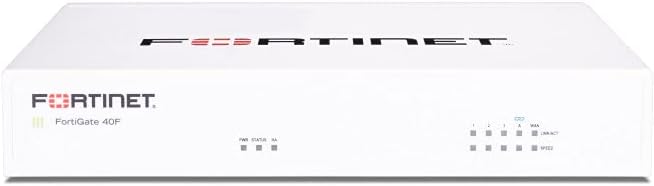
The FortiGate-40F stands out as a top choice for small businesses needing reliable network security. With a solid 4.2 rating, it offers efficient protection without consuming much physical space.
We may earn a commission when you buy through this link, at no additional cost to you.
Its robust connectivity includes five Gigabit ports, allowing flexible network configurations. The built-in FortiGuard Labs integration ensures your network stays protected against known and emerging threats.
While it does not include a subscription service out of the box, the hardware performance remains impressive. This trade-off allows organizations to tailor their security spending more effectively.
Small office owners seeking quiet and efficient security should strongly consider this appliance. It delivers the performance needed to keep daily operations running smoothly and securely.
The fanless compact design minimizes noise and space usage, making it perfect for small offices with limited room.
Powered by Fortinet’s AI, it identifies threats quickly, ensuring your network stays safe against evolving cybersecurity risks.
We may earn a commission when you buy through this link, at no additional cost to you.
The Netgate 1100 is an excellent budget-friendly option that doesn't compromise on essential security features. Its 4.1 rating reflects strong performance for cost-conscious users.
We may earn a commission when you buy through this link, at no additional cost to you.
Pre-loaded with pfSense+ software, it gets you running quickly. The device offers powerful routing capabilities and includes lifetime software updates, ensuring long-term usability.
Though throughput is capped at 650 Mbps, it is sufficient for many small offices. The main drawback is the limited number of ports, which might restrict complex network setups.
Organizations seeking affordable and reliable network security should prioritize this gateway. It offers great value by combining hardware and software in a single, efficient unit.
Includes lifetime pfSense+ software updates, ensuring your gateway remains secure without additional subscription costs.
Provides 24/7/365 expert technical support to help with setup and troubleshooting whenever you need assistance.
We may earn a commission when you buy through this link, at no additional cost to you.
The Zyxel USGFLEX100H delivers strong performance for small to mid-sized offices. Its 4.0 rating indicates solid reliability for basic security needs.
We may earn a commission when you buy through this link, at no additional cost to you.
It supports offline updates and configuration, which is crucial for maintaining operations during internet outages. The Nebula portal offers centralized management for easy policy enforcement.
While the Entry Defense Pack covers basics, unlocking advanced features like anti-malware requires an additional Gold Security Pack. This can increase the total cost of ownership.
Offices needing reliable management and offline capabilities will find this appliance beneficial. It strikes a balance between cost and advanced network control features.
Firmware updates can be done offline via FTP, keeping your interface accessible even if internet access is disrupted.
Eight configurable Gigabit ports let you assign roles like WAN or LAN, offering versatile network configuration options.
We may earn a commission when you buy through this link, at no additional cost to you.
The SonicWall TZ280 earns a high 4.7 rating for its robust inspection capabilities and ease of deployment. It is ideal for businesses requiring faster network speeds.
We may earn a commission when you buy through this link, at no additional cost to you.
Powered by the RFDPI engine, it achieves up to 2.5 Gbps inspection throughput. This speed ensures minimal latency while maintaining thorough security checks on all traffic.
Security services are sold separately, meaning you must budget for subscriptions to activate full protection. This adds to the initial cost but ensures tailored security services.
Businesses with high-speed internet connections will appreciate its performance. It provides a powerful security foundation for growing or distributed office environments.
Patented Reassembly-Free Deep Packet Inspection ensures fast and efficient traffic analysis without slowing down your network.
Zero-touch deploy and manage via cloud Network Security Manager for streamlined remote administration and monitoring.
We may earn a commission when you buy through this link, at no additional cost to you.
The Fortinet FortiGate-70G achieves a perfect 5.0 rating, reflecting excellent performance and reliability for branch offices. It provides comprehensive security in a compact form.
We may earn a commission when you buy through this link, at no additional cost to you.
With ten Gigabit Ethernet ports, it supports extensive connectivity needs. The Secure SD-WAN feature improves cloud and SaaS performance without compromising security policies.
Centralized management via FortiGate Cloud simplifies administration across multiple sites. This makes it easier to enforce consistent policies across a distributed organization.
Branch offices with high connectivity demands will find this appliance highly effective. It ensures seamless integration with switches and APs for a unified network.
Improves cloud and SaaS performance by intelligently routing traffic while maintaining robust security policies across the WAN.
Ten Gigabit Ethernet RJ45 ports provide ample connectivity for various network devices in small office and branch setups.
We may earn a commission when you buy through this link, at no additional cost to you.
The Sophos XGS 128 is built for larger offices requiring enterprise-level security and performance. Its high throughput supports extensive data transfers and complex network needs.
We may earn a commission when you buy through this link, at no additional cost to you.
With nine 2.5 Gigabit ports and a fiber option, it offers flexible connectivity. This allows businesses to expand their network architecture without limitations.
Like other models, it requires a subscription for full threat protection. However, the hardware ensures reliable operation and visibility into network traffic.
Larger organizations needing resilient and intelligent traffic routing should consider this appliance. It supports secure networking for both site-to-site and remote access.
Delivers up to 19.1 Gbps firewall throughput, ensuring your network remains fast even under heavy security inspection.
Provides resilient connectivity and intelligent traffic routing across multiple WAN connections for optimized performance.
We may earn a commission when you buy through this link, at no additional cost to you.
The Zyxel USGFLEX700 is designed for mid-size to large offices needing comprehensive security. Its perfect 5.0 rating underscores its reliability and robust feature set.
We may earn a commission when you buy through this link, at no additional cost to you.
Included 1-Year UTM services cover essential protection like anti-malware and web filtering. This bundle simplifies setup and reduces the need for immediate additional purchases.
While it handles 500 users, the lack of 10G ports may limit future scaling. However, its current throughput is more than adequate for most businesses.
Large organizations requiring centralized management and strong security should choose this firewall. It delivers high session capacity and effective threat prevention.
Includes 1-year anti-malware, ransomware blocking, web filtering, and IDP services for immediate comprehensive protection.
Uses the award-winning Nebula Cloud Management solution to easily monitor, manage, and configure network security policies.
We may earn a commission when you buy through this link, at no additional cost to you.
The SonicWall TZ680 is built for high-end SMBs requiring top-tier performance. Its 5 Gbps firewall inspection ensures security doesn't bottleneck your network speed.
We may earn a commission when you buy through this link, at no additional cost to you.
Connectivity options include 10G SFP ports, which support future-ready networking. This allows businesses to leverage high-speed internal connections for critical data.
Zero Trust Network Access via Cloud Secure Edge ensures remote workers remain protected. This feature is vital for businesses with hybrid or distributed work models.
Distributed sites need fast, secure network management will find this device effective. It provides enterprise features tailored for the high-end small business market.
Zero Trust Network Access keeps distributed sites and remote workers protected with secure Cloud Secure Edge integration.
Includes 2x5G SFP+ and 2x10G SFP ports for high-speed connectivity and flexible network expansions.
We may earn a commission when you buy through this link, at no additional cost to you.
The FortiGate 60F offers a complete solution for medium-sized businesses needing robust security. Its 4.4 rating confirms strong protection capabilities.
We may earn a commission when you buy through this link, at no additional cost to you.
Bundled with 36 months of Unified Threat Protection, it simplifies budgeting for security services. This ensures consistent updates and defense against online threats.
FortiCare Premium support adds value by providing high-quality assistance. This reliability is crucial for businesses that cannot afford prolonged downtime.
Medium businesses needing infrastructure-level protection without enterprise complexity should choose this appliance. It balances effective protection with reliable service.
36 months of FortiGuard Unified Threat Protection secures against advanced threats and botnets out of the box.
Includes FortiCare Premium support ensuring service continuity and high-quality customer service for your business.
We may earn a commission when you buy through this link, at no additional cost to you.
The Cisco ASA5525-X is a classic option for those seeking familiar Cisco security features at a lower price. Its 4.3 rating reflects steady performance for basic needs.
We may earn a commission when you buy through this link, at no additional cost to you.
As a renewed unit, it offers cost savings but may come with limited warranty. The 8 port Gigabit configuration is standard for many legacy business networks.
Users should note that older hardware might lack some modern security features found in newer models. It is suitable for smaller offices prioritizing budget.
Organizations familiar with Cisco systems looking for a budget-friendly entry point will find this useful. It provides reliable basic firewall protection for smaller environments.
Offers a budget-friendly way to access trusted Cisco security features with an 8-port Gigabit Ethernet configuration.
Provides essential network security features suitable for smaller business environments needing straightforward firewall protection.
We may earn a commission when you buy through this link, at no additional cost to you.
Selecting the right hardware firewall requires understanding your network size, security needs, and future growth plans.
Throughput refers to the volume of traffic the firewall can process without slowing down your network. Ensure the firewall’s inspection speed matches your internet connection speed to avoid bottlenecks.
Choose a firewall with higher throughput than your internet speed to maintain performance under load.
Count the number of devices needing wired connections and future expansion needs. Gigabit ports are standard, but some high-speed businesses may benefit from 10 Gigabit ports.
Select a model with enough ports to cover current needs while allowing room for network growth.
Your firewall must support the number of concurrent users and sessions expected in your business. Medium to large offices require higher capacity to prevent connection drops.
Verify the user and session limits listed for each appliance to match your workforce size.
Many modern firewalls require annual subscriptions for features like threat protection and anti-malware. Hardware-only models may have lower upfront costs but need ongoing fees for full functionality.
Evaluate whether you need bundled services or prefer to manage subscriptions separately for better cost control.
Centralized cloud management simplifies policy enforcement across multiple locations. Look for models offering intuitive portals that support remote configuration and monitoring.
Prioritize firewalls with robust cloud tools if you manage multiple sites or remote employees.
Reliable technical support ensures quick resolution of security issues. Check the warranty length and if support is included with the purchase or requires an add-on.
Invest in models with strong warranty terms to safeguard your investment against hardware failures.
The underlying OS determines the advanced features available such as SD-WAN or deep packet inspection. Some systems include these tools while others require separate licensing.
Review the OS capabilities to ensure they align with your required security protocols and network management needs.
Consider both initial hardware costs and long-term subscription expenses. A higher upfront investment might save money over time if it includes essential services for years.
Calculate total cost of ownership over three years to make a financially sound decision for your business.
Start by connecting the firewall between your modem and network switch. Follow the manufacturer’s setup wizard to configure basic network settings and ensure internet access.
Regularly update firmware to protect against new vulnerabilities. Most modern appliances allow offline updates so your network remains secure even during internet outages.
Monitor logs and traffic reports to identify potential threats early. Adjust security policies as your business needs change to maintain optimal protection levels.
Many hardware firewalls operate on a subscription model for advanced features like threat intelligence. Some models include a year of service, while others need separate purchases for full functionality.
Yes, most modern appliances include anti-malware engines and sandboxing to detect and block ransomware before it reaches internal devices.
Next-Generation Firewalls offer deeper inspection capabilities such as application control and SSL decryption beyond basic packet filtering.
They are typically designed for business use but some budget models work for home offices needing higher security than consumer routers provide.
Firmware updates are usually free but some advanced threat detection features require an active service subscription to function correctly.
Yes, most models include VPN capabilities to allow remote employees to connect securely to your business network from any location.
We reviewed ten hardware firewalls that balance performance, features, and price for businesses of all sizes.
Prioritize models with high throughput and user capacity matching your growth plans to avoid needing early upgrades.
Verify current pricing and subscription details directly with vendors before finalizing your network security purchase.