
Canon MegaTank G3270
4.1Editor score
Up to 2 years ink included
Save up to $1000 on ink
Wireless print copy and scan
This comprehensive guide compares the top 10 ink tank printers for home and office use, analyzing features, cost savings, and print quality to help you choose
Finding the right printing solution can be challenging when traditional cartridges drain your budget quickly. Ink tank printers offer a revolutionary alternative with refillable systems that significantly reduce long-term costs while delivering reliable performance for everyday tasks.
We have carefully evaluated ten leading models based on their ink capacity, print speeds, connectivity options, and overall value. Each product was assessed for its ability to handle high-volume printing needs without compromising on quality or ease of use for modern households.
Every selection in this list highlights specific strengths such as wireless capabilities, screen interfaces, or included ink duration. Keep in mind that product availability and pricing may fluctuate over time, so verify current details before making your final purchasing decision today.
4.1Editor score

4.2Editor score

4.1Editor score
This side-by-side comparison outlines the key specifications and capabilities of each selected ink tank printer to help you understand their differences at a glance before diving into detailed reviews.




The Epson EcoTank ET-2803 stands out as a top contender in the ink tank category due to its innovative cartridge-free design and impressive ink capacity. With a solid rating from users who value reliability and cost efficiency, this model delivers sharp text and vibrant colors using Micro Piezo Heat-Free technology that ensures consistent quality across various paper types. Its ability to print thousands of pages on a single set of bottles makes it ideal for families or small offices needing dependable performance without frequent interruptions.
We may earn a commission when you buy through this link, at no additional cost to you.
Key strengths include the included ink supply which lasts up to two years and the easy-to-fill EcoFit bottles that reduce the risk of spills during refilling. The built-in flatbed scanner and color display simplify document copying and navigation while wireless connectivity enables seamless printing from smart devices via AirPrint or the Epson Smart Panel app. This combination of high capacity and user-friendly features supports continuous workflow even when demand spikes during busy periods at home or work environments.
Despite its advantages there are minor trade-offs such as the time required for initial setup and a slightly larger physical footprint compared to traditional cartridge-based printers. However these factors are generally acceptable given the long-term savings and reduced waste from eliminating disposable cartridges. Users seeking environmental benefits alongside performance will appreciate how EcoTank technology helps reduce plastic waste ending up in landfills over time.
This printer is best suited for households or workspaces that prioritize low running costs and consistent high-volume output without sacrificing quality. Whether you need to print school assignments work documents or family photos the ET-2803 provides a versatile solution that adapts well to diverse needs. Choosing this model means investing in a system designed for longevity and ease of use throughout its operational life.
The included ink supply eliminates the need for frequent purchases and significantly lowers the cost per page compared to traditional cartridge systems.
By reducing cartridge waste this printer supports eco-friendly printing practices and aligns with growing demand for sustainable office equipment.
We may earn a commission when you buy through this link, at no additional cost to you.
The Canon MegaTank G3270 offers an excellent entry point into ink tank printing with a focus on affordability and essential functionality. It includes enough ink for up to two years of printing allowing users to enjoy low-cost operation from the start. The wireless capabilities enable easy printing from smartphones and computers making it suitable for home users who need reliable access without complicated setup procedures.
We may earn a commission when you buy through this link, at no additional cost to you.
This model excels in providing high page yields with up to 6000 black and white pages on a single ink set. The straightforward interface and compact design fit well into smaller workspaces while delivering consistent output for documents and basic photos. Its ability to save significant money on ink over time makes it a practical choice for budget-conscious buyers seeking value without compromising core performance features.
While it lacks automatic duplex printing and has a smaller display screen these limitations are balanced by the substantial savings and ease of use. Users willing to manually flip pages for double-sided jobs will find the cost benefits outweigh the minor inconvenience. The single-sided printing limitation is acceptable for many home scenarios where volume requirements are moderate rather than industrial.
Ideal for students or families needing a dependable printer for everyday tasks the G3270 delivers reliable performance at a competitive price. Its focus on essential features like wireless printing and high ink capacity ensures it meets most general needs efficiently. Choosing this model means prioritizing long-term savings and simplicity over advanced automation features found in higher-end alternatives.
The competitive pricing makes this printer accessible to more users while still offering the long-term benefits of a tank system.
High page yields ensure that each ink set provides extensive printing capacity reducing the frequency of replacements and maintenance.
We may earn a commission when you buy through this link, at no additional cost to you.
The HP Smart Tank 5003 represents a premium option with an emphasis on convenience and advanced capabilities tailored for modern home offices. It includes enough ink for up to three years reducing the need for frequent purchases while offering a mess-free refill system that simplifies maintenance. Its AI-capable features enable smarter printing workflows which can optimize settings automatically based on document type and user preferences.
We may earn a commission when you buy through this link, at no additional cost to you.
Key strengths include superior print quality with sharper text and richer colors compared to many competitors in this category. The easy-access design ensures refilling is simple and spill-free allowing users to focus on tasks without worrying about messes or complicated procedures. Mobile and wireless printing options make it easy to share documents from various devices ensuring seamless connectivity across home or small office networks.
Although the initial investment is higher than basic models the long-term savings and enhanced features justify the cost for users needing reliable high-volume output. Some internet connectivity is required for certain smart features which may limit functionality in areas with unstable connections. However for most users the benefits of automation and ease of use outweigh this minor dependency on network availability.
This printer is best suited for professionals or families who prioritize quality and convenience over initial budget constraints. Its ability to handle borderless prints and high volumes makes it versatile for both documents and photos. Choosing the 5003 means investing in a system designed for longevity and modern integration that adapts to evolving printing needs over time.
AI capabilities allow the printer to optimize settings automatically improving efficiency and reducing manual adjustments for common tasks.
The refill system design minimizes spills and simplifies ink changes ensuring a clean workspace and hassle-free upkeep.
We may earn a commission when you buy through this link, at no additional cost to you.
The Canon Megatank G3290 builds on the value of tank printing with added convenience features like automatic duplex printing and a larger touchscreen interface. It includes enough ink for up to two years ensuring low-cost operation while the auto two-sided printing helps reduce paper usage and manual handling. The color touchscreen makes navigation intuitive allowing users to manage settings and tasks quickly without needing external devices.
We may earn a commission when you buy through this link, at no additional cost to you.
This model stands out for its ability to handle high-volume printing efficiently with yields of up to 6000 black and 7700 color pages per set. The wireless connectivity supports seamless sharing from multiple devices which is essential for households with several users or small businesses needing reliable output. Its design balances functionality with ease of use ensuring it fits well into modern environments requiring consistent performance.
While the price is slightly higher than basic models the included features like duplex printing and touchscreen justify the extra cost for many buyers. Some users may need time to calibrate the touch interface but once set up it streamlines daily operations effectively. The trade-off is acceptable given the efficiency gains and reduced paper waste from automated double-sided output.
Ideal for users who value convenience and automation this printer offers a robust solution for everyday printing needs. Whether handling school work or office documents the G3290 delivers quality and efficiency in equal measure. Choosing this model means prioritizing features that simplify workflows while maintaining the cost benefits of a tank-based system.
Auto duplex printing reduces paper consumption and manual effort making it ideal for eco-conscious users and high-volume tasks.
The touchscreen interface simplifies settings and tasks allowing quick access to functions without needing external controls or apps.
We may earn a commission when you buy through this link, at no additional cost to you.
The Epson EcoTank ET-4800 is designed for users needing high-capacity printing with consistent quality and reliability. Its high-capacity ink tanks reduce the frequency of refills while Micro Piezo Heat-Free technology ensures sharp text and vibrant colors across various paper types. The built-in scanner and copier provide all-in-one functionality eliminating the need for separate devices and saving valuable workspace.
We may earn a commission when you buy through this link, at no additional cost to you.
This model focuses on durability and efficiency with a design that supports long operational life without frequent maintenance. Users benefit from the reduction in cartridge waste which aligns with environmental goals while keeping costs low over time. The flatbed scanner allows for high-resolution document copying making it suitable for archiving or sharing important files digitally.
While the initial cost is higher the long-term savings and performance justify the investment for those needing robust printing capabilities. Setup requires some attention to detail but once configured the printer operates smoothly for various tasks. The trade-off in price is acceptable given the durability and reduced need for consumables over the printer lifespan.
Best for small offices or home users needing reliability and efficiency the ET-4800 offers a balanced solution. Its focus on capacity and quality makes it ideal for environments where printing volume is significant. Choosing this model means prioritizing long-term performance and waste reduction over immediate budget considerations.
Large tanks minimize downtime by reducing refill frequency and supporting continuous printing for extended periods without interruption.
Integrated scanning and copying capabilities streamline workflows and eliminate the need for additional office equipment.
We may earn a commission when you buy through this link, at no additional cost to you.
The Epson EcoTank ET-2903 combines speed with high ink capacity making it suitable for users who need fast and reliable output. It includes enough ink for up to three years ensuring minimal maintenance and consistent performance over time. The 11 PPM black print speed helps complete large jobs quickly while the color display simplifies navigation and settings management.
We may earn a commission when you buy through this link, at no additional cost to you.
Key strengths include the 100-sheet paper tray which reduces reloading frequency and supports continuous workflow for busy environments. Wireless and mobile printing enable easy sharing from devices ensuring flexibility in how documents are produced. The design focuses on reliability with Heat-Free technology that supports the permanent printhead for long-term use.
While the price is higher the long-term value and speed justify it for those prioritizing efficiency. Using genuine ink is recommended for warranty coverage which ensures optimal performance but may limit third-party options. The trade-off is acceptable given the benefits of speed and capacity in professional or high-demand home settings.
Ideal for workspaces needing speed and reliability the ET-2903 delivers efficient performance. Its focus on high capacity and quick output makes it versatile for diverse tasks. Choosing this model means prioritizing speed and convenience while maintaining the cost benefits of a tank system.
High PPM ratings reduce waiting times and support faster completion of large printing tasks without sacrificing quality.
The larger paper tray reduces reloading frequency and ensures continuous printing during busy periods without interruption.
We may earn a commission when you buy through this link, at no additional cost to you.
The HP Smart Tank 5003 offers reliable performance for home use with a focus on long-term ink supply and ease of refilling. Including ink for up to three years it reduces the need for frequent purchases and supports consistent printing without interruptions. The mess-free refill system ensures maintenance is simple and clean allowing users to focus on tasks without worrying about spills.
We may earn a commission when you buy through this link, at no additional cost to you.
Key strengths include wireless connectivity that enables printing from various devices and mobile apps for seamless sharing. Its design supports borderless prints and basic AI features that optimize settings for different document types. The printer provides reliable output for everyday needs with quality that meets general expectations for home office tasks.
While some features require internet connectivity this is common in modern printers and does not impact core printing functions. The interface is straightforward but may lack advanced customization options compared to higher-end models. The trade-off is acceptable given the convenience and value provided by the long ink supply and easy maintenance.
Best for households needing a dependable and low-maintenance printer the 5003 delivers consistent results. Its focus on simplicity and long supply makes it suitable for routine tasks. Choosing this model means prioritizing ease of use and cost efficiency over advanced features.
Mess-free refilling reduces complexity and ensures a clean workspace during routine ink replacement tasks.
Wireless options enable seamless printing from multiple devices making it easy to share documents and photos.
We may earn a commission when you buy through this link, at no additional cost to you.
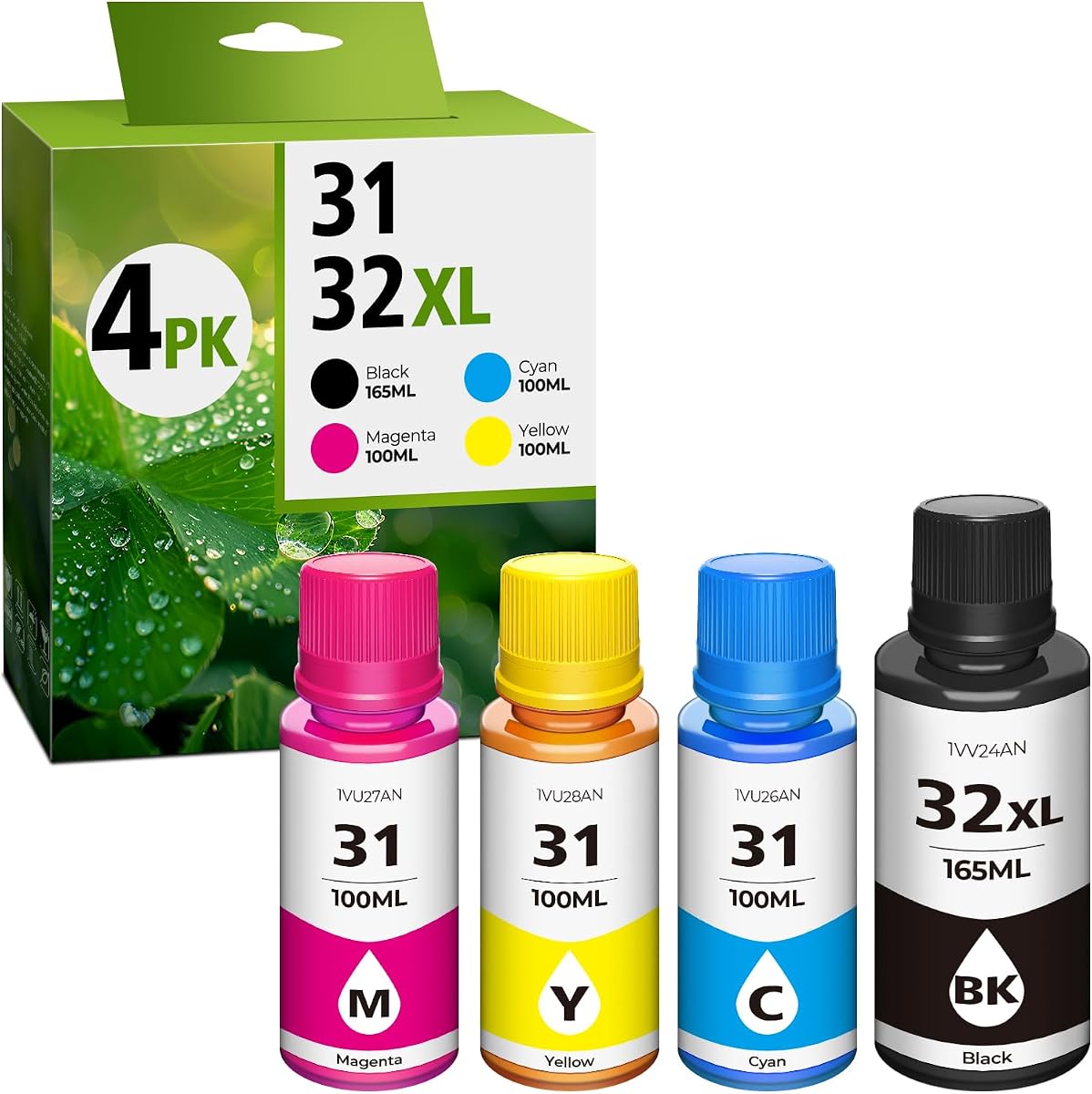
The 31 Ink 32XL Black Bottle Set provides an affordable alternative for users needing refills for Smart Tank printers. Compatible with many HP models it offers high page yields that extend printing capacity without frequent purchases. The design supports easy refilling ensuring minimal effort and leakage during maintenance tasks.
We may earn a commission when you buy through this link, at no additional cost to you.
Key strengths include compatibility with a wide range of printers and the high yield that reduces cost per page. Users can expect crisp professional-quality prints with vibrant colors for both documents and images. The bottles are designed to reduce replacement frequency which supports long-term cost efficiency.
While this is dye ink rather than pigment it works well for general use but may not match OEM performance for specific tasks. Cleaning heads before refill is recommended to ensure optimal performance and avoid issues. The trade-off is acceptable for users prioritizing cost savings and convenience over OEM specifications.
Ideal for budget-conscious users with compatible printers this refill set offers value and reliability. Its focus on yield and compatibility makes it suitable for high-volume printing needs. Choosing this means prioritizing savings while maintaining acceptable quality for everyday tasks.
High page yields reduce the frequency of purchases and lower the overall cost of ownership over time.
Wide model support ensures this refill works for many users without requiring printer changes or upgrades.
We may earn a commission when you buy through this link, at no additional cost to you.
The Epson EcoTank ET-2980 offers feature-rich printing with high-quality photo output and long ink supply. Including up to three years of ink it reduces replacement frequency and supports continuous use. The EcoFit bottles simplify refilling ensuring a mess-free process and consistent performance over time.
We may earn a commission when you buy through this link, at no additional cost to you.
Key strengths include high-resolution photo prints and wireless connectivity via the Smart Panel app. Users can print and scan from devices easily making it suitable for modern home office needs. Its design balances quality with convenience ensuring versatility for diverse tasks.
Using genuine ink is recommended to maintain quality and warranty coverage. The higher price reflects advanced capabilities and long supply making it suitable for those prioritizing quality. The trade-off is acceptable given the benefits of consistent performance and reduced maintenance.
Best for users needing high photo quality and reliability the ET-2980 delivers strong performance. Its focus on ease and quality makes it versatile. Choosing this model means prioritizing quality and convenience over initial cost.
High-resolution capabilities ensure vibrant and sharp photo prints suitable for personal and professional use.
Wireless app support streamlines printing and scanning tasks making device sharing and document management easy.
We may earn a commission when you buy through this link, at no additional cost to you.
The Epson EcoTank ET-2800 provides solid value for users needing reliable performance with included ink for up to two years. It uses Micro Piezo Heat-Free technology to deliver vivid detailed prints and consistent output across various paper types. The 10 ppm speed ensures efficient handling of larger jobs without sacrificing quality.
We may earn a commission when you buy through this link, at no additional cost to you.
Key strengths include wireless printing and scanner copier functions that support versatile use. Users benefit from reduced cartridge waste and long-term cost savings. Its design balances performance and affordability making it suitable for home users seeking dependable output.
While setup may take some time and it lacks advanced features the core functionality meets most needs effectively. The focus on reliability and savings makes it a practical choice for routine tasks. The trade-off is acceptable given the value provided.
Ideal for those seeking dependable performance and value the ET-2800 is a practical solution. Its focus on cost and quality ensures it meets diverse needs efficiently. Choosing this model means prioritizing essential features and long-term savings.
Heat-Free technology ensures consistent print quality and longevity with minimal maintenance requirements over time.
Fast speeds and wireless options streamline workflows and enable quick completion of printing tasks.
We may earn a commission when you buy through this link, at no additional cost to you.
Selecting the right ink tank printer requires evaluating key factors that align with your printing needs and budget constraints.
Evaluate the total ink capacity and expected page yields to ensure the printer supports your volume needs without frequent refills. Higher yields mean lower long-term costs and less interruption during busy periods.
Prioritize models offering years of ink included to minimize upfront supply purchases and simplify maintenance schedules.
Choose a printer with an easy-access mess-free refill system to reduce the risk of spills and simplify maintenance tasks. Key features include color-coded bottles and ergonomic nozzles for precise pouring.
Look for designs that prevent clogging and support consistent ink flow to avoid performance issues over time.
Consider pages per minute ratings and resolution capabilities to ensure the printer meets your speed and output quality requirements. Faster speeds benefit high-volume users while higher resolution ensures sharp text and vibrant photos.
Check for support of various media types and borderless printing options to maintain flexibility for diverse document needs.
Ensure the printer supports wireless and mobile printing to enable seamless sharing from smartphones laptops and tablets. Look for compatibility with AirPrint or Mopria and dedicated apps for remote management.
Verify support for network protocols and cloud services to maintain flexibility across multiple devices and user accounts.
Assess paper tray size and support for different paper sizes to ensure the printer accommodates your document and media needs. Higher capacities reduce reloading frequency and support continuous workflow.
Look for features like automatic duplex printing to save paper and improve efficiency for two-sided documents.
Consider the durability of printheads and the need for regular cleaning cycles to ensure reliable long-term performance. Models with permanent printheads may require less maintenance and offer better value.
Check warranty terms and support options to protect your investment and ensure access to troubleshooting resources when needed.
Evaluate the environmental benefits of reducing cartridge waste and energy consumption through efficient design and technology features. Eco-friendly models often include energy-saving modes and recyclable packaging.
Choose printers that support sustainable materials and offer recycling programs for ink bottles to minimize your ecological footprint.
Calculate total cost including upfront price and long-term supply expenses to determine the true value of the printer over time. Lower per-page costs generally offset higher initial investments for high-volume users.
Consider available promotions and bundle offers that may include additional ink or accessories to maximize savings.
Begin by setting up the printer on a stable flat surface and connecting it to your network following manufacturer instructions. Install the included ink bottles carefully to avoid spills and ensure proper sealing of tank openings.
Regularly run cleaning cycles and check ink levels to maintain consistent print quality and prevent clogging. Keep the printer updated with the latest firmware and use genuine or recommended ink to avoid compatibility issues.
Store the printer in a cool dry environment away from direct sunlight to protect internal components. When not in use for extended periods run a test page to ensure the printhead remains clear and functional.
An ink tank printer uses refillable external ink tanks instead of disposable cartridges. It works by feeding ink from these tanks to the printhead allowing for long print runs with lower cost per page. Refills are done using dedicated bottles designed to prevent spills and ensure easy maintenance.
Yes they are generally more affordable long-term due to high ink capacity and low cost per page. Initial investment may be higher but the savings on ink over time typically offset the upfront cost for most users.
Refill frequency depends on your print volume but many models include enough ink for up to three years. Regular use may require refills every few months depending on the number of pages printed each week.
It is recommended to use genuine or manufacturer-approved ink to maintain quality and warranty coverage. Third-party inks may save costs but could cause clogging or performance issues not covered by warranty.
They can dry out if unused for extended periods so run test pages regularly to prevent clogging. Some models have automatic maintenance cycles to keep the printhead clear during idle periods.
Use the printer software or menu to run built-in cleaning cycles periodically. For stubborn clogs manually clean the printhead following manufacturer instructions to avoid damage and ensure consistent performance.
Yes most modern ink tank printers support wireless mobile printing via apps or protocols like AirPrint and Mopria. Ensure your printer is connected to the same network as your device for seamless sharing.
Our top picks like the Epson EcoTank ET-2803 and HP Smart Tank 5003 offer excellent value and performance for different needs. These models balance capacity connectivity and quality to meet diverse printing requirements effectively.
Prioritize factors like ink capacity and refill design when selecting a printer to ensure long-term satisfaction and cost efficiency. Consider your volume needs and feature preferences to choose the model that aligns best with your workflow.
Remember to check current pricing and availability as offerings may change over time. Verifying details before purchase ensures you get the best value for your investment.