
NOYAFA NF-488
4.5Editor score
Multifunctional cable testing
Backlit LCD screen
PoE voltage detection
Compare the top ten inline POE testers for 2026. This guide reviews features, compatibility, and performance of the best network power testing tools available.
Inline POE testers are essential tools for network professionals who need to verify power delivery over Ethernet cables efficiently. They help ensure that devices like cameras and phones receive the correct voltage and current without disrupting service.
We compared ten highly rated models based on their testing modes, display clarity, and compatibility with IEEE standards. Each product was evaluated for ease of use, build quality, and ability to handle both standard and passive PoE configurations.
Each pick below highlights key strengths and potential trade-offs to help you choose the right tool for your specific network environment. Please note that prices and availability can change frequently so check current listings before purchasing.
4.5Editor score

4.1Editor score

4.1Editor score
This table provides a side-by-side comparison of all ten selected inline POE testers to help you quickly identify the right model for your networking needs.


The TRENDnet TC-NTP1 stands out as a reliable inline POE tester for professionals who need to verify power standards quickly. It holds a 4.1 rating and supports 4PPoE and PoE+ technologies effectively.
We may earn a commission when you buy through this link, at no additional cost to you.
Its T, N, and I modes allow detailed diagnostics of PSE devices and passive setups. The step button locks displays for real-time monitoring which saves time during complex installations.
While it lacks a high-resolution OLED screen the standard readout remains clear and functional. The lack of battery dependency is a significant benefit for field technicians working long shifts.
This tester is ideal for network engineers managing government compliant projects due to its NDAA status. Its robust support structure ensures you get help when troubleshooting critical infrastructure issues.
Government customers in the US and Canada can rely on this tester for secure networking solutions.
The step button lets users lock specific readouts like wattage for continuous performance checks.
We may earn a commission when you buy through this link, at no additional cost to you.
The PoE-T100 offers a premium experience with its bright OLED display showing all critical metrics at once. It draws power from the line so you never carry batteries for field work.
We may earn a commission when you buy through this link, at no additional cost to you.
Its three modes cover PD simulation inline pass-through and DC measurement. This versatility ensures you can handle standard and non-standard passive PoE without switching tools.
The screen clarity is excellent in sunlight which helps avoid reading errors on outdoor installs. However the OLED might consume slightly more energy from the line than simpler LCDs.
Network professionals needing precise data visualization will appreciate this model. Its ability to handle DC supplies alongside PoE makes it a versatile addition to any toolkit.
Real time power voltage and current measurements appear clearly on a single page.
PD Inline and DC modes let you test everything from switches to generic power supplies.
We may earn a commission when you buy through this link, at no additional cost to you.
The NOYAFA NF-488 provides essential testing features at an entry-level price point. It combines POE detection with cable continuity checks saving you from buying separate tools.
We may earn a commission when you buy through this link, at no additional cost to you.
Its backlit LCD ensures visibility in dark server rooms or cable closets. The anti-slip casing gives a secure grip when testing tight connections on high-density patches.
While it lacks advanced power measurement depth the voltage range covers most standard setups. The simplicity means a shorter learning curve for less experienced installers.
Budget-conscious technicians will find this a reliable starter tool. It effectively identifies faults without breaking the bank allowing funds to be spent on more critical equipment.
This model offers core functions like voltage and continuity checks without a high cost.
It handles both network continuity and PoE detection reducing the need for multiple testers.
We may earn a commission when you buy through this link, at no additional cost to you.
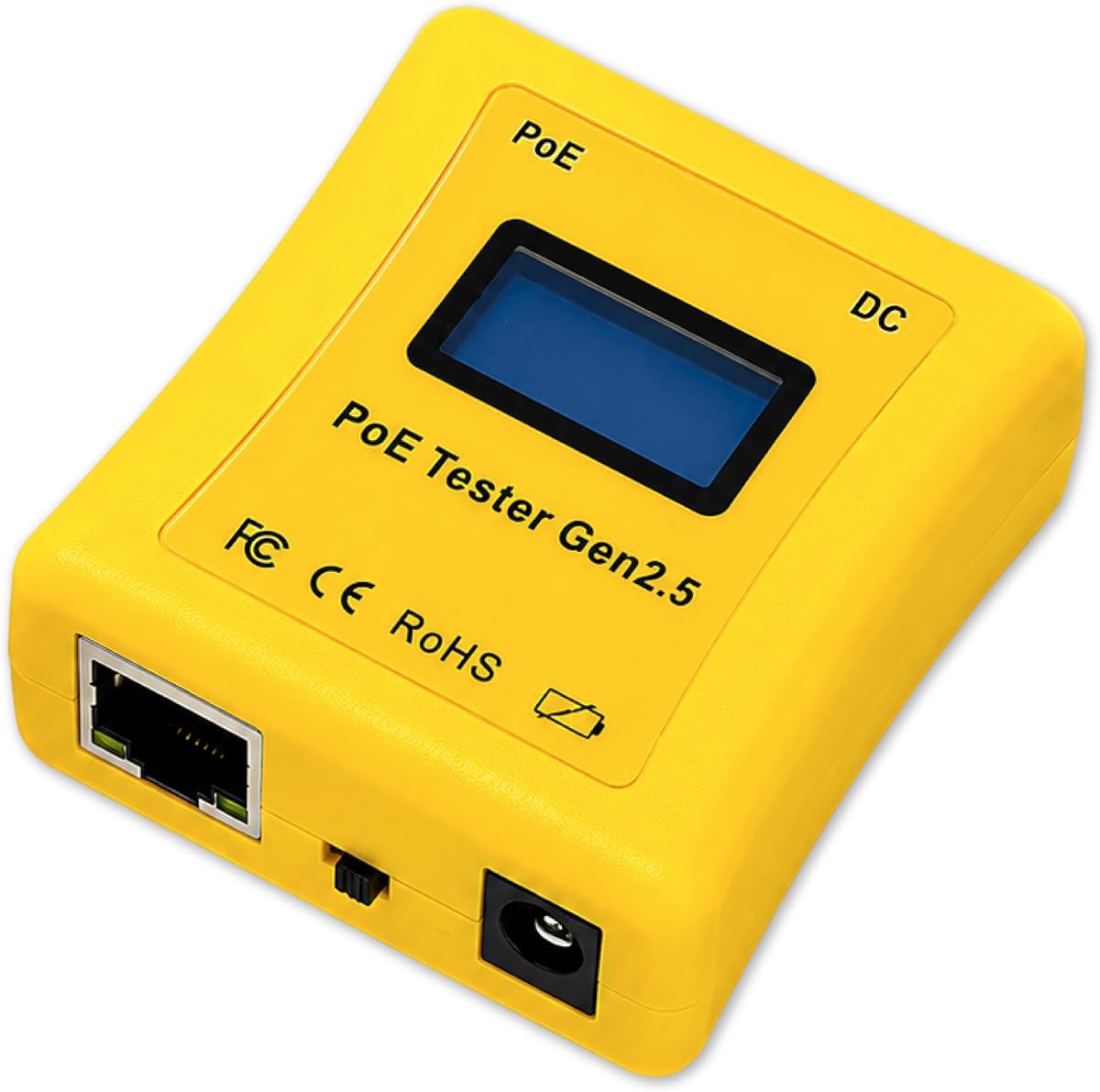
The PoE Texas Gen2.5 features a new ergonomic curved body that fits comfortably in the hand. It eliminates battery needs by drawing power directly from the Ethernet line.
We may earn a commission when you buy through this link, at no additional cost to you.
Its screen cycles through voltage current and power readings automatically. The 25% smaller size makes it easy to pocket during extensive cable runs in ceilings.
While it supports up to 280 watts it is sufficient for most common 802.3bt applications. The lack of a battery charging port adds convenience for heavy field use.
Technicians valuing comfort and simplicity will appreciate this model. Its focus on core functionality ensures you get accurate readings without unnecessary complexity.
The new curved body is 25% smaller for easier holding in tight spaces.
Draws power from the PoE line so you never need to replace batteries.
We may earn a commission when you buy through this link, at no additional cost to you.
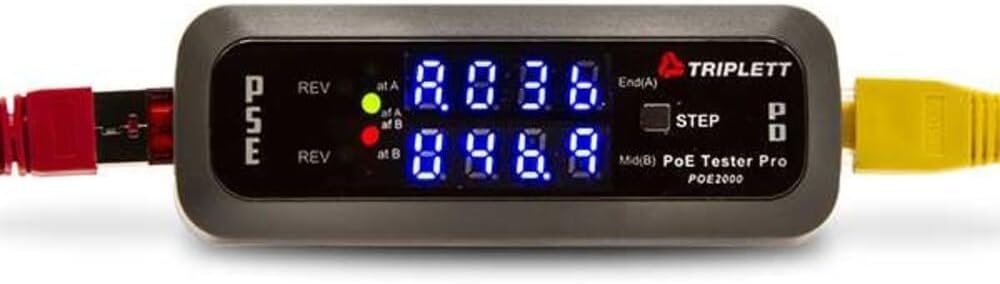
The Triplett POE2000 uses dual 7-digit LEDs to indicate power sources clearly. It helps you identify if a connection is end span midspan or across pairs.
We may earn a commission when you buy through this link, at no additional cost to you.
Yellow LEDs alert you to reversed polarity preventing accidental damage to sensitive devices. The step button cycles through voltage current and power for focused data review.
While the LED interface is less detailed than an LCD it offers quick status checks. Some users find the lower rating reflects limitations in modern standard support.
Installers who prefer simple visual cues may still find this useful. Its polarity alerts are critical for protecting expensive endpoints in unmanaged network environments.
Dual LEDs show end span or midspan power sources without complex menus.
Yellow LEDs warn of reversed polarity to prevent hardware damage.
We may earn a commission when you buy through this link, at no additional cost to you.
The Triplett POE3000 speeds up installation by using visual indicators for IEEE standards. Four LEDs confirm compliance while yellow ones warn of polarity issues.
We may earn a commission when you buy through this link, at no additional cost to you.
It detects PSE-type and class ensuring you know exactly what power source is connected. Inline monitoring alternates data so you can track voltage and power changes.
Users may prefer a digital screen for precision but the LEDs offer speed. The step button allows selecting specific data to display for focused monitoring.
Network teams prioritizing speed over detailed numbers will like this model. Its simple interface reduces confusion during high-pressure network troubleshooting tasks.
Four LEDs indicate IEEE802.3af 802.3at/bt standards for quick verification.
Alternating displays show voltage current and power for real-time tracking.
We may earn a commission when you buy through this link, at no additional cost to you.
The Jonard Tools POE-1 verifies PoE presence and standards instantly without needing power from the line. It uses an included AA battery for unpowered cable checks.
We may earn a commission when you buy through this link, at no additional cost to you.
Its compact design with a belt clip ensures portability across large sites. Resistance measurement helps verify continuity for Cat5 through Cat6a cables easily.
While it supports passive and 802.3 standards the battery dependency for non-power modes is a minor drawback. However the included adapter ensures you can test any setup.
Field techs needing a pocket tool will find this practical. It balances power testing with resistance verification effectively for comprehensive cable diagnostics.
Compact lightweight design with a belt clip makes it easy to carry.
Measures resistance to ensure flawless data transmission on various cable types.
We may earn a commission when you buy through this link, at no additional cost to you.
This generic model adds cable length measurement which is rare at this price point. It helps verify runs between 5 and 300 meters accurately during installation.
We may earn a commission when you buy through this link, at no additional cost to you.
The port flash detection locates active ports in crowded panels quickly. A rechargeable battery and auto-shutoff ensure long sessions without constant manual interaction.
While the branding is generic the features are robust for the cost. Load validation ensures connected devices receive stable power preventing device failures.
Installers verifying physical cable runs will appreciate the length feature. Its load validation ensures your network devices remain powered consistently.
Measures lengths from 5 to 300 meters for installation verification.
Features port flash detection to locate active ports quickly.
We may earn a commission when you buy through this link, at no additional cost to you.
The Inline Cat5/6 DVM combines a digital multimeter with PoE testing capabilities. It allows checking power voltage while verifying network continuity on Cat5 and Cat6 cables.
We may earn a commission when you buy through this link, at no additional cost to you.
Its power panel design suggests integration with rack systems for easier access. The inline setup helps you verify connections without disrupting the entire network.
While details are scarce the dual function offers efficiency for maintenance tasks. It serves well as a specialized tool for environments with fixed infrastructure.
Technicians who already use DVMs may find this a natural fit. Its power panel design simplifies testing in structured cabling environments.
Combines digital multimeter functions with PoE testing in one device.
Designed to integrate with power panels for easier access to connections.
We may earn a commission when you buy through this link, at no additional cost to you.
This NF-488 variant includes a loop-back test to diagnose potential issues. The power detection reaches up to 180W covering most high-end network devices.
We may earn a commission when you buy through this link, at no additional cost to you.
An included LED lamp helps illuminate dark racks during testing. Customer service promises replies within 24 hours to assist with any usage questions.
The power range is robust but the interface remains standard for this class. The loop-back feature adds value for checking switch integrity remotely.
Installers needing a lamp and robust power check will appreciate this kit. The loop-back test ensures the integrity of your switch connections.
Helps diagnose whether there is a problem with the loop on the switch.
Includes an LED lamp to illuminate low-light or dark environments.
We may earn a commission when you buy through this link, at no additional cost to you.
Choosing the right inline POE tester requires evaluating compatibility power measurement and display types to fit your specific network environment.
Ensure the tester supports IEEE 802.3af/at/bt standards as well as passive PoE. Most modern devices use 802.3at or bt but older setups may rely on non-standard voltages.
Look for models that explicitly list voltage ranges from 12V to 57V to cover all potential sources.
OLED displays offer better visibility in sunlight while LCDs provide sufficient data in dark server rooms. Consider your primary working environment when selecting screen technology.
A step button or toggle function is essential for locking specific metrics like wattage during monitoring.
Battery-free models draw power from the line which reduces maintenance but may limit usage on unpowered cables. Units with AA or rechargeable batteries offer more flexibility for continuity checks.
If you test many cables without power a dedicated battery model saves the trouble of external power sources.
Gigabit ports ensure your tester does not bottleneck high-speed network connections. Faster ports reduce latency and ensure accurate throughput diagnostics.
Select a model with at least one Gigabit port to match modern network switch capabilities.
NDAA compliance is critical for government or high-security projects. It ensures the device meets specific security and origin standards for federal use.
Always check for compliance labels if you work with public sector infrastructure to avoid procurement issues.
Modes like PD simulation and loop-back testing expand the utility of your tool beyond simple voltage checks. These help verify switch behavior without needing actual powered devices.
Prioritize testers that offer inline pass-through and simulation modes for versatile troubleshooting.
Field work often exposes testers to drops and dust so rugged designs matter. Look for anti-slip casings and protective rubberized edges to extend the life of the tool.
Invest in a model with a protective case if you carry it daily to construction sites.
Manufacturer protection plans provide peace of mind against defects or accidental damage. Two-year warranties are common among professional grade tools.
Choose a brand known for responsive support to get help if you encounter issues with the device.
Connect the tester between the power source and the device to check voltage and current. Ensure the cable is securely plugged into the Gigabit ports for accurate data.
Use the step button to cycle through measurements like voltage amperage and wattage. Lock specific readouts for real-time monitoring when testing unstable power sources.
Store the device in a protective case away from moisture and heat. Clean the contacts regularly with a dry cloth to prevent interference with readings.
An inline POE tester verifies that power is being delivered correctly over Ethernet cables. It helps network professionals identify if devices are receiving the required voltage and current to function properly.
Many modern testers draw power directly from the PoE line so batteries are not needed for powered testing. However some models require AA batteries to test unpowered cables.
Yes most high-quality testers support passive non-standard PoE in addition to IEEE 802.3af/at/bt. This ensures compatibility with a wide range of legacy or niche devices.
The tester can detect PSE types by connecting to the switch port and checking for power negotiation. It will indicate the power source type and class clearly on the display.
Yes some models support only Fast Ethernet while others support Gigabit speeds. Always check the specs to ensure the tester matches your network cable requirements.
Some models offer specific DC modes that measure voltage and polarity from standard power supplies. This versatility helps you test both PoE and DC powered devices.
The TRENDnet TC-NTP1 and PoE-T100 lead the list for their comprehensive features and reliability. They provide the stability needed for professional network maintenance and installations.
Prioritize models with OLED screens or clear LCDs if you work in varying light conditions. Battery-free operation is a significant advantage for technicians working long shifts.
Remember to check current availability and warranty terms before finalizing your purchase. Prices can fluctuate so always verify the listing details to get the best deal.