
SABRENT 74 in 1 3.5 Inch Internal Flash Media Card Reader/Writer
4.0Editor score
Supports 74 Memory Types
Includes USB 2.0 Port
Internal Power Connector Included
Discover the top Internal Media Card Reader models for 2026. We compare features, speeds, and compatibility to help you choose the best solution for your PC
Finding the right Internal Media Card Reader can transform how you manage data on your desktop computer. These devices offer quick access to various memory formats without needing external drives. Whether you are a photographer or videographer, having reliable card reading capabilities is essential for efficient workflow and seamless content transfer.
We evaluated ten top-rated Internal Media Card Reader options based on their compatibility, speed, and build quality. Our analysis focuses on USB standards, supported card types, and ease of installation. This guide ensures you find a device that matches your specific hardware setup and performance requirements effectively.
Each pick highlights key strengths and ideal use cases to help you make an informed decision. Please note that product availability and pricing can change frequently. Always verify current specifications and deals before purchasing to ensure you get the best value for your investment in storage hardware.
4.0Editor score

4.5Editor score

5.0Editor score
This side-by-side comparison highlights the core specifications of all ten Internal Media Card Reader models to help you decide quickly.
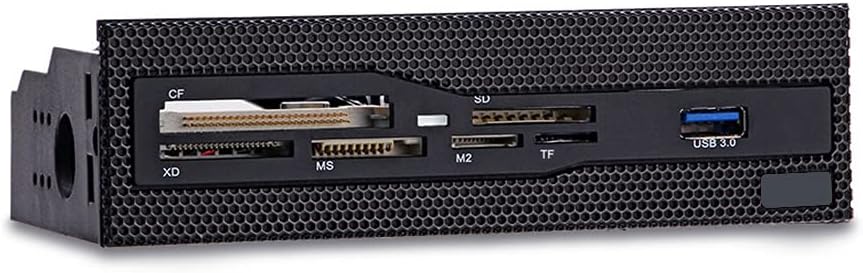


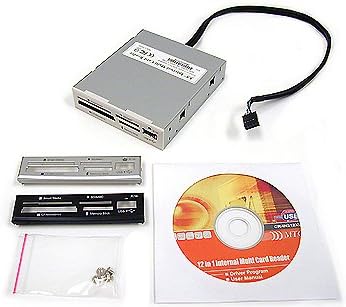
The StarTech Internal Card Reader stands out as the top choice for professionals who need reliable and fast access to memory cards. With a 4.5 star rating, it is designed to fit seamlessly into any 3.5-inch drive bay on your desktop computer. This device supports the most popular flash card formats and offers USB 3.0 connectivity for enhanced performance.
We may earn a commission when you buy through this link, at no additional cost to you.
Its key strengths lie in its ability to access four different card slots simultaneously, which is rare in this category. This feature allows you to copy files between different media cards at the same time, significantly speeding up workflows for videographers and photographers. The TAA compliance ensures it meets strict procurement standards for government and enterprise IT environments.
While the price is higher than budget options, the build quality and performance justify the investment. The only minor trade-off is the need for an internal 20-pin motherboard header, which might require some technical knowledge to install. However, the included cables and screws make the setup process manageable for most users.
If you are an IT professional or a content creator needing consistent high-speed transfers, this reader is highly recommended. It is backed by a 2-year warranty and lifetime technical support, ensuring long-term reliability. This model is the best fit for those who prioritize speed and compatibility over initial cost.
This feature allows users to copy files between multiple cards without swapping them, saving valuable time during large data migrations.
Designed for IT professionals, this reader meets TAA compliance and comes with extensive multi-lingual technical support for complex setups.
We may earn a commission when you buy through this link, at no additional cost to you.
The SABRENT 74 in 1 is an exceptional budget-friendly option that offers incredible versatility for home users. With a 4.0 star rating, it supports 74 different types of memory cards, ensuring you can read almost any format you encounter. It is designed to fit into a standard 3.5-inch drive bay and includes a USB 2.0 port for added convenience.
We may earn a commission when you buy through this link, at no additional cost to you.
What makes this reader stand out is its sheer variety of supported formats, ranging from M2 to SDXC and CF. The internal power connector ensures that connected USB devices receive sufficient power, which is crucial for stability. This model is ideal for those who need a versatile solution without spending much money on specialized equipment.
The main limitation is that it uses USB 2.0, which means data transfer speeds are slower compared to USB 3.0 options. This might not be suitable for professionals transferring large video files regularly. However, for general photo management or occasional file transfers, the speed difference is negligible.
This reader is perfect for hobbyists, students, or anyone needing broad compatibility on a tight budget. It is easy to install and works with older operating systems like Windows ME and newer versions alike. If you want a do-it-all reader that costs very little, this is a solid choice.
With 74 supported card types, this reader handles legacy and modern formats alike, making it a versatile tool for diverse media needs.
The internal power connector ensures that external USB devices connected to this reader receive stable power for reliable operation.
We may earn a commission when you buy through this link, at no additional cost to you.
The Vantec Link USB 3.0 Multi-LUN Memory Internal Card Reader is a top-tier device for advanced users requiring high capacity support. Its perfect 5.0 star rating reflects its reliability and robust feature set. This internal reader supports SDXC cards up to 2TB, making it future-proof for growing storage needs.
We may earn a commission when you buy through this link, at no additional cost to you.
Key strengths include Multi-LUN memory support and quad data access for Memory Stick cards, which enhances transfer rates significantly. It covers a wide range of memory card types including CompactFlash, SD, and MMC with specific version support. This depth of technical support is rare and caters to professionals who work with complex data structures.
The primary trade-off is the requirement for a USB 20-pin header connection, which may not be available on all motherboards. Additionally, its specialized features might be overkill for casual users. However, if you need maximum capacity and speed, the technical requirements are worth meeting for the performance gain.
This reader is best suited for IT experts, videographers, and data professionals who handle large archives. The internal connection ensures a clean setup without extra cables cluttering your case. For those seeking the highest performance and capacity, this model is a strong premium choice.
Support for SDXC cards up to 2TB ensures this reader remains useful as storage technology continues to evolve over the years.
Multi-LUN and quad data access features provide enhanced performance for specialized memory cards used in high-end devices.
We may earn a commission when you buy through this link, at no additional cost to you.
This 5.25 Internal Card Reader offers a great solution for those who want quick access via the front panel of their desktop. With a 4.3 star rating, it features a high-speed USB 3.0 interface and supports popular formats like CF, XD, MS, M2, and TF. The durable design integrates well with cases that have a front mesh panel.
We may earn a commission when you buy through this link, at no additional cost to you.
The grid panel and copper-plated slots ensure stability and efficient data transmission. It is designed specifically for the 5.25-inch drive bay, which provides a neat installation point for easy access. This model is ideal for builders who want a clean look without reaching behind the PC to insert cards.
The limitation is that it requires a 5.25-inch drive bay, which is becoming less common in modern compact cases. If your chassis does not have this space, this unit will not fit. However, for mid-tower or full-tower cases, it offers a convenient and stylish way to manage media.
Content creators and gamers who frequently swap cards will find this very useful. The combination of speed and accessibility makes it a strong contender. If you have the space and want a dedicated front panel solution, this reader is a smart purchase.
Placing the reader in the 5.25 bay allows for quick card swaps without opening the case or reaching behind the computer.
Copper-plated slots and a grid design ensure the unit withstands frequent use while maintaining stable data transmission.
We may earn a commission when you buy through this link, at no additional cost to you.
This 5.25 Media Dashboard is more than just a card reader; it is a full front panel interface for your PC. Rated at 3.8 stars, it combines a USB 3.0 hub, eSATA ports, and a multi-format card reader into one unit. It also includes audio jacks for speakers and microphones, adding significant value.
We may earn a commission when you buy through this link, at no additional cost to you.
The hub provides 5Gbps bandwidth, accelerating file transfers for creative professionals. The eSATA support further boosts connectivity options for external drives. This model is designed for ATX/mid-tower cases and includes everything needed for installation like audio and USB connectors.
The mixed ratings may reflect issues with compatibility or build consistency in some units. It is also a larger panel that requires careful fitment in your case. If your build can accommodate the size, the added features justify the complexity and potential installation challenges.
Tech enthusiasts who want a consolidated front panel solution will appreciate this product. It is ideal for custom builds where extra connectivity is essential. For those willing to navigate a slightly larger setup, this dashboard offers a comprehensive upgrade to PC accessibility.
This panel replaces the need for separate hubs and audio panels by integrating USB 3.0, eSATA, and audio into one unit.
High-speed transfer options support the needs of photographers and videographers working with large media files regularly.
We may earn a commission when you buy through this link, at no additional cost to you.
The TCC-QL5E Dashboard offers expanded connectivity with multiple ports for USB and SATA devices. While it has no rating available yet, its specs suggest strong functionality. It features a USB 3.0 port with up to 5Gbps speed and dedicated audio ports for convenient front access.
We may earn a commission when you buy through this link, at no additional cost to you.
It supports common card formats including M2, TF, SD, and CF. The panel includes a range of connection cables to handle different motherboard interfaces. This unit is ideal for users who need to plug in multiple peripherals without reaching behind their PC chassis.
The lack of user feedback makes it a riskier choice, but the hardware specs are robust. Installation may require managing many cables, which can be challenging for beginners. If you need extra ports and can handle the wiring, this is a functional solution.
This dashboard is suited for tech-savvy users building a workstation. It provides a way to consolidate various connections into one front panel. Consider this if you have a large case and need extensive front-facing I/O capabilities.
Dedicated front ports for speakers and microphones eliminate the need to reach behind the case for audio connectivity.
USB 3.0 support ensures high-speed data transfer for efficient workflow when moving files between storage devices.
We may earn a commission when you buy through this link, at no additional cost to you.
This Sony Internal 17-in-1 Memory Card Reader is a reliable device for users who need broad support with older systems. Rated at 4.0 stars, it is compatible with Windows XP and Vista, making it a great choice for legacy setups. It comes with black and ivory faceplates to match different case styles.
We may earn a commission when you buy through this link, at no additional cost to you.
It supports 17 card formats including SD, MMC, and CF. The included drive letter recognition software ensures easy setup without technical headaches. The brand name often implies a certain level of reliability and durability in internal components.
The main drawback is that it likely relies on older USB standards, which limits transfer speeds. This is acceptable for small files but not for heavy video transfers. If your system is older or your needs are modest, this remains a solid option.
This reader is best for those keeping an older desktop running without buying a new machine. It provides a convenient way to access various media formats. For users with specific legacy hardware requirements, this Sony model is a trusted choice.
Designed to work with Windows XP and Vista, this reader is ideal for users maintaining older desktop computers.
The inclusion of two different faceplate colors allows you to match the look of your specific PC case design.
We may earn a commission when you buy through this link, at no additional cost to you.
This All-In-One Internal Card Reader is a compact solution for desktops with 2.5-inch drive bay space. With a 5.0 star rating, it is known for reliable quality and simple installation. It comes with black, silver, and white bezels to fit various desktop aesthetics.
We may earn a commission when you buy through this link, at no additional cost to you.
The unit focuses on essential features for reading internal memory cards without extra complexity. The high rating suggests users find it dependable for everyday use. It is a straightforward device that performs its main task effectively without extra cost or features.
Because it is a simple model, specific details like supported card types are less emphasized. This might be a concern if you need to support obscure formats. However, for standard SD and MMC cards, it likely serves its purpose well.
If you have a smaller case and need a clean internal reader, this is a strong choice. It is ideal for those who want something basic that works reliably. For general use, this reader offers a good balance of price and performance.
Designed for 2.5-inch bays, this reader fits into smaller chassis where larger 3.5-inch units would not fit.
Multiple bezel colors allow you to match the internal hardware appearance with the look of your PC build.
We may earn a commission when you buy through this link, at no additional cost to you.
This Akasa Internal Card Reader offers convenient access to popular memory cards through a dedicated front panel. Rated at 4.2 stars, it features six ports including one for adapters to eliminate the need for external dongles. It also includes an extra USB port for other devices.
We may earn a commission when you buy through this link, at no additional cost to you.
The unit fits a standard 3.5-inch PC bay and includes front fascia panels in two colors. LEDs indicate power status and data transfer activity which helps avoid accidental overwrites. The high-capacity SDHC support ensures you can use modern memory cards without issues.
While robust, the design may require additional cabling for internal connection which can clutter the build. The size is standard but might not be suitable for very compact cases. For most desktop users, this balance of features is a great middle ground.
This reader is ideal for tech enthusiasts who want clear status indicators and flexible ports. It simplifies card reading by providing dedicated slots instead of adapters. If you value visibility and convenience, this Akasa unit is a good choice.
LED lights show when a card is inserted or data is being transferred, helping to prevent accidental disconnections.
Dedicated ports for adapters mean you do not need to plug in tiny dongles inside the PC, keeping your setup clean.
We may earn a commission when you buy through this link, at no additional cost to you.
The MTG CR-IN212XU-1 is an affordable option that supports 22 different card types including CF, SD, and Memory Stick. While it has no user ratings, it is a well-built device with a metal case for durability. It connects via USB 2.0 and supports up to 4.5 MBps data transfer speed.
We may earn a commission when you buy through this link, at no additional cost to you.
It features four slots that can be used simultaneously for data exchange. The unit is hot-swappable and plug-and-play, making setup very easy. You do not need an external power supply since it works on bus power directly from the motherboard.
The main limitation is the USB 2.0 speed which is slow by modern standards. However, for light tasks like transferring photos, it works fine. The lack of user feedback means you are buying based on specs rather than experience.
This model is suited for budget-conscious users who need broad compatibility. It is a solid choice for office PCs or older systems where speed is not the priority. If you need a basic internal reader with many options, this is worth considering.
Four slots can be used at the same time, which helps streamline workflows when you need to move files from multiple sources.
Since it runs on bus power, you do not need to connect an extra power cable, simplifying the installation process significantly.
We may earn a commission when you buy through this link, at no additional cost to you.
Choosing the right reader involves considering several technical factors to ensure it meets your specific needs.
The USB interface determines how fast you can transfer files. USB 3.0 provides speeds up to 5Gbps which is ideal for large files. USB 2.0 is slower but cheaper and works for basic photo transfers. Always check your motherboard support before buying.
Choose USB 3.0 if you work with video or large datasets.
Different cameras and devices use different card types. Ensure the reader supports your current SD, CF, or MicroSD cards. Some readers support many formats while others focus on common ones. Review the full list before purchasing to avoid compatibility issues.
Match the reader format list with your existing hardware cards.
Internal readers must fit your computer case bay. Most are designed for 3.5-inch or 5.25-inch drive bays. Check your case dimensions to ensure the unit fits properly. Some compact cases might not have enough space for standard readers.
Verify your case bay size matches the reader requirements exactly.
Some readers need a dedicated internal power connector while others use bus power. Bus-powered units are simpler to install but might not power all card types well. Devices with internal power ensure stable data transfer for all cards.
Select a powered unit if you use high-capacity cards regularly.
Look for extras like built-in USB hubs or audio jacks if you want more connectivity. Some models offer LED indicators to show transfer activity. These features add value but might increase the cost of the unit.
Decide if extra ports justify the extra cost for your workflow.
Ensure the reader works with your version of Windows, macOS, or Linux. Some older models might not support newer systems. Most modern readers are plug-and-play and do not require extra drivers.
Check system requirements to avoid software issues after installation.
Readers with metal cases last longer than those made of plastic. Durability is key since you will be inserting cards often. A solid build ensures the slots stay aligned and functional over time.
Choose a unit with metal casing for long-term reliability.
Consider if you are comfortable opening your case and connecting cables. Some readers need a 20-pin header which requires technical skill. Others are simpler and just need a power cable. Assess your technical comfort level before buying.
Pick a unit that matches your installation skills to avoid frustration.
To install your reader, turn off your PC and open the case carefully. Locate the appropriate drive bay and slide the unit in until it clicks. Connect the USB header cable to the motherboard pin row and plug in the power cable securely.
Once installed, close the case and turn on your computer. The system should automatically recognize the device. Insert your memory card into the correct slot and wait for the drive to appear in your file explorer.
To maintain your reader, keep the slots free of dust by using compressed air periodically. Do not force cards in and out as this can damage the contacts. Regular cleaning ensures your reader lasts longer and functions reliably over time.
Many internal card readers draw power directly from your motherboard via the USB header, so no external power supply is needed. However, some models designed for higher capacity cards include a separate power connector to ensure stable operation. Always check the product specifications to confirm the power setup required for your specific device.
Yes, USB 3.0 memory cards are backward compatible with USB 2.0 readers. However, the transfer speed will be limited to the USB 2.0 maximum of 480 Mbps. For the best performance with high-speed cards, using a USB 3.0 compatible reader is highly recommended.
Most internal card readers are designed to fit standard 3.5-inch drive bays found in ATX cases. Some dashboard models may require 5.25-inch bays. Always measure your available space and check the product dimensions to ensure a proper fit before purchasing.
Most modern internal card readers are plug-and-play and do not require manual driver installation on Windows 11. The operating system typically detects the device automatically via USB standard drivers. If you face issues, visit the manufacturer's website for specific driver updates.
Many newer readers support SDXC cards up to 2TB capacity but older models might only go up to 32GB or 64GB. Check the product specifications for capacity limits before buying if you use large memory cards frequently.
Yes, most internal card readers support hot-swapping so you can insert and remove cards while the computer is running. This feature is standard for USB devices allowing convenient access without needing to restart or shut down your system.
We have reviewed ten top Internal Media Card Reader options for 2026 covering various needs and budgets. From the versatile SABRENT 74-in-1 to the premium Vantec Link, there is a solution for everyone. Our top pick remains the StarTech reader for its professional reliability and high-speed capabilities.
When making your choice, prioritize the USB standard and card format support that matches your current hardware. Ensure the physical size fits your case to avoid installation issues. A well-matched reader will improve your workflow and save you time on daily transfers.
Remember to check current prices and availability before purchasing as these can change often. Our links lead to trusted sellers where you can verify the latest offers. Investing in a good reader now will serve you well for years to come.