
TP-Link Ethernet Splitter 1 to 2
4.6Editor score
One to two port expansion
USB power included
Compact aluminum housing
Gigabit transmission speed
This guide compares the top ten internet splitter options for home and office networking to help you choose the right model for reliable connectivity.
Finding the right internet splitter can transform how you connect your devices. Whether you need more ports for gaming or office gear, a quality splitter expands your network efficiently.
We evaluated ten top-rated models based on speed, build quality, and ease of use. Our analysis covers gigabit performance, power needs, and compatibility with modern Ethernet cables.
Each pick shows real features and verified ratings from users. Remember that prices and availability change frequently, so check current listings before making your final decision today.
4.6Editor score

4.7Editor score

4.4Editor score
The following table provides a side-by-side look at all ten models we reviewed. Each entry highlights core specifications and links to the product page for more details.



This LIEZHUA Gigabit Ethernet Splitter offers a straightforward solution for expanding a single network port into two. With a solid rating of 4.3 stars, users appreciate its ability to handle high speeds up to 1,000 Mbps while maintaining stability. The device is designed to let two devices transfer data simultaneously without significant interference.
We may earn a commission when you buy through this link, at no additional cost to you.
The standout quality lies in its visual feedback system. Six LED indicators help you accurately determine which connected device is currently running, making troubleshooting easier in busy environments. The aluminum alloy casing protects internal components from physical damage and aids heat dissipation during extended use sessions. Gold plated pins ensure reliable signal transmission over time.
While the performance is strong, the need for a 5V USB power source is a trade-off. Without power, the unit cannot function, so you must plan your placement near a power adapter. Additionally, the LAN cable is not included, meaning you may need to buy one separately to get started immediately after unboxing.
This splitter is ideal for home users or small offices needing a quick two port expansion without buying a full switch. If you value visual status indicators and durable build quality, this model fits the bill. For those needing more ports or higher bandwidth reliability, consider a dedicated switch instead.
The six LED indicators provide clear visual cues about which ports are active, helping users quickly identify connection status without needing software tools.
Constructed with an aluminum alloy shell and integrated mechanical soldering, this splitter resists physical stress and maintains stable signal paths over long periods.
We may earn a commission when you buy through this link, at no additional cost to you.
The TP-Link TL-SG105 stands out as a top contender in the Ethernet expansion market. Boasting a 4.7 rating, this five port gigabit unmanaged switch delivers reliable performance for homes and offices alike. It transforms one connection into five without requiring complex configuration, making it accessible for non technical users who need immediate results.
We may earn a commission when you buy through this link, at no additional cost to you.
Key strengths include its energy efficient technology and fanless design. The lack of a fan means silent operation, which is crucial for quiet offices or living rooms. The durable metal casing supports both desktop and wall mounting options, adding flexibility to your setup. Advanced traffic optimization ensures video or voice data gets priority when needed.
One trade-off is the physical size. While compact for a switch, it takes up more space than a simple splitter. You also need access to a standard power outlet to run it, which may limit placement options in some tight wiring setups. However, the stability and port count justify the extra space for most users.
We recommend this model for anyone needing more than two connections or wanting long term reliability. The 3 year warranty provides peace of mind that cheaper splitters cannot match. If silent operation and high port density matter to your network setup, the TL-SG105 is a smart investment for future proofing.
The fanless design ensures zero noise interference, making it perfect for bedrooms, offices, or media centers where sound disruption is unacceptable.
Port based 802.1p DSCP QoS and IGMP Snooping allow you to prioritize critical data like video calls over less urgent traffic automatically.
We may earn a commission when you buy through this link, at no additional cost to you.
For those seeking an affordable expansion solution, the TP-Link Ethernet Splitter 1 to 2 delivers solid value. With a 4.6 rating, it balances cost and performance effectively. This powered RJ45 Ethernet splitter expands one Gigabit Ethernet port into two active ports, allowing two devices to connect simultaneously without the need for complex wiring or configuration steps.
We may earn a commission when you buy through this link, at no additional cost to you.
The inclusion of a Cat5e Ethernet cable in the package makes setup incredibly fast. You can unbox, plug in, and start using the device immediately. The compact aluminum alloy housing is lightweight and easy to carry, making it suitable for travel or temporary setups in hotel rooms or coworking spaces where ports are limited.
Users should note that bandwidth is shared between the two connected devices. If both demand high speed simultaneously, actual performance depends on network conditions. This trade-off is acceptable for most general use cases but may not suit heavy gaming or large file transfer needs across both ports at once.
This model is perfect for households needing a quick fix for extra ports without spending much. Its trusted brand reputation ensures reliable quality control. If you value portability and a quick start out of the box, this budget friendly splitter is an excellent choice for basic network expansion needs today.
The inclusion of a USB power cable and Cat5e Ethernet cable means you have everything needed for immediate setup right out of the box.
The lightweight aluminum design fits easily into laptop bags, allowing travelers to set up wired connections anywhere without bulky equipment.
We may earn a commission when you buy through this link, at no additional cost to you.
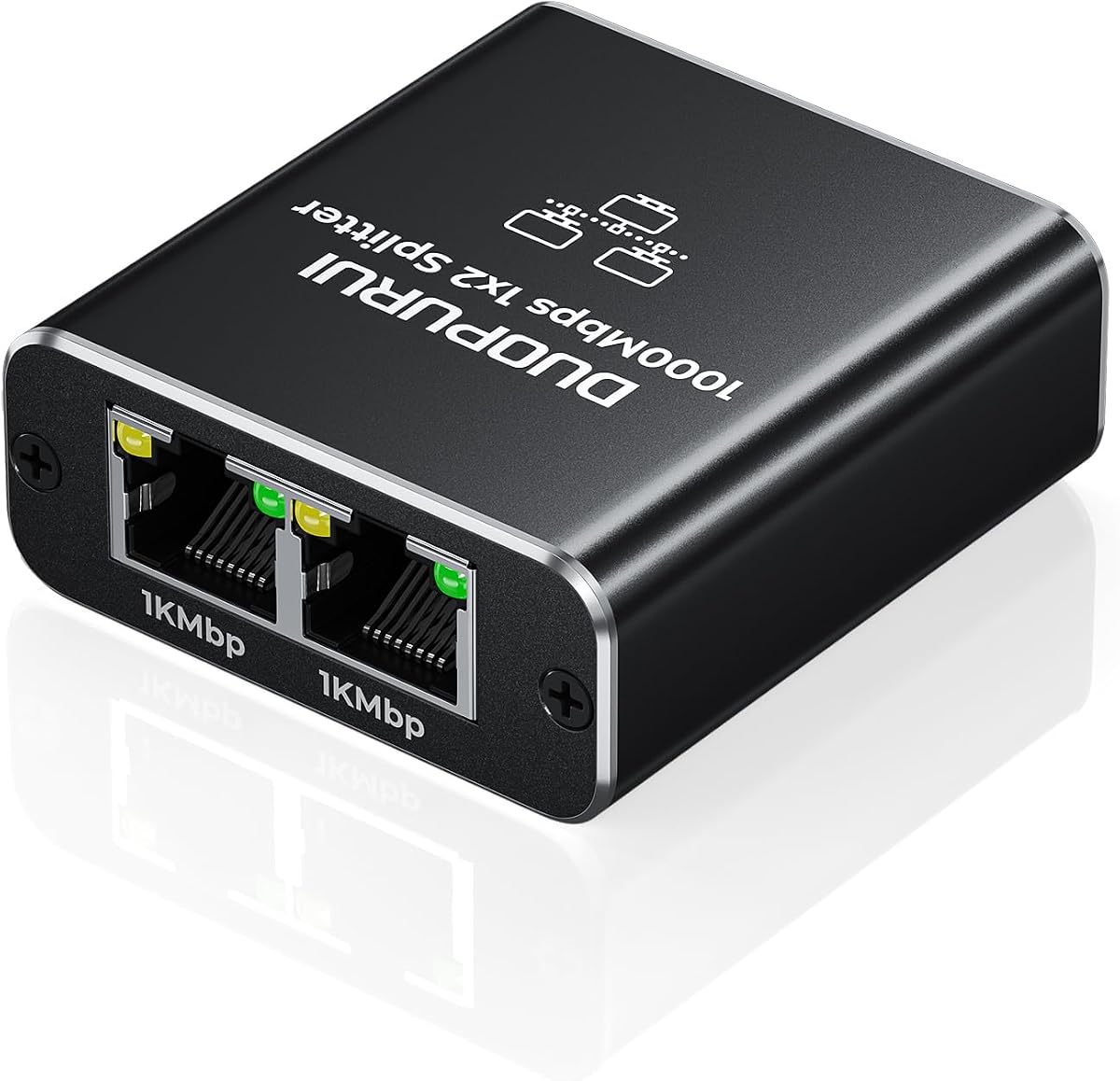
The DUOPURUI Ethernet Splitter is built for high bandwidth tasks like 4K streaming. With a 4.4 rating, it promises reliable 1000Mbps transmission rates suitable for modern media consumption. All RJ45 ports support up to 1000Mbps, backward compatible with 10/100Mbps networks to ensure broad compatibility across your existing devices and older hardware.
We may earn a commission when you buy through this link, at no additional cost to you.
Its alloy material shell provides rugged protection against physical wear and tear. The internal high performance circuit board ensures stable signal transmission even in complex electromagnetic environments. This anti jamming capability is critical for maintaining video quality and reducing packet loss during online gaming or video conferencing sessions at home.
A potential drawback is the need for an external USB power adapter for best stability. While it can work via laptop USB, performance may drop if the source lacks sufficient power. Also, no Ethernet cable is included, so you must provide your own Cat5 to Cat8 cable to connect devices to the unit.
This unit suits media centers where reliable high speed streaming is non negotiable. If you watch 4K content on multiple devices, this splitter helps maintain consistent performance. Ensure you have a stable power source and the right cable for best results when deploying this model in your home theater setup.
Designed specifically for 4K HD video and large file transfers, this splitter handles high bandwidth demands without dropping connection quality during peak usage.
The high quality alloy casing shields internal components from damage, ensuring long term durability even in environments with frequent plugging and unplugging.
We may earn a commission when you buy through this link, at no additional cost to you.
For users needing four active ports from a single line, the LIEZHUA Ethernet Splitter 1 to 4 is a top choice. With a 4.4 rating, it supports ultra fast data transfer speeds of up to 1000Mbps for gaming and large file transfers. One Ethernet port connects to four devices, providing fast stable network connections for all participants.
We may earn a commission when you buy through this link, at no additional cost to you.
This model stands out by including a Cat 6 LAN cable in the package. This extra value means you can connect at least one device immediately without buying accessories. The lightweight design allows easy carrying, making it practical for travel or setting up temporary networks at events where wired connections are preferred.
Keep in mind that bandwidth is shared across four ports. If multiple devices stream high quality video at once, speeds will drop. Also, the USB power cord is required for operation, so you must have access to a power source. Despite these limits, the port count is impressive for a splitter form factor.
Choose this if you need more ports than a standard 1 to 2 splitter offers but don't want a full switch. It is ideal for small offices or gaming setups with multiple consoles. The included cable and portability make it a versatile tool for various network expansion scenarios.
The inclusion of a Cat 6 LAN cable provides immediate connectivity right out of the box, saving you the cost of buying a cable separately.
With four ports available, this unit supports simultaneous networking for multiple devices, reducing the need for multiple single port splitters.
We may earn a commission when you buy through this link, at no additional cost to you.
The Internet Splitter 1 in 4 Out is designed for simple wired network expansion. It features four RJ45 output ports from a single input, allowing four devices to connect simultaneously. With a 4.4 rating, it supports data transfer speeds up to 1000Mbps, ensuring fast and reliable connections for your office or home environment.
We may earn a commission when you buy through this link, at no additional cost to you.
This model includes a USB-C power cable for reliable stable operation. The plug and play setup means no configuration is required. You simply connect your cables and power source to start using it immediately. Its compatibility with Cat5 to Cat8 cables ensures maximum flexibility across different network setups and existing infrastructure.
The main limitation is that bandwidth is shared across four ports. If you run multiple high bandwidth applications, speeds will be split between devices. You also need to provide a power adapter for best stability. Despite this, it remains a solid choice for basic networking where cost and simplicity are priorities.
This splitter is ideal for those needing quick wired access for multiple devices without complex setups. If you have four devices needing wired connections and limited budget, this unit works well. Ensure your power source is stable to avoid connection drops during active use sessions.
Zero configuration requirements mean you can set up your expanded network in minutes without any technical knowledge or software installation steps.
The inclusion of a USB-C power cable aligns with modern power standards, allowing use with many existing charging adapters for convenience.
We may earn a commission when you buy through this link, at no additional cost to you.
The Ethernet Splitter Adapter offers seamless connectivity with a key bonus: a included Cat 6 Ethernet cable. With a 4.3 rating, it allows you to expand your network without additional purchases. Each port supports simultaneous use, ensuring uninterrupted internet access for two devices with a maximum transfer rate of 1000Mbps per cable.
We may earn a commission when you buy through this link, at no additional cost to you.
Its transmission distance reaches up to 100 meters, making it suitable for larger homes or offices with longer cable runs. LED indicators clearly display the working status of each port, helping you confirm connections instantly. The lightweight plastic housing provides heat dissipation, though it may feel less robust than metal options.
The plastic construction is a trade-off for weight and cost. It may not withstand heavy daily use as well as alloy models. Additionally, the device requires a power source to function. If you need a portable, rugged option, consider metal alternatives. However, the included cable adds significant immediate value.
This model works well for budget conscious users who want to avoid buying extra cables. If you need a quick two port expansion with a ready to use cable, it is a good fit. Ensure you place it near a power outlet to maximize its performance and stability.
The inclusion of a Cat 6 Ethernet cable ensures you can connect your first device immediately, saving you time and money on accessories.
With support for transmission distances up to 100 meters, this splitter remains effective even in larger spaces where standard cables might falter.
We may earn a commission when you buy through this link, at no additional cost to you.
The 1 to 3 Mini Ethernet Splitter solves connection problems with one Ethernet cable. With a 4.5 rating, it supports three devices sharing a single line. Three devices share 1000M total bandwidth, ensuring stable data transfer between them. It is the best solution for weak WiFi environments needing wired stability for multiple devices.
We may earn a commission when you buy through this link, at no additional cost to you.
The aluminum metal body offers durability and stable operation. Advanced socket technology ensures comfortable plugging and unplugging without port damage. USB charging cable included allows power from computers or mobile power. LED indicators help you see which devices are active, simplifying network management during use.
Be cautious with modem use; contact technical support to confirm compatibility before connecting directly to modems. Bandwidth is shared, so heavy usage on one device impacts others. Despite this, it remains a great compact option for travel or temporary setups where three wired connections are required.
This unit is perfect for travelers or small offices needing three wired ports. The durable build and portable size make it reliable for on the go setups. If you need to connect multiple devices via cable without a switch, this model is an efficient and robust solution for various environments.
The high quality aluminum metal body provides superior durability compared to plastic options, ensuring long term stability in active use conditions.
LED indicators on the device help you see which device is active, simplifying network management without needing external software tools.
We may earn a commission when you buy through this link, at no additional cost to you.
The Dockteck Ethernet Splitter 1 to 3 lets three devices share a single Ethernet line. With a 4.5 rating, it ensures stable reliable data transfer at rates up to 1000Mbps. All connected devices share the 1000Mbps network, making it ideal for setups where you need wired access but lack sufficient ports on your router.
We may earn a commission when you buy through this link, at no additional cost to you.
Its compact and portable design offers greater flexibility for network expansion plans. The aluminum material provides durability and efficiency heat dissipation. You can carry it easily in a laptop bag for business trips. The lightweight construction ensures it adds minimal weight to your gear while delivering consistent performance across all connected ports.
Bandwidth is shared across three ports, so high speed demands by one device may slow others. You must also connect a power source via USB to operate. While not suitable for heavy enterprise use, it is excellent for personal networks or small home offices needing a portable wired solution without a full switch.
This model is best for users prioritizing portability and simplicity. If you travel often and need reliable wired internet for multiple devices, this splitter is a solid choice. The aluminum build ensures it withstands travel wear, making it a long term addition to your tech toolkit for various connectivity needs.
The compact and portable design allows you to carry it in a laptop bag, enabling wired connections in hotels or remote workspaces easily.
High quality aluminum construction ensures efficient heat dissipation, allowing the device to work stably for long periods without overheating.
We may earn a commission when you buy through this link, at no additional cost to you.
The UGREEN Ethernet Splitter combines performance with a Space Grey finish for modern aesthetics. With a 4.5 rating, it divides one gigabit network into two with transmission speeds up to 1000Mbps. It simultaneously enables two devices to reach full speeds, solving issues of insufficient network wiring and unstable signal transmission effectively.
We may earn a commission when you buy through this link, at no additional cost to you.
Constructed from high-quality aluminum alloy, it ensures signal stability through gold plated pin cores. The eco-friendly PCB board inside protects against interference. This build minimizes signal crosstalk, providing safe and reliable data transfer. Its compact lightweight design makes it highly portable for business trips or temporary setups at home.
You must provide a 5V power connection via USB. If your USB port lacks sufficient power, performance may vary. Also, bandwidth is shared between the two ports. For most home uses, this is not an issue. However, if you need independent full speed on both ports, consider a dedicated switch.
This splitter is perfect for style conscious users who need basic port expansion. The premium Space Grey finish matches modern tech gear beautifully. If you value build quality and aesthetics alongside solid performance, this model stands out among budget options for network expansion.
The Space Grey finish and aluminum alloy build give this splitter a premium look that blends seamlessly with modern tech gear and home office setups.
Gold plated pin cores and full metal protection for RJ45 sockets ensure no signal crosstalk and interference during heavy data transfer.
We may earn a commission when you buy through this link, at no additional cost to you.
Selecting the right internet splitter depends on your specific networking needs. This guide outlines critical factors to consider before making a purchase decision.
Determine how many devices need simultaneous wired access. Some splitters offer one to two ports, while others provide up to four. If you need more than four, consider a standard Ethernet switch instead.
Choose a model that matches the number of devices you plan to connect without overloading the splitter with unnecessary ports.
Most modern splitters support up to 1000Mbps (Gigabit) speeds. Ensure your splitter supports the speed your internet plan provides. Shared bandwidth means total speed is split among connected devices.
For high bandwidth activities like 4K streaming or gaming, prioritize splitters with gigabit support and strong signal stability features.
Many splitters require a 5V USB power source to function correctly. Check if the unit includes a power cable. If not, ensure you have a compatible power adapter available for setup.
Always use the recommended power source to avoid signal drops or unreliable performance during extended use sessions.
Aluminum or alloy casings offer better durability and heat dissipation than plastic models. Look for gold plated pins to ensure long term signal integrity. Durable builds withstand daily plugging and unplugging.
Invest in a well built splitter to ensure it lasts longer and maintains stable performance over time in demanding environments.
Ensure the splitter works with your existing cables. Most support Cat5 to Cat8. Check if a cable is included in the package to save additional costs when setting up.
Use high quality Ethernet cables to maximize the speed and stability of your network connection.
Look for models that require no drivers or configuration. Plug and play devices let you connect instantly without technical steps. This reduces setup time and complexity for users.
Prioritize plug and play models to ensure easy setup and immediate usability without extra software steps.
Compact models are ideal for travelers or small desks. Check if the design fits your space constraints. A lightweight build allows easy relocation between rooms or offices.
Select a size that fits your intended placement while ensuring it remains easy to move if needed.
Some manufacturers offer up to three years of warranty coverage. Check for free technical support hours before purchasing. Strong support ensures help if issues arise after setup.
Review warranty terms and support availability to ensure protection and assistance if the device fails.
To set up your splitter, plug the USB power cable into a 5V power source and connect it to the splitter. Ensure your device is powered before connecting any Ethernet cables.
Connect your router or modem to the splitter's input port. Then connect each device to the available output ports using Ethernet cables. Verify all connection lights show active status.
Keep the splitter in a well ventilated area to avoid overheating. Avoid bending cables sharply to prevent damage to internal wiring and maintain stable signal transmission.
An internet splitter is a device that expands a single Ethernet port into multiple ports. It allows multiple devices to connect to the same network line. Most modern splitters support gigabit speeds for fast data transfer.
Yes, most active splitters require a power source like a USB cable to function correctly. Passive splitters exist but often limit bandwidth. Always check the product details for power requirements before purchasing.
Not exactly. Splitters often share bandwidth across ports, while switches manage traffic independently. For heavy use, a switch provides better performance. Splitters work well for basic home expansion needs.
Most splitters support Cat5 to Cat8 cables. Check compatibility before use. High quality cables ensure you get the full speed your splitter supports.
Most common splitters support 1 to 2, 1 to 3, or 1 to 4 devices. If you need more ports, consider a larger switch or multiple units. Check product specs for exact port counts.
If multiple devices run heavy tasks at once, total bandwidth is shared. This may reduce speed per device. For light use, a splitter should not slow your internet significantly.
We reviewed ten top models for reliable network expansion. Our top picks include the TP-Link TL-SG105 for overall reliability and the TP-Link 1 to 2 for budget friendly performance.
Prioritize port count, build quality, and power needs when choosing. Ensure your splitter supports your internet speed to avoid bottlenecks. A solid unit can simplify your home network setup effectively.
Prices change frequently, so check current listings before buying. Verify warranty coverage and support details for peace of mind. Choose a model that fits your exact use case today.