
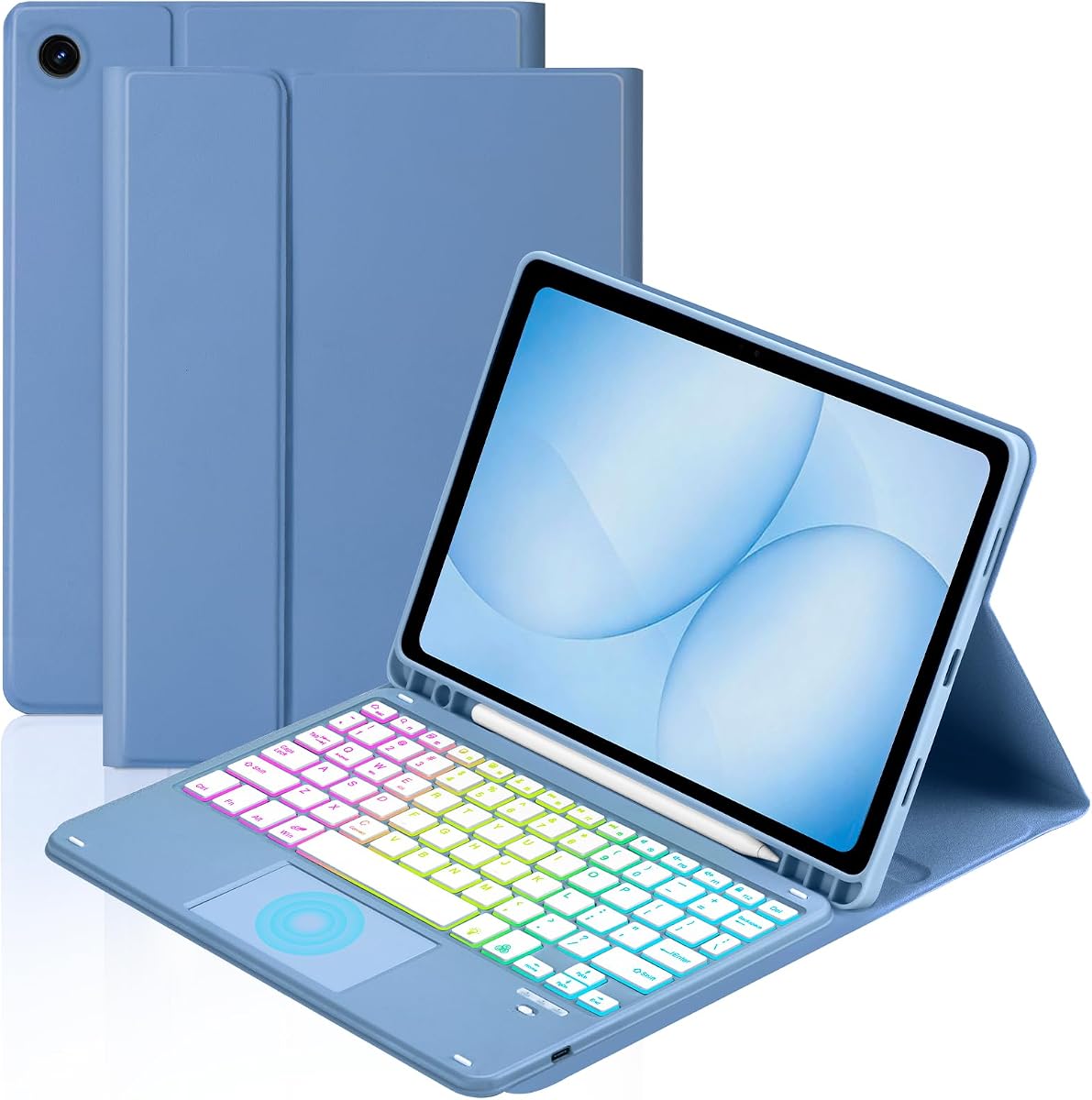
YBING Keyboard Case
4.5Editor score
7-color rainbow backlight
Detachable magnetic keyboard
360-degree rotation
This guide compares the top 10 keyboard cases for Samsung Galaxy A11 tablets, evaluating features like trackpads, battery life, and durability to help you
Finding the right keyboard for your Samsung A11 tablet can transform it into a powerful productivity machine. Whether you are working on documents, browsing the web, or managing emails, a reliable keyboard case offers the comfort and efficiency of a laptop in a portable form factor.
We have carefully evaluated ten top-rated keyboard cases specifically designed for the Galaxy A11 and A9 Plus models. Our comparison focuses on build quality, typing experience, battery longevity, and additional features like trackpads or stylus holders to ensure you get the most value.
Each pick below highlights key strengths and potential trade-offs to help you make an informed decision based on your specific workflow. Please note that product availability and pricing may fluctuate over time, so check the latest details before making your final purchase.
4.5Editor score

4.3Editor score

4.6Editor score
The following table provides a side-by-side overview of the ten keyboard cases reviewed in this guide. Each entry highlights essential specifications and features to help you quickly identify the option that best fits your Samsung A11 tablet setup.




The Dexnor case for the Samsung Galaxy Tab A11+ stands out as a top contender for users seeking a complete laptop replacement experience. With a solid 4.3-star rating from verified buyers, this keyboard case combines practicality with thoughtful design features that enhance daily productivity on the go.
We may earn a commission when you buy through this link, at no additional cost to you.
Its standout feature is the built-in multi-touch trackpad, which allows you to navigate your tablet without constantly reaching for the screen. This is complemented by a robust battery capable of up to ten hours of continuous use with backlighting, ensuring you stay powered through long work sessions. The ultra-light 1.36-pound weight makes it exceptionally portable for students and professionals alike.
While the keyboard offers strong magnetic support and a 120-degree viewing angle, users should note it is not a floating cantilever design, meaning the screen sits directly on the keyboard base. Additionally, the keyboard cannot fold around to the back, which might limit flexibility for some users. These trade-offs are minor compared to the overall value and functionality it provides.
This case is ideal for anyone who needs a reliable typing solution with trackpad control for their Galaxy A11+ or A9+ tablet. Whether you are editing documents, managing emails, or browsing the web, the Dexnor keyboard case delivers a seamless and efficient workflow that justifies its top recommendation status.
The multi-touch trackpad supports gestures for navigation, making document editing and web browsing significantly faster and more intuitive.
Weighing only 1.36 pounds, this case offers full-around protection against drops and scratches while remaining easy to carry in a backpack.
We may earn a commission when you buy through this link, at no additional cost to you.
The YBING Keyboard Case offers an exceptional value proposition for budget-conscious users who do not want to compromise on features. With a high 4.5-star rating, this case proves that affordability does not mean sacrificing style or functionality for your Galaxy A11 Plus or A9 Plus tablet.
We may earn a commission when you buy through this link, at no additional cost to you.
Key strengths include the vibrant 7-color rainbow backlight and the ability to rotate the back cover 360 degrees, allowing for both portrait and landscape use. The detachable keyboard design is particularly useful, letting you separate the keys when you only need to watch media or use the tablet as a standalone device. It also includes a convenient pencil holder for your stylus.
On the downside, the battery life when the backlight is active is around five hours, which is shorter than some competitors but sufficient for most short work sessions. Users should also remember to charge the keyboard separately using the provided Type-C cable. These minor limitations are outweighed by the versatility and cost-effectiveness of the case.
This case is perfect for students or casual users looking for an all-in-one solution that supports reading, writing, and media consumption. If you need a flexible and stylish keyboard cover that won't break the bank, the YBING case is a highly recommended choice for your Samsung tablet.
The 360-degree rotating cover allows you to use your tablet in any orientation, making it great for reading, watching videos, or typing.
Despite its low price, this case includes premium features like multi-color backlighting and dedicated shortcut keys that enhance usability.
We may earn a commission when you buy through this link, at no additional cost to you.
The Soke Keyboard Case earns the Best Premium badge with an impressive 4.6-star rating, reflecting its superior build quality and user-friendly features. It is designed specifically for the Samsung Galaxy Tab A11 Plus 2025 model, ensuring a precise fit and reliable performance for your device.
We may earn a commission when you buy through this link, at no additional cost to you.
What sets this case apart is its multi-system compatibility, allowing you to switch between iOS, Windows, and Android seamlessly. The auto sleep/wake function helps conserve your tablet's battery, while the 7-color backlit keys provide a comfortable typing experience in any lighting condition. The magnetic design ensures a stable connection between the keyboard and the case.
One consideration is the charging time, which takes about 3 to 4 hours for a full charge. Additionally, you must verify your specific model number before purchase to ensure compatibility. However, the robust construction and thoughtful feature set make these minor inconveniences acceptable for a premium product.
This case is ideal for power users who need a reliable, high-performance keyboard that adapts to different operating systems. If you prioritize quality and advanced features like system switching and auto sleep/wake, the Soke Keyboard Case is the top premium choice for your Galaxy A11 Plus.
Support for three operating systems means you can use this keyboard case with various devices, increasing its utility beyond just the tablet.
The auto sleep/wake feature automatically manages power states, helping you extend the overall battery life of your tablet during idle periods.
We may earn a commission when you buy through this link, at no additional cost to you.
The TUNKARMOR Case Keyboard is designed for users who value versatility and portability. Its magnetic detachable keyboard transforms your tablet into a mini laptop in seconds, allowing you to remove the keyboard when you just want to watch videos or read comfortably.
We may earn a commission when you buy through this link, at no additional cost to you.
The case supports three adjustable viewing angles and features anti-slip slots to keep your tablet secure in any position. It also includes a built-in pen holder, though the pen itself is not included. The full 360-degree protection ensures your device is safe from scratches, bumps, or dents during daily use.
One thing to note is that you must verify your tablet model before purchasing, as this case is tailored for specific A9 and A11 models. The auto sleep/wake function helps save battery life, but the absence of a pen in the box is a small drawback. These factors do not significantly detract from its overall utility.
If you need a flexible solution that allows for easy detachment and strong protection, this case is an excellent option. It caters to users who switch frequently between typing and media consumption, offering a balanced mix of functionality and protection for your Samsung tablet.
The magnetic keyboard can be removed quickly, letting you use the tablet freely without the bulk of the keyboard attached.
With three distinct viewing angles and anti-slip slots, you can find the perfect position for typing, drawing, or reading comfortably.
We may earn a commission when you buy through this link, at no additional cost to you.
This Tablet Case Keyboard distinguishes itself by including a rechargeable wireless mouse alongside the keyboard, providing full desktop-like control for your Galaxy A11+ or A9+ Plus tablet. With a 4.4-star rating, it is a strong choice for users who need precise navigation alongside typing.
We may earn a commission when you buy through this link, at no additional cost to you.
The built-in smart trackpad supports multi-touch gestures for smooth interaction, and the keyboard features a vibrant 7-color rainbow backlight for typing in low light. It also supports adjustable viewing angles and comes with a Type-C charging cable for convenient recharging of the keyboard.
Keep in mind that while there is a stylus slot, the pen is not included. Additionally, the mouse may need to be paired separately via Bluetooth. These minor details are manageable given the added value of having both a mouse and trackpad in one package.
This set is best suited for productivity seekers who want maximum control over their tablet. Whether you are editing complex documents or navigating through spreadsheets, the combination of a mouse, trackpad, and keyboard offers a powerful workspace experience.
Both a trackpad and a wireless mouse provide flexible control methods, letting you choose the best tool for your current task.
The rainbow backlight modes not only add fun aesthetics but also ensure you can see the keys clearly in dim environments.
We may earn a commission when you buy through this link, at no additional cost to you.
The Harvopu case is a powerhouse for users who need long-lasting battery performance. Its keyboard is built to endure with up to 180 hours of use on a single charge, making it perfect for travelers or those who forget to charge devices frequently.
We may earn a commission when you buy through this link, at no additional cost to you.
It also includes a wireless mouse with 3-level DPI adjustment for precision control. The multi-color backlight modes add a touch of customization, and the case itself is stain-resistant, meaning spills and marks can be wiped away easily. It is designed to fit both Wi-Fi and 5G variants of the A11 Plus and A9 Plus.
One potential downside is that the mouse has its own battery requirements separate from the keyboard. Also, dark surfaces on the case may show fingerprints more visibly over time. These are minor points compared to the endurance and durability offered.
If battery life and ease of cleaning are your top priorities, this case is a great fit. The combination of a high-capacity keyboard and a stain-resistant case ensures you stay productive and your device stays looking new for longer.
The 180-hour battery life means you can work for weeks without worrying about charging the keyboard frequently.
The stain-resistant material repels coffee and spills, keeping your case looking clean and professional even after daily use.
We may earn a commission when you buy through this link, at no additional cost to you.
TiMOVO Keyboard Case is designed for durability and longevity. With a 420mAh rechargeable battery, it offers significant usage time between charges. Its 4.4-star rating reflects strong user satisfaction with its build and functionality.
We may earn a commission when you buy through this link, at no additional cost to you.
The 7-color backlight modes allow you to personalize your typing experience, and the detachable keyboard makes it easy to carry your tablet without the bulk. Three adjustable viewing angles help you find a comfortable position for any task, and the anti-slide design keeps the tablet secure.
One note is that the keyboard disconnects after 10 minutes of inactivity and reconnects when you press a key. This power-saving feature is useful but might require a brief adjustment when you return to typing after a short break.
This case is ideal for users who want a reliable, long-lasting accessory for their Galaxy A11 Plus. The focus on battery life and protection makes it a solid choice for daily work and entertainment use.
The hibernation state saves battery when not in use, ensuring you have power when you need it most.
With seven backlight colors and multiple angles, you can adapt the case to suit your mood and environment.
We may earn a commission when you buy through this link, at no additional cost to you.
The MePadKey Touchpad Keyboard Case offers advanced navigation options for your tablet. With a smart touchpad that supports multi-finger gestures including four-finger clicks, it provides precise control for browsing and editing tasks.
We may earn a commission when you buy through this link, at no additional cost to you.
The magnetic adsorption design ensures the keyboard stays firmly attached, preventing accidental slips. It also features a 7-color rainbow backlight and anti-slip grooves for comfortable viewing angles. The detachable design allows you to separate the keyboard when not needed.
Before buying, verify that your tablet model is compatible, as this case is designed for specific A11 Plus and A9 Plus versions. Additionally, remember to use the provided pencil holder if you have a stylus. These considerations ensure you get the best fit.
This case is perfect for those who rely on touchpad gestures for navigation. Whether you are multitasking or navigating through apps, the responsive touchpad adds a layer of convenience and efficiency to your tablet experience.
Support for up to four-finger gestures means you can perform complex navigation tasks quickly without touching the screen.
Magnetic adsorption ensures the keyboard stays in place during typing, offering a stable and professional feel.
We may earn a commission when you buy through this link, at no additional cost to you.
This MePadKey Touchpad Keyboard Case offers versatile functionality with 360-degree rotation and a built-in pen holder. It is designed to be a multi-functional companion for your Galaxy A11 Plus or A9 Plus tablet, supporting typing, reading, and drawing.
We may earn a commission when you buy through this link, at no additional cost to you.
The touchpad supports multi-finger gestures for smooth navigation, and the rainbow backlight mode ensures visibility in dark environments. It also works across three systems, providing flexibility for different devices. The thickened convex edges protect the tablet from scratches and drops.
You will need to provide your own stylus as it is not included in the box. Charging is done via a Type-C cable which is usually included. These minor requirements are standard for keyboard cases of this type and do not diminish the value.
Ideal for users who need a multi-purpose case, this option covers all bases from typing to media consumption. The rotation and gesture support make it a flexible choice for dynamic daily use.
360-degree rotation means you can use your tablet in any orientation without removing it from the case.
Compatibility with three systems allows you to use this keyboard with a range of devices beyond just your Samsung tablet.
We may earn a commission when you buy through this link, at no additional cost to you.
The Supveco Keyboard Case is designed for robust protection and efficiency. Made of flexible silicone and TPU, it provides a shock-absorbing layer for your Galaxy Tab A11 Plus. The 4.6-star rating highlights its reliability among users.
We may earn a commission when you buy through this link, at no additional cost to you.
It features a honeycomb grid pattern that helps prevent overheating, extending your tablet's lifespan. The 7-color backlight keys allow for comfortable typing in any environment. An auto sleep/wake function ensures your battery is conserved when the case is closed.
You should check your tablet model carefully before purchasing to ensure the case fits properly. The charging time for the keyboard is about 3.5 hours, which is reasonable given its battery capacity. These points are standard for high-quality protective keyboard cases.
If your priority is keeping your tablet safe while maintaining functionality, this case is an excellent option. The combination of durable materials and smart power features makes it a top choice for daily protection and use.
The flexible silicone and honeycomb grid offer superior shock absorption and heat dissipation to protect your device.
Auto sleep/wake functionality helps you save battery life effortlessly by managing power states automatically.
We may earn a commission when you buy through this link, at no additional cost to you.
Selecting the right keyboard case involves more than just finding one that fits. You need to consider features that align with your daily tasks, whether that is long typing sessions, media consumption, or graphic work.
Always verify the exact model number of your Samsung Galaxy A11 or A9 Plus before buying. Many cases are designed specifically for certain releases such as 2023 or 2026 models and may not fit others.
Confirm compatibility by checking your tablet settings to avoid returns or fit issues later.
Decide between detachable and fixed keyboard cases. Detachable keyboards offer flexibility if you want to use the tablet as a standalone device for media.
Fixed cases often provide more stability but are less versatile if you prefer a light setup.
Look for keys with good spacing and travel distance. Scissor-switch keys typically provide a better typing feel for long sessions.
Test the feel if possible or read user feedback to ensure the keys are not too shallow or stiff.
If you plan to use your tablet in low-light environments, a backlit keyboard is essential. Many options offer single or multi-color backlighting.
Choose a model with adjustable brightness to balance visibility with battery consumption.
Battery duration varies widely between models. Some offer 10 hours of backlight usage while others offer over 100 hours without it.
Consider your charging routine and select a battery capacity that matches your usage patterns.
Built-in trackpads or included wireless mice add significant value for productivity tasks like editing documents.
Check if the trackpad supports multi-touch gestures for smoother navigation across apps.
If you use a stylus for notes or drawing, a built-in pen holder keeps it secure and accessible.
Ensure the holder is durable enough to keep the pen in place during transport.
Materials like PU leather, silicone, or TPU affect both durability and feel. Silicone provides better shock absorption.
Choose materials that feel comfortable in hand and offer sufficient protection for your daily environment.
To get the most out of your keyboard case, start by fully charging the battery before first use. This ensures optimal performance and prevents early drain.
Keep the keyboard clean by wiping it with a dry cloth. Avoid using liquids or abrasive cleaners that could damage the backlight keys or casing.
When not using the keyboard for long periods, store it in a cool dry place to maintain battery health and prevent dust buildup.
Most keyboards are designed for specific variants like the A11 Plus or A9 Plus with particular model numbers. Always check your device settings to confirm compatibility before purchasing.
Battery life depends on usage and backlight settings. Some models offer up to 10 hours with backlight on and over 100 hours without it.
Yes, most detachable cases allow you to separate the keyboard. However, the tablet will not auto-wake from the case in this state.
Many models support multi-system use including Android, iOS, and Windows. Check product details to confirm system support.
Cases with hard shells or flexible silicone provide strong protection against scratches and drops. Some feature honeycomb grids for added shock absorption.
Most cases include a holder for the stylus but do not come with the pen itself. You must purchase a separate stylus if needed.
Choosing the right keyboard case for your Samsung Galaxy A11 can significantly improve your workflow. The top picks like the Dexnor for Galaxy Tab A11+ and Soke Keyboard Case offer excellent balance between features and performance.
If budget is a priority, consider the YBING Keyboard Case which provides impressive features like 360-degree rotation and backlight at a lower cost.
Remember to verify compatibility and check current availability before purchasing to ensure you get the best match for your specific tablet model.