
AULA WIN68 HE Mechanical Gaming Keyboard 60%
4.5Editor score
Adjustable Actuation Point
Web Driver Customization
16.8 Million RGB
Discover the top keyboards for Valorant featuring rapid trigger, high polling rates, and ergonomic designs to sharpen your aim and dominate competitive ranked
Finding the right keyboard for Valorant can transform your gameplay by improving response times and precision. Players need fast actuation and reliable inputs to hit difficult shots during intense firefights.
We evaluated ten top-rated models based on their switch technology, polling rates, and build quality. Each selection offers unique features designed to minimize latency and maximize control in competitive shooters.
This guide highlights standout models with detailed reviews and comparisons to help you decide. Keep in mind that prices fluctuate frequently so always check current listings before making your final purchase decision.
4.5Editor score

4.1Editor score

4.6Editor score
The following table provides a side-by-side overview of each keyboard's most critical specifications and features to help you quickly identify which model aligns best with your gameplay style and budget requirements.

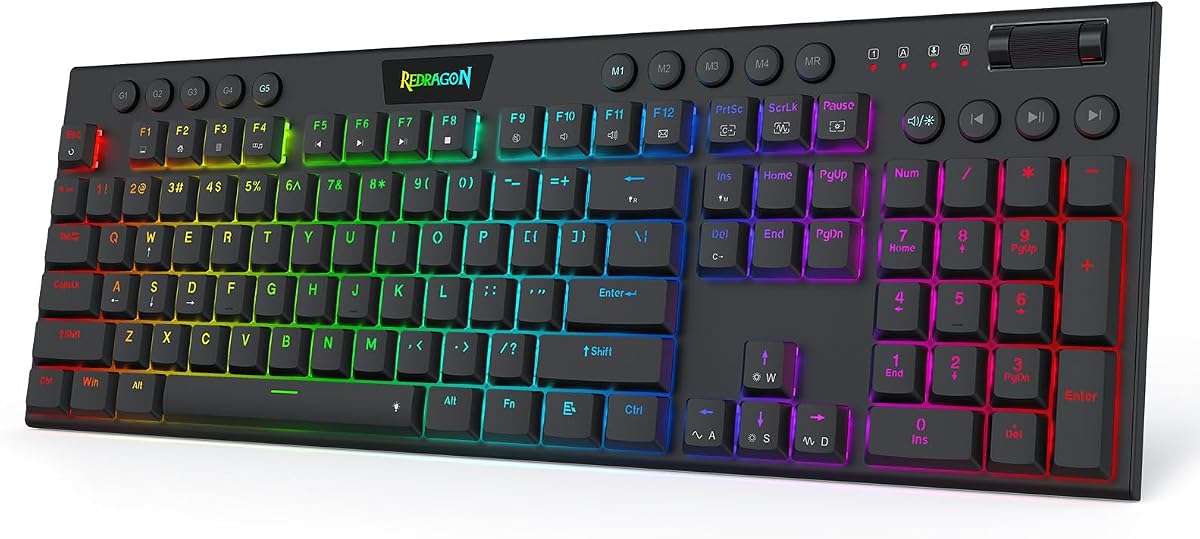





The Redragon K673 HE stands out as a top contender for Valorant players seeking precision and speed. With a solid rating from users and its rapid trigger capabilities, it ensures every movement registers instantly without physical contact delays.
We may earn a commission when you buy through this link, at no additional cost to you.
Its UltraMag POM magnetic switches allow you to adjust actuation points between 0.1mm and 3.4mm giving you full control over sensitivity. The 8000Hz polling rate transmits inputs up to eight times faster than standard keyboards which is crucial for competitive play.
While the software-powered tuning offers great flexibility it may take some time to configure profiles correctly. Additionally the wired design means you cannot move this keyboard freely during long gaming sessions without managing cables.
This keyboard is ideal for competitive gamers who prioritize speed and customization over wireless freedom. If you want a setup that adapts to your precise timing needs this model delivers consistent performance under pressure.
Dynamic key activation cuts redundant keystrokes allowing you to change direction instantly without holding keys.
Anti-wobble independent switch-plate design paired with dampening layers gives a soft Hi-Fi bounce.
We may earn a commission when you buy through this link, at no additional cost to you.
The Redragon K686 HE offers similar magnetic switch technology to the K673 model but at a slightly lower price. Users appreciate its ability to handle rapid inputs with high accuracy thanks to the Hall-effect technology.
We may earn a commission when you buy through this link, at no additional cost to you.
Key features include a single control knob for media and backlight management alongside adjustable actuation profiles. The dual-module floating structure ensures each keypress feels consistent which reduces fatigue during long matches.
However being wired limits where you can place it on your desk compared to wireless options. Also while the price is attractive the build materials feel less premium than higher-end competitors.
This is a solid choice for budget-conscious players who still want high-end performance. If you need reliable rapid trigger mechanics without spending a fortune this model fits the bill well.
Independent switch-plate design prevents wobble so every key feels stable during intense movement.
A single control knob adjusts backlight brightness and media playback without memorizing combos.
We may earn a commission when you buy through this link, at no additional cost to you.
The Redragon K618 HE excels with its low-profile magnetic switches which reduce travel distance significantly. This design allows for faster actuation that can help you react quicker to enemy movements.
We may earn a commission when you buy through this link, at no additional cost to you.
Features like a dedicated macro zone let you record combos without needing software installation first. The slimmer design makes it comfortable for your wrists and fits well on smaller desks.
While the user rating is perfect the customization options are simpler than other models. Also the low profile might feel different if you are used to standard mechanical switches.
This keyboard is best for players who prefer compact ergonomic setups. If you want speed and a lightweight feel for long typing or gaming sessions consider this model.
Shortest travel low-profile switches sense keypresses without physical contact for faster timing.
A dedicated 4×5 macro zone plus media controls let you record combos instantly.
We may earn a commission when you buy through this link, at no additional cost to you.
The Corsair Clipper PRO MINI brings premium Hall effect technology to a compact 60% form factor. Its MGX Hyperdrive Core switches offer reliable actuation with adjustable settings for varied playstyles.
We may earn a commission when you buy through this link, at no additional cost to you.
Durability is a strong point with IP57 rating allowing it to handle spills and dust. The dual-layer sound dampening ensures keystrokes remain quiet which is great for shared environments.
Adjusting to the missing arrow keys or function row may be tricky at first. Also the white finish looks sleek but requires careful handling to avoid visible stains.
This model suits those with limited desk space who still want high performance. If you prioritize durability and a compact footprint for aiming accuracy this is a strong choice.
IP57-Rated durability handles water and dust resistance for long FPS sessions.
Dual-layer sound dampening keeps keystrokes quieter and distraction free during matches.
We may earn a commission when you buy through this link, at no additional cost to you.
The Razer Huntsman Mini leverages optical switches to register inputs at the speed of light. This results in incredibly fast responses which are ideal for quick movement sequences in shooters.
We may earn a commission when you buy through this link, at no additional cost to you.
Snap Tap technology simplifies strafe movements by prioritizing inputs between two keys. The aluminum frame ensures structural integrity while the Chroma RGB syncs with a wide range of peripherals.
Using full features requires Razer Synapse software which may not appeal to everyone. Also the short actuation distance can lead to accidental presses if you touch keys lightly.
This keyboard is perfect for players who want speed and ecosystem integration. If you already use Razer gear and need fast inputs this fits your setup well.
Linear optical switch technology uses optical beam-based actuation at the speed of light.
Razer Snap Tap allows responsive in-game movement via prioritizing latest input between keys.
We may earn a commission when you buy through this link, at no additional cost to you.
The Aula WIN60 HE provides a hot swappable platform with magnetic switches for versatile performance. You can change switches without soldering which offers great flexibility for tweaking your typing feel.
We may earn a commission when you buy through this link, at no additional cost to you.
Its web-based driver allows customization without heavy software downloads. This streamlined interface makes it simple to personalize keys and RGB lighting efficiently across compatible systems.
The limited compatibility with Mac systems might restrict some users. Additionally the basic build quality may not feel as solid compared to more expensive brands.
This is an excellent option for tinkerers on a budget. If you want to experiment with magnetic switches and avoid bulky software this model is worth considering.
Web-based driver accessible from any device avoids bulky software downloads and compatibility issues.
Advanced magnetic switches ensure precise and consistent actuation without physical contact.
We may earn a commission when you buy through this link, at no additional cost to you.
The AULA WIN68 HE offers rapid trigger capabilities with ultra-low latency for precise movement. Its 8000Hz polling rate ensures commands take effect instantly giving you an edge in fast-paced games.
We may earn a commission when you buy through this link, at no additional cost to you.
Key mapping and actuation points can be adjusted to the smallest unit using a web driver. This lets you set preferences individually to match your keystroke habits perfectly.
Windows exclusivity for the driver limits use on Mac users. Also the RGB lighting is functional but lacks advanced customization compared to premium brands.
This model is best for FPS gamers needing speed on a tight budget. If you require rapid trigger functionality without breaking the bank this is a great choice.
Ultra-low latency of 0.3ms ensures your commands take effect instantly during matches.
Adjustable actuation point allows personalization to the smallest unit of 0.1mm.
We may earn a commission when you buy through this link, at no additional cost to you.
The AULA F75 Pro Wireless brings tri-mode connectivity to a 75% layout with hot swappable switches. This allows you to switch between Bluetooth and wired modes depending on your priority.
We may earn a commission when you buy through this link, at no additional cost to you.
Features like a 4000mAh battery ensure long usage between charges. Side printed PBT keycaps are durable and allow light to shine through fonts for a unique look.
Wireless connection inherently introduces slightly higher latency than a direct cable. Also pairing devices takes time compared to plug-and-play wired options.
This keyboard suits those who want versatility and a clean desk setup. If you value wireless freedom alongside customization this model balances both needs well.
Connect via Bluetooth 5.0, 2.4GHz wireless and USB wired connection easily.
Side engraved PBT keycaps take double injection molding for durability without fading.
We may earn a commission when you buy through this link, at no additional cost to you.
The ATTACK SHARK X68 HE provides adjustable Hall-effect switches that bind four functions per key. This flexibility allows for a unique control scheme optimized for specific game mechanics.
We may earn a commission when you buy through this link, at no additional cost to you.
Top mount structure and hi-fi typing sound enhance the user experience significantly. A curved wrist rest adds ergonomic support during long sessions to keep hands comfortable.
The external driver link requires visiting a website which might be less convenient. Also while it supports dual systems switch options are limited.
This model is best for users who want full control over their inputs. If you prioritize customizable keystrokes and ergonomics this keyboard is worth exploring.
Allow you bind 4 functions according to 4 different pressing degrees to one key.
Scientific structure with compact 66 key and curved wrist rest for comfort.
We may earn a commission when you buy through this link, at no additional cost to you.
The ASUS ROG Strix Scope II 96 combines a full-size layout with space-saving design for desktop users. Its tri-mode connectivity supports up to three devices with reliable wireless performance.
We may earn a commission when you buy through this link, at no additional cost to you.
Features like pre-lubed mechanical switches offer a smooth typing and gaming experience. Enhanced acoustics absorb pinging noises ensuring distraction-free gameplay during intense matches.
The premium price may be prohibitive for budget buyers. Additionally its larger size might not fit compact desk setups effectively.
This keyboard is ideal for power users needing a full layout and wireless freedom. If you want top-tier build quality and long battery life this is a premium choice.
Exceptional battery life of up to 1500 hours in 2.4GHz wireless mode.
Hot swappable pre-lubed mechanical switches allow customization for smooth keystrokes.
We may earn a commission when you buy through this link, at no additional cost to you.
Selecting the right keyboard requires balancing speed, comfort, and build quality. This guide outlines key factors to consider when shopping for your next gaming peripheral.
Valorant players benefit most from magnetic or optical switches which offer rapid trigger capabilities. These technologies allow you to reset keys instantly without physical contact reducing input delay significantly.
Prioritize switches with adjustable actuation points to customize sensitivity to your exact needs.
Higher polling rates like 8000Hz ensure your inputs are transmitted faster than standard 1000Hz keyboards. This consistency helps in tracking enemies and hitting precise shots during fast movements.
Look for models advertising high polling rates to maintain a competitive edge.
Compact 60% or 75% layouts free up desk space for larger mouse movements essential for low sensitivity aiming. Full-size or TKL layouts may still be needed if you rely on arrow keys for utility.
Choose a layout that fits your desk dimensions without sacrificing essential function keys.
Wired connections provide the most stable input but wireless options offer desk flexibility. Tri-mode connectivity allows switching between Bluetooth and 2.4GHz wireless for convenience without constant cabling.
Ensure any wireless model meets latency standards for competitive play before buying.
Robust materials like aluminum frames prevent flex during intense typing sessions. Keycaps made of PBT resist shine and wear over time keeping your setup looking new longer.
Inspect the construction for durability especially if you use the keyboard daily for long hours.
Software support allows you to program macros and remap keys for complex strategies. Web-based drivers are gaining popularity for easy access across devices without installing heavy applications.
Check for compatibility with your operating system before relying on customization features.
Features like wrist rests or ergonomic angles reduce strain during marathon gaming sessions. Proper typing angle ensures your hands stay relaxed preventing fatigue during critical matches.
Look for models offering detachable accessories to adjust comfort levels as needed.
Quiet keyboards are essential for shared environments where noise can disturb others. Dampening layers inside the case absorb sound from key switches ensuring silent clicks and presses.
Prioritize models with sound reduction features if you value a quiet environment.
Start by configuring your actuation points in the driver software to match your playstyle. Lower values allow faster presses but may lead to accidental inputs if not calibrated carefully.
Keep your keyboard clean by regularly removing dust and debris from key switches using compressed air. This prevents mechanical failures and ensures consistent performance over long periods.
Utilize macros for utility setups to streamline your in-game actions. Assign common actions to single keys to save time and reduce physical strain during intense rounds.
Hall Effect keyboards are highly valuable for Valorant due to their rapid trigger capabilities. They allow keys to reset instantly without physical contact which minimizes input lag significantly. This ensures your movements register precisely when needed giving you a tactical advantage over mechanical options.
A polling rate of 8000Hz is currently the standard for top-tier competitive play. It provides near-instant input registration which helps in tracking moving targets accurately. Higher rates reduce latency and ensure every keystroke is processed immediately.
Modern wireless keyboards using 2.4GHz connectivity now rival wired speed. Look for models with low latency claims and high polling rates to ensure performance. Wired connections remain the safest bet for minimizing any possible signal interference.
Most rapid trigger models require software installation to configure settings via a dedicated menu. You can typically adjust actuation depth and reset thresholds to suit your finger sensitivity. Always refer to the manufacturer instructions for specific steps.
Compact layouts like 60% free up desk space allowing for larger mouse movements. This helps with low-sensitivity aiming which is common among professional Valorant players. Choose compact layouts only if you are comfortable without arrow keys.
Many modern magnetic keyboards offer hot-swappable sockets allowing you to change switches without soldering. This flexibility lets you experiment with different actuation strengths or feel preferences easily. Check product specs to confirm hot-swap compatibility before buying.
A 60% or 75% keyboard is ideal for small desks as it removes the number pad. These layouts save significant space while retaining essential keys for gaming. Consider a TKL model if you need arrow keys but still want space efficiency.
RGB lighting does not impact performance but helps identify keys in low-light environments. Some models use RGB to signal different gaming modes which can be useful for quick access. Decide based on your aesthetic preferences rather than technical necessity.
This guide highlighted top models ranging from budget-friendly magnetic options to premium wireless solutions. Each keyboard offers unique features tailored to speed and precision which are critical for competitive success.
Prioritize rapid trigger technology and high polling rates to ensure your inputs are processed instantly. Balance these performance metrics with ergonomic design to maintain comfort during long gaming sessions.
Prices change frequently so check current listings to find the best deal available today. Select the model that aligns with your specific needs and enjoy a smoother gaming experience.