
HDMI KVM Switch 3 Monitors 2 Computers
4.5Editor score
4 USB 3.0 ports included
4K@60Hz resolution support
Wired controller for ease
This guide compares the top KVM Switch for Triple Monitors to help professionals and gamers choose the right device for multi-monitor productivity.
Finding the right KVM Switch for Triple Monitors is essential for professionals who need seamless control over multiple displays and peripherals. A quality switch ensures efficient workflow without constant cable swapping.
We evaluated ten leading models based on resolution support, switching speed, and compatibility with modern display standards. Each option offers unique features for home offices and workstations.
Every pick includes detailed specs and real-world performance notes to help you decide. Remember that availability and pricing may change so check current offers before buying.
4.5Editor score

4.9Editor score

3.9Editor score
This side-by-side comparison highlights key specifications across all ten models to help you identify the best fit for your setup needs.





The AV Access KVM Switch stands out as the top choice for professionals needing seamless triple monitor switching. It combines docking and KVM functionality with impressive 8K@60Hz support and Power Delivery.
We may earn a commission when you buy through this link, at no additional cost to you.
This device allows one USB C cable to handle video data and up to 100W charging for laptops. The shared Ethernet connection keeps downloads active on unselected computers during switching.
Trade-offs include limited Mac support for extended modes and a higher cost compared to basic switches. However the benefits justify the investment for power users needing a complete desk solution.
Buy this if you want to replace multiple hubs with one device that supports high resolution and network sharing. It delivers unmatched convenience for dual workstation setups.
Connect your laptop using just one USB C cable for display data and charging reducing desk clutter significantly.
The shared Ethernet port ensures both computers stay online for background tasks even when one is not in use.
We may earn a commission when you buy through this link, at no additional cost to you.
This HDMI KVM Switch offers excellent value for users needing triple monitor control without breaking the budget. It supports 4K@60Hz and includes four USB 3.0 ports for peripherals.
We may earn a commission when you buy through this link, at no additional cost to you.
Key strengths include backward compatibility with lower resolutions and a sturdy build. The wired controller allows flexible placement outside your work area for a cleaner desk.
You must ensure your PC supports triple display output and connects via three HDMI cables. Hotkey toggling is not available which may slow switching for some users.
Perfect for home offices or students wanting reliable multi-monitor sharing at a low cost. It balances features and price well for most basic needs.
Plug and play design with included cables ensures quick installation without needing additional drivers or software.
Faster data transfer for external drives and devices compared to older USB 2.0 standards included in cheaper models.
We may earn a commission when you buy through this link, at no additional cost to you.
UGREEN delivers a premium aluminum KVM switch designed for high fidelity displays with 8K@60Hz support. It features gaming tech like FreeSync and GSync to eliminate tearing.
We may earn a commission when you buy through this link, at no additional cost to you.
The unit supports HDR10+ and multiple refresh rates up to 240Hz for smooth motion. Its robust build ensures stability for demanding creative or gaming workflows.
To reach maximum resolution you must use short high quality cables and avoid converters. Lack of EDID emulation may complicate some setups requiring manual detection.
Ideal for professionals or gamers needing top tier performance and durability. The investment ensures a high quality signal for the most advanced monitors.
Supports variable refresh rate technologies to keep gameplay smooth and visually stable across triple displays.
Aluminum housing provides excellent heat dissipation and a sleek look that matches modern workstations.
We may earn a commission when you buy through this link, at no additional cost to you.
This model expands on standard setups by allowing four computers to share three monitors and USB ports. It supports 8K@60Hz and 4K@144Hz for high performance.
We may earn a commission when you buy through this link, at no additional cost to you.
A wired remote and panel buttons provide flexible switching options. The driver free plug and play design simplifies installation for diverse operating systems.
Setup requires specific port configurations on each PC including discrete graphics cards for all connections. Cabling complexity increases with more computers connected.
Best for environments like IT labs or offices needing centralized control of multiple systems. It maximizes space while maintaining high video standards.
Unique ability to connect four desktops instead of the typical two found in most consumer switches.
Includes necessary cables and a remote to keep your workspace organized despite increased connection count.
We may earn a commission when you buy through this link, at no additional cost to you.
This KVM switch offers a balanced mix of HDMI and DisplayPort options for triple monitor setups. It supports up to 8K@60Hz on HDMI and 4K@144Hz on DP.
We may earn a commission when you buy through this link, at no additional cost to you.
A dedicated power switch allows easy reset of signals without unplugging. Four USB 3.0 ports handle peripherals efficiently with high data transfer speeds.
You must provide your own HDMI and DP cables which may be inconvenient. The lack of keyboard hotkeys means relying on physical buttons for switching.
Great for users wanting flexible video input types without breaking the budget. It handles both gaming and productivity needs effectively.
Accommodates both HDMI and DisplayPort monitors simultaneously for diverse display setups.
External power switch makes troubleshooting quick without needing to access the rear connections.
We may earn a commission when you buy through this link, at no additional cost to you.
This docking station combines KVM switching with advanced network sharing so both PCs stay online during transitions. It supports 8K@60Hz and USB C connections for laptops.
We may earn a commission when you buy through this link, at no additional cost to you.
Features include audio access card readers and USB 3.2 ports for fast file transfers. The compact design replaces multiple devices on your desk.
Mac users face limitations with extended displays so check compatibility before purchase. The premium price reflects its extensive connectivity options.
Best for professionals requiring constant network connectivity alongside multi monitor workflows. It simplifies dual workstation setups significantly.
Both computers retain network connectivity allowing downloads or syncs to continue on the unused system.
Adds SD card and audio jacks which are often missing from standard KVM switches.
We may earn a commission when you buy through this link, at no additional cost to you.
Designed specifically for HDMI setups this switch supports the latest 2.1 standard for high refresh rates up to 4K@120Hz. It includes USB 3.0 ports for all common peripherals.
We may earn a commission when you buy through this link, at no additional cost to you.
The wired controller allows you to hide the device while keeping access handy. Driver free operation ensures quick setup without software delays.
It requires specific HDMI cables for best performance and lacks DisplayPort options for mixed setups. Cables must be short to maintain signal integrity at high resolutions.
Ideal for users with all HDMI monitors wanting modern refresh rate support. It offers a focused solution for HDMI based triple displays.
Leverages the latest HDMI standard for higher resolutions and refresh rates in modern setups.
Four USB 3.0 ports support mice keyboards and storage devices seamlessly across both computers.
We may earn a commission when you buy through this link, at no additional cost to you.
This unique KVM allows three computers to share a triple monitor setup and USB peripherals efficiently. It supports 8K@60Hz and 4K@144Hz resolutions for high performance.
We may earn a commission when you buy through this link, at no additional cost to you.
A wired remote simplifies switching between the three systems without reaching behind the unit. The design supports extended and copy modes easily.
Cable management is key since each PC needs specific port connections. USB sharing is limited to common ports so prioritize essential devices.
Great for offices with three shared workstations needing to save space. It reduces hardware clutter while maintaining display quality.
Allows three computers to share one monitor setup which is rare in standard KVM products.
Supports both extended and duplicate modes so you can choose how to present content.
We may earn a commission when you buy through this link, at no additional cost to you.
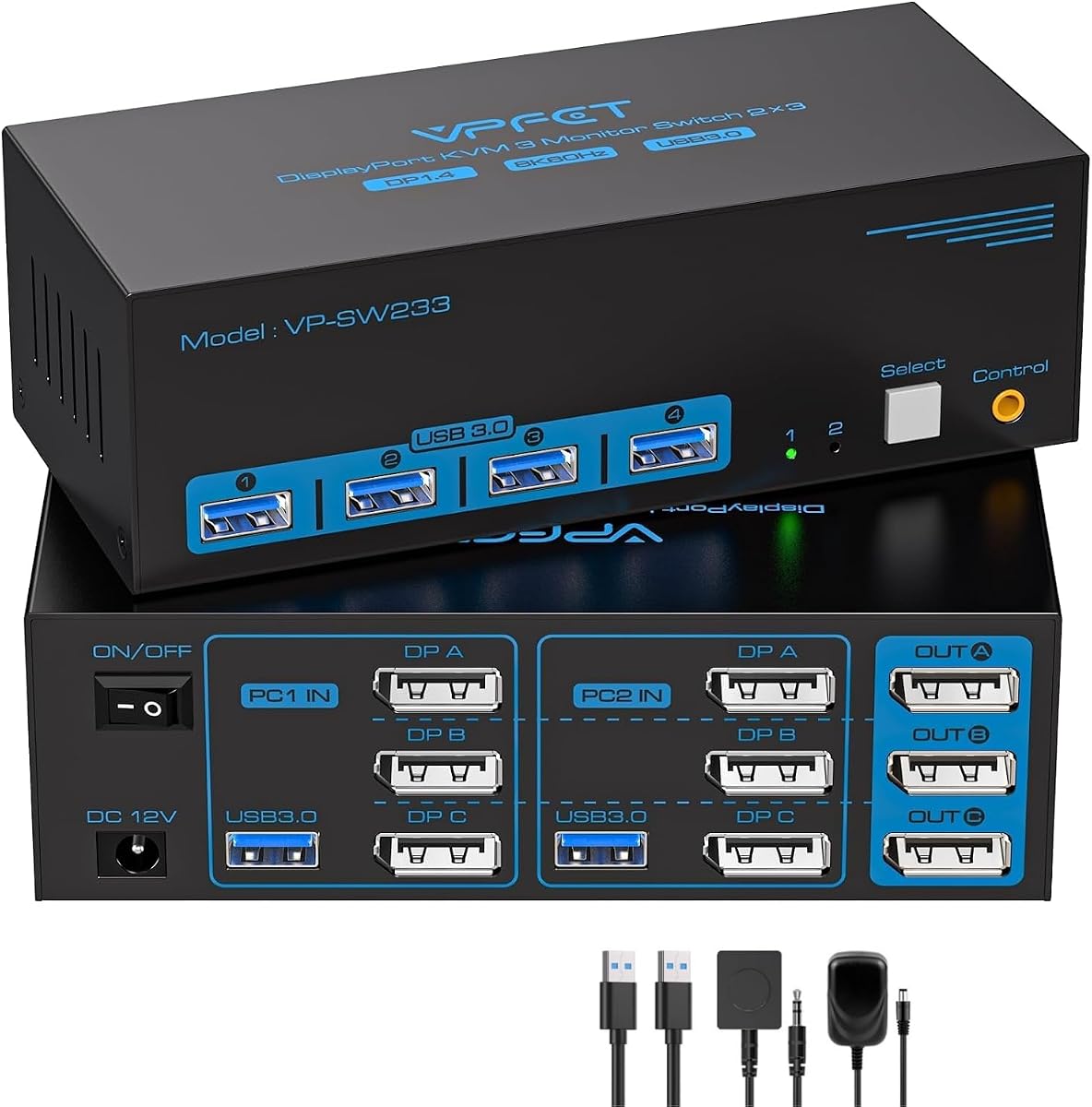
This KVM switch focuses exclusively on DisplayPort for users needing high refresh rates up to 4K@144Hz. It ensures stable connections for graphics intensive tasks like editing.
We may earn a commission when you buy through this link, at no additional cost to you.
One button switching allows easy access to three monitors and USB peripherals. The 5Gbps USB transfer speed keeps file sharing efficient.
It cannot work with HDMI monitors so your setup must be DP compatible. Each PC needs three DisplayPort outputs which may require specific graphics cards.
Best for users with high end DP monitors needing smooth motion. It delivers focused performance for graphics professionals.
Supports up to 144Hz for fluid visuals in video editing or gaming environments.
Designed for demanding desktop environments to maintain reliable signal without flickering.
We may earn a commission when you buy through this link, at no additional cost to you.
This KVM switch offers a complete solution with all necessary HDMI and DP cables included in the box. It supports 8K@60Hz and 4K@144Hz with full USB 3.0 sharing.
We may earn a commission when you buy through this link, at no additional cost to you.
A wired remote and panel buttons provide flexible control. It works with Windows Mac and Linux systems easily without extra drivers.
You must ensure your PC supports triple display output as the switch does not emulate EDID. Cable management is simplified by the included set.
Perfect for users wanting an out of box experience without extra purchases. It balances features and convenience effectively.
Includes HDMI 2.1 DP 1.4 and USB cables so you can start using immediately.
Compatible with major operating systems including Windows Mac and Linux for universal use.
We may earn a commission when you buy through this link, at no additional cost to you.
Selecting the right KVM requires balancing resolution support connection types and peripheral needs.
Look for support of at least 4K@60Hz to ensure crisp visuals. Higher rates like 4K@144Hz or 8K@60Hz are essential for gaming or detailed work. Check that both HDMI and DisplayPort inputs support the required resolution.
Always match cable specifications to output to avoid signal degradation.
Choose HDMI or DisplayPort inputs based on your monitor ports. Hybrid switches offer flexibility for mixed setups while single type switches are simpler. Ensure your PC has enough output ports to connect all monitors.
Hybrid models provide more future proofing for diverse hardware.
Standard switches support two computers but some allow three or four. Decide how many systems you need to share the display and USB ports. More inputs may require complex cabling but increase workspace efficiency.
Select a unit matching the exact number of systems you plan to share.
Ensure the switch has enough USB 3.0 ports for all peripherals. Faster data transfer is critical for external drives and peripherals. Verify that USB connections handle keyboards mice and audio without lag.
Prioritize USB 3.0 over older standards for best performance.
Some switches need external power adapters to run USB devices reliably. Check if a 12V adapter is included and if the unit supports high power peripherals. External power ensures stable operation for hard drives and webcams.
Always connect external power for stable peripheral sharing.
Look for both panel buttons and wired controllers for flexible placement. Some switches support keyboard shortcuts but many rely on physical controls. Choose a method that fits your desk layout and workflow preferences.
Wired controllers keep the workspace tidier by allowing flexible switch placement.
Ensure compatibility with your OS like Windows Mac or Linux. Some units have restrictions on Mac extended display modes. Check if driver free operation is supported for plug and play convenience.
Verify OS compatibility before buying to avoid setup issues.
Aluminum housings offer better heat dissipation and durability. Look for units with at least a one year warranty for support. Check customer reviews for reliability and build quality feedback.
Invest in durable builds for long term performance and stability.
Connect each computer to the KVM using the required video and USB cables. Ensure power adapters are plugged in for stable operation and peripheral power.
Press the physical button or use the wired controller to switch between systems. Your monitors and peripherals will change inputs automatically without restarts.
Keep the device in a well ventilated area to prevent overheating. Dust regularly to maintain connection quality and long term reliability.
Your computer must support three independent displays simultaneously. Many modern GPUs can handle this but some integrated graphics may be limited. Check your PC specifications before purchasing to ensure compatibility.
Active adapters may work but passive ones often cause signal issues. Most switches recommend direct connections to avoid latency or resolution loss. Always prefer native HDMI or DisplayPort outputs if possible.
Most modern switches support 4K@60Hz on all three monitors. Higher refresh rates depend on both the switch and your monitor capabilities. Always check the specs for maximum supported resolutions and refresh rates.
Yes most USB 3.0 switches support wireless receivers and dongles. Ensure the receiver is plugged into the KVM USB ports for proper switching. Wireless devices should work seamlessly after the setup.
Yes hybrid switches often support both laptop and desktop systems. USB C laptops may need specific cables to ensure proper video output. Check for docking station features if you want single cable laptop connection.
If you use multiple PCs for different tasks a KVM saves space and cables. It lets you control everything with one keyboard and mouse set. Without one you would need separate peripherals for each computer.
Check that all cables are securely connected and the power adapter is plugged in. Ensure your computer supports multiple display modes like extended or mirror. Restarting the switch often resolves signal recognition issues.
The top picks cover a range of needs from budget HDMI switches to premium docking stations with network sharing. Each option delivers seamless control for multiple systems with high resolution output.
Prioritize resolution support and peripheral compatibility to match your workflow. Ensure your PCs can drive three displays before purchasing any KVM unit.
Always verify current pricing and availability as models may change. With the right switch your workspace becomes more efficient and organized.