
LeapFrog 2-in-1 LeapTop Touch
4.7Editor score
2-in-1 tablet mode
Customizable name feature
Five learning modes
This guide compares the top ten laptops for five year olds, evaluating educational content, build quality, and ease of use for young learners starting tech.
Finding the right laptop for a five year old can be challenging for parents who want to balance education with entertainment. These devices are designed to introduce young children to basic computer skills in a safe and engaging way.
We evaluated ten top models based on their educational value, durability, and interface design. Our comparison focuses on how well each laptop supports early learning milestones like reading, math, and problem-solving.
Each pick highlights unique features that cater to different learning styles and preferences. Please note that availability and specifications may change over time so checking current details is recommended before purchase.
4.7Editor score

4.5Editor score

4.2Editor score
The following table provides a side-by-side overview of key specifications and features for each model to help you make an informed decision based on your child's specific needs.





The VTech Genio Bilingual JuniorBook stands out as a top choice for introducing young children to computing concepts. It features a realistic design that mimics a real laptop while providing a safe environment for learning basic skills.
We may earn a commission when you buy through this link, at no additional cost to you.
This model offers over eighty preloaded activities that cover subjects like math, science, and language arts. The bilingual functionality allows children to switch between English and Spanish, which can help build early language skills effectively.
One trade-off is the lack of internet connectivity, which means all content must be loaded in advance. However, this design choice ensures a safe screen-free experience without the risk of accidental web access.
It is an excellent recommendation for parents seeking a structured learning tool that feels like a real computer. The keyboard and cursor controller help develop fine motor skills while kids engage with educational games.
The ability to switch between English and Spanish makes this laptop a versatile tool for bilingual households or families interested in language exposure.
Using a full-size QWERTY keyboard and cursor helps children transition smoothly to actual computers in school environments later on.
We may earn a commission when you buy through this link, at no additional cost to you.
The Lexibook Unicorn Educational Laptop combines fun visuals with practical learning tools. It includes a variety of activities designed to test knowledge and improve skills in areas like math and logic.
We may earn a commission when you buy through this link, at no additional cost to you.
This device emphasizes music education with tools for composing and playing melodies. Such features encourage creativity alongside traditional academic subjects, making learning more engaging for children who enjoy artistic expression.
The ergonomic design ensures that the laptop is comfortable for small hands to use over extended periods. This attention to detail supports long play sessions without causing fatigue for young users.
It is a solid option for parents looking to introduce music and logic concepts early. The realistic mouse and keyboard provide a good foundation for future computer use while keeping the experience playful.
Musical activities provide a unique angle on education, allowing children to explore notes and composition in a simple interface.
Different activity levels allow children to test their knowledge and improve at their own pace without feeling overwhelmed.
We may earn a commission when you buy through this link, at no additional cost to you.
This Kids Laptop offers a vibrant color screen that enhances visual learning experiences for young users. The TFT display provides clear visuals that help keep children engaged during educational activities.
We may earn a commission when you buy through this link, at no additional cost to you.
With forty-eight learning modes, it covers a broad spectrum of topics including alphabet, mathematics, and general knowledge. This variety ensures that children can explore different subjects without outgrowing the device quickly.
The slim design makes it easy to carry and store, supporting portable learning experiences. A protective film is included on the screen, which must be removed before use to ensure optimal visibility.
It is a good fit for parents who want a portable device with a wide range of content. The realistic keyboard and mouse support motor skill development while the screen offers a lively interface.
The color screen brings activities to life, making it easier for children to interact with visual elements during games.
Its compact size allows for easy transport, meaning learning can continue whether at home or traveling elsewhere.
We may earn a commission when you buy through this link, at no additional cost to you.
The LeapFrog 2-in-1 LeapTop Touch is a highly rated budget-friendly option that offers flexible learning modes. Its unique design allows the screen to flip and convert into a touch tablet for varied interaction.
We may earn a commission when you buy through this link, at no additional cost to you.
Children can engage in role-play activities like sending messages to a toy character, which adds a fun layer to learning. Parents can customize the device with their child's name to make the experience more personal.
While it is less feature-rich than premium models, it effectively covers basic skills like ABCs, numbers, and music. This makes it an excellent starting point for younger children or those just beginning to explore technology.
It is a great value for parents seeking an accessible entry point into educational tech. The high rating reflects its reliability and appeal to young learners who enjoy interactive play.
The ability to switch between laptop and tablet modes adds versatility that keeps children engaged through different types of interaction.
Customizing the device with a child's name helps create a sense of ownership and increases engagement with the activities.
We may earn a commission when you buy through this link, at no additional cost to you.
The VTech Play Smart Preschool Laptop features a sleek design that looks like a grown-up computer, appealing to children who want to emulate their parents. It includes thirty activities that grow with the child through leveled learning.
We may earn a commission when you buy through this link, at no additional cost to you.
Personalization is a key aspect, allowing kids to set their own avatar and details. This feature helps create a more engaging environment as children see their own identity reflected in the software.
Educational content includes logic games and musical exploration which support cognitive development. The introduction to basic Spanish words also provides an opportunity for early language exposure in a casual setting.
It is a well-rounded choice for preschoolers transitioning into school age. The combination of fun games and structured learning makes it suitable for both entertainment and educational purposes.
Setting up an avatar and personal details helps children feel more connected to the device and motivates continued use.
Logic and music games are designed to challenge thinking and creativity in ways that are appropriate for young minds.
We may earn a commission when you buy through this link, at no additional cost to you.
The LEXiBOOK LAPTAB offers a significantly larger and more powerful experience compared to toy laptops. Its ten-inch HD touchscreen and fast processor provide a smooth interface that feels like a real computer for older children.
We may earn a commission when you buy through this link, at no additional cost to you.
Access to Google Play and thousands of apps allows for a wider range of educational and entertainment options. This connectivity ensures that the device remains useful as the child grows and their interests evolve.
Robust parental controls and customizable profiles make it safe for family use. Parents can manage time limits and apps to ensure a balanced experience that prioritizes learning and safety.
It is a premium investment for families ready to step into more advanced technology. The combination of hardware power and software flexibility makes it a versatile tool for learning and play.
Wi-Fi and USB ports allow for updates and transfers that keep the device current and useful over a longer period.
The ability to access a wide range of apps means the laptop can adapt to changing educational needs and interests.
We may earn a commission when you buy through this link, at no additional cost to you.
This Kids Laptop stands out for its built-in camera functionality, allowing children to take photos and express their creativity. It includes a variety of filters and frames that make photo taking fun and engaging.
We may earn a commission when you buy through this link, at no additional cost to you.
With sixty-four learning modes, it covers a comprehensive range of educational topics. The balance between learning and entertainment ensures that children remain interested in using the device regularly.
The camera feature helps children record memories with family and friends, adding a social dimension to the learning experience. It encourages them to explore their surroundings actively while using the device.
It is an ideal gift for children who enjoy visual arts and photography alongside traditional learning. The camera and educational tools together create a well-rounded interactive experience.
The camera feature allows children to document their daily life, turning learning into a creative and social activity.
A high number of modes means children can switch tasks easily, preventing boredom and encouraging exploration of different skills.
We may earn a commission when you buy through this link, at no additional cost to you.
The LeapFrog LeapPad Academy is designed to grow with kids from early childhood through elementary school. It includes a stylus that supports writing and drawing skills which are essential for early development.
We may earn a commission when you buy through this link, at no additional cost to you.
Educational apps cover math, reading, and coding skills providing a structured path for learning. The shatter-safe screen and tough bumper ensure durability even if the device is dropped during use.
Parents can manage content and time limits through built-in controls ensuring a safe environment. A three-month trial of LeapFrog Academy is included offering access to thousands of additional resources.
It is a versatile platform for families looking for a long-term learning solution. The inclusion of a stylus and durable build makes it suitable for daily use in various settings.
The stylus helps develop hand-eye coordination and writing skills which are critical for school readiness and early literacy.
A shatter-safe screen and bumper design protect the device from common accidents ensuring longer lifespan and reliability.
We may earn a commission when you buy through this link, at no additional cost to you.
The Lexibook Barbie Educational Laptop combines a popular theme with robust educational content. It features a realistic design that appeals to children interested in this style while offering over one hundred twenty activities.
We may earn a commission when you buy through this link, at no additional cost to you.
Learning includes math, logic, and music with bilingual support in English and Spanish. This ensures that children can practice vocabulary and concepts in both languages effectively.
The compact size makes it easy to carry and store which supports learning on the go. Whether at home or traveling the device fits easily into bags or backpacks for convenient access.
It is a great option for children who respond well to themed learning environments. The high activity count ensures plenty of content to keep them engaged over time.
Using a familiar theme can make learning feel more fun and less like a chore increasing motivation for regular use.
The bilingual activities provide a structured way to practice vocabulary in two languages enhancing cognitive flexibility.
We may earn a commission when you buy through this link, at no additional cost to you.
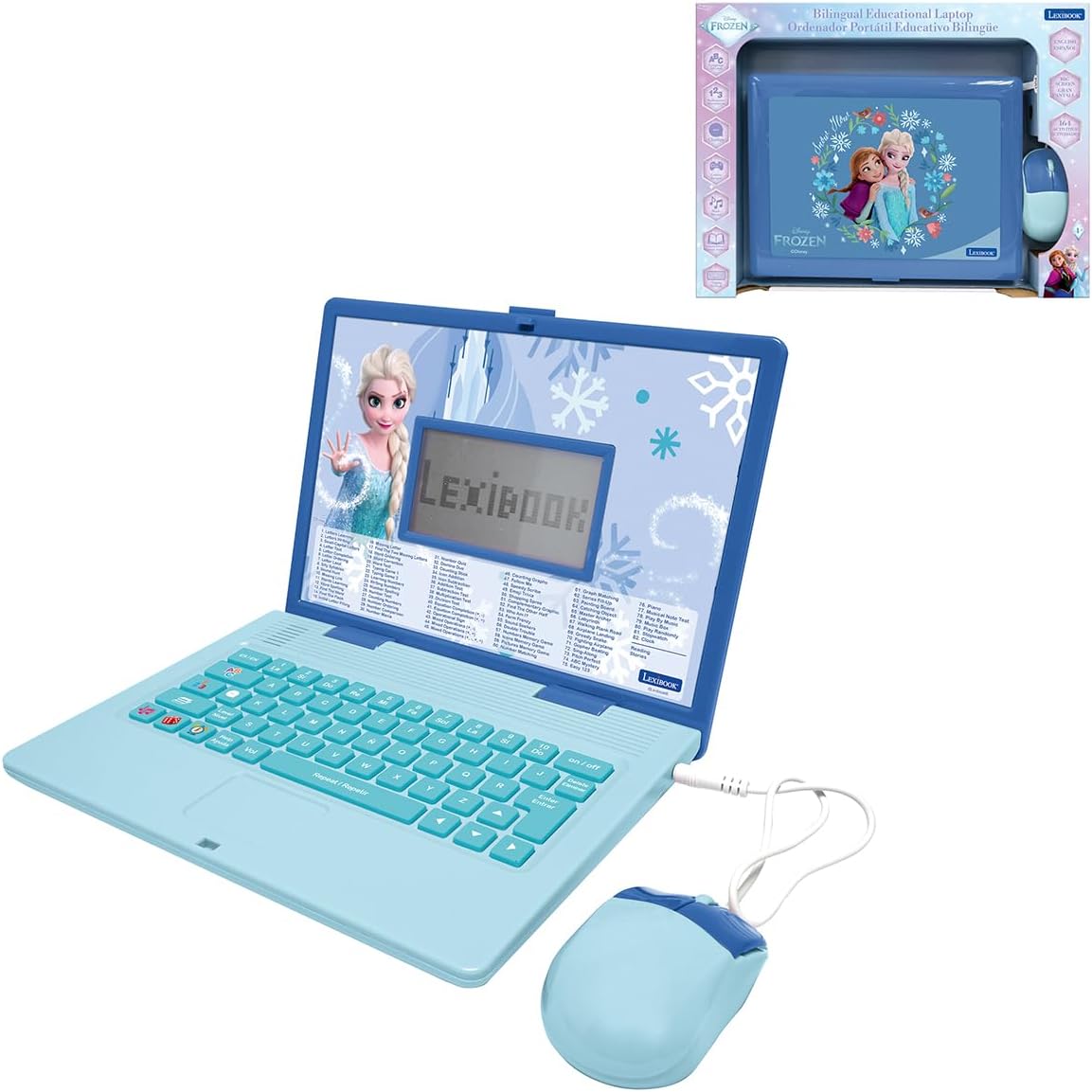
The LEXiBOOK Frozen Educational Laptop offers a themed learning experience that includes over one hundred sixty-four activities. This extensive library covers vocabulary, spelling, and math in both English and Spanish.
We may earn a commission when you buy through this link, at no additional cost to you.
Voice guidance helps children navigate the device easily making it accessible for those who are still developing reading skills. The clear LCD screen ensures that all visuals are easy to see during play.
Its lightweight design makes it comfortable to hold for extended periods. This feature supports long play sessions without causing hand fatigue for young children using the laptop.
It is a strong contender for children who are fans of the theme and want educational content. The combination of voice guidance and bilingual support makes it a versatile choice.
Voice guidance allows pre-readers to interact with the content effectively without needing to read instructions themselves.
A high number of activities ensures that children can revisit content and explore new lessons regularly.
We may earn a commission when you buy through this link, at no additional cost to you.
Selecting the right laptop involves considering several factors that impact learning, safety, and usability.
Look for laptops that offer age-appropriate activities covering math, reading, and logic. The content should be interactive and capable of growing with the child to ensure longevity.
Prioritize devices with structured learning paths that encourage exploration and skill building over time.
A realistic keyboard and mouse can help children develop motor skills needed for real-world computing. Touchscreens are also useful for intuitive interaction especially for younger users.
Ensure the interface is simple enough for a child to navigate independently without constant assistance.
Children often handle devices roughly so choose models with rugged construction and protective features. A sturdy casing prevents damage from accidental drops or bumps.
A device that can withstand daily use will save money in the long run and provide consistent learning experiences.
If your child is learning more than one language, a laptop with bilingual options can be a valuable tool. Switching between languages helps reinforce vocabulary and comprehension skills.
Check if the device allows easy switching between languages to maximize educational potential for bilingual households.
Some laptops run on batteries while others use rechargeable power. Consider how often you need to replace batteries or charge the device for uninterrupted learning.
Rechargeable options may be more cost-effective over time but battery models offer more portability during travel.
A screen that is too small can strain eyes and limit the usability of content. A larger display provides clearer visuals and more space for interactive elements.
Balance portability with screen size to ensure comfortable viewing for extended periods without fatigue.
If you plan to use the laptop while traveling or moving between rooms, a lightweight and compact model is ideal. A smaller device fits easily into bags and backpacks.
Prioritize portability if you need the laptop for learning on the go or for multiple locations at home.
Laptops for young children vary widely in price depending on features and brand. Set a budget that aligns with the value offered by the educational content.
Consider long-term value such as the number of activities and durability when comparing cost across different models.
Always read the instruction manual to understand how to activate features and customize settings. This ensures that you can set up the device correctly before handing it to your child.
Keep the device clean by wiping it with a soft cloth and avoiding liquids. Dust and dirt can accumulate on screens and keyboards which may affect performance over time.
Store the laptop in a dry and cool place when not in use to preserve battery life. Avoid exposing it to extreme temperatures which could damage internal components.
Yes, most educational laptops are designed with safety in mind. They do not require internet access which prevents exposure to unwanted content. Always supervise young children during initial use to ensure safe interaction.
Battery life varies by model but typically lasts several hours of active play. Battery powered models allow for easy replacement while rechargeable options provide convenience. Always keep spare batteries or a charger handy for uninterrupted use.
Most toy laptops do not connect to the internet to keep content contained. Some premium models offer Wi-Fi capabilities for additional apps and updates. Check specific product details if internet connectivity is a requirement.
Many devices allow parents to input their child's name or select learning levels. This customization helps tailor the experience to individual needs and interests. Look for models with personalization features to enhance engagement.
Most educational laptops are designed for children between the ages of three and eight. Five year olds typically find the content challenging but engaging. Check the age recommendations on packaging for best results.
No, most devices come with preloaded content that is ready to use. Some models may allow updates via USB or Wi-Fi but this is not required. Convenience is a key feature for these learning tools.
Keyboards help develop typing skills while touchscreens are intuitive for navigation. A combination of both offers the most versatile learning experience. Choose based on your child's current skill level and needs.
Many models include parental controls or limited interfaces to manage content. Some allow time limits or app restrictions to ensure safe usage. Review the parental control features before purchasing.
Choosing the right laptop for a five year old depends on balancing educational value with engagement. The VTech Genio Bilingual JuniorBook offers a robust learning experience while the LeapFrog 2-in-1 LeapTop Touch provides an affordable option.
Consider factors such as screen size, bilingual support, and durability when making your selection. Each device serves a unique purpose and understanding your child's needs will guide you to the right choice.
Remember to check current availability and specifications as models may update over time. Investing in a quality learning tool can provide a strong foundation for future academic success.