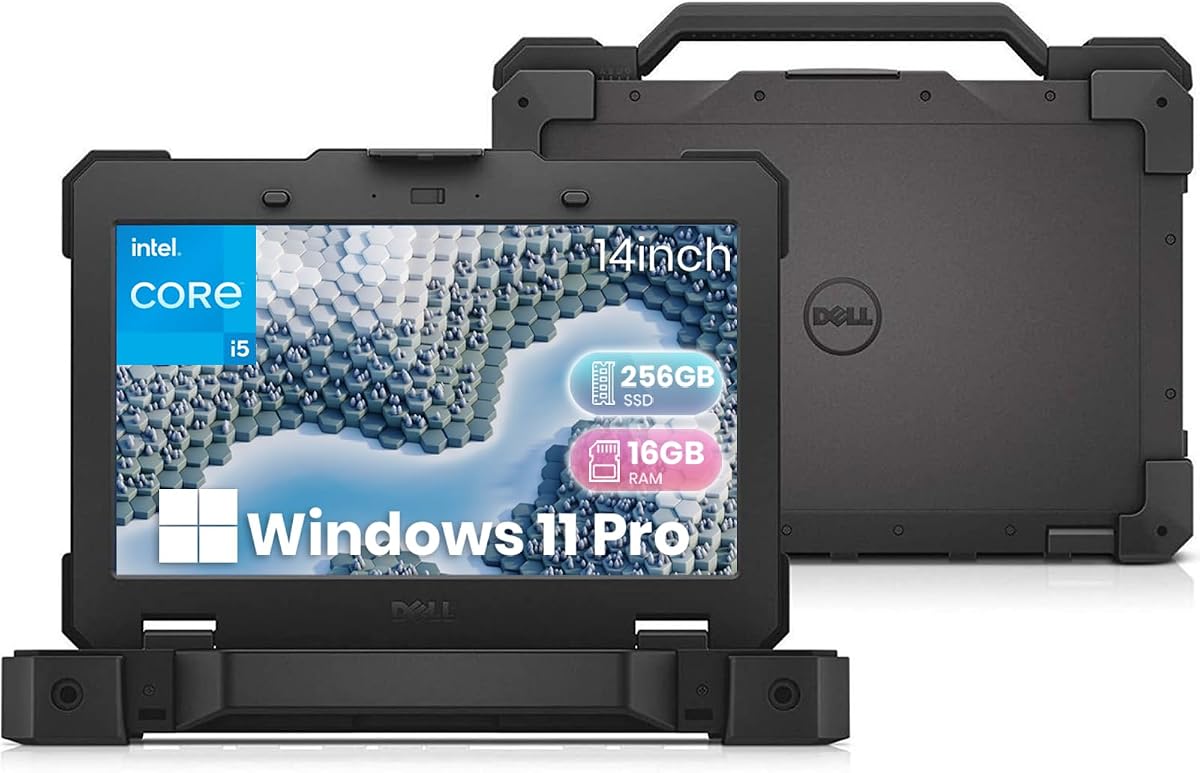
Dell Latitude 5414 Rugged
5.0Editor score
Military-grade durability standard
Legacy RS-232 serial port
Renewed certified reliability
Ham radio operators often need reliable computing power in the field or at home to manage logs, interface with radios, and access emergency networks. Choosing the right laptop involves balancing durability, connectivity ports, and processing speed to handle demanding software and harsh environments effectively.
We have carefully evaluated ten top-rated devices ranging from rugged industrial laptops to consumer business models. Our comparison focuses on build quality, port availability for serial and USB connections, battery life, and overall performance to ensure you find a machine that supports your operating goals.
Each pick highlights specific strengths like military-grade protection, legacy port support, or modern AI features for station management. Please note that product availability and prices can change frequently so always verify current details before making your final purchase decision today.
5.0Editor score

4.4Editor score

4.0Editor score
As an Amazon Associate we earn from qualifying purchases.
The following table provides a side-by-side overview of key specifications and features for each of the ten selected devices to help you quickly identify the model that best fits your specific ham radio operating needs.


The Panasonic Toughbook FZ-55 MK1 stands out as a top choice for ham radio operators who need a reliable machine that can withstand challenging environments. With a rating of 4.4 stars, this renewed unit offers a perfect balance of ruggedness and performance for field operations or fixed station logging.
We may earn a commission when you buy through this link, at no additional cost to you.
Its standout qualities include the MIL-STD-810H certification which ensures it can handle drops and extreme conditions without failure. The inclusion of 4G LTE allows operators to stay connected to emergency networks or upload logs from remote locations where Wi-Fi is unavailable. The Intel Core i5-8365U processor paired with 32GB of RAM ensures that even demanding logging software and digital mode applications run smoothly.
While the 14-inch HD display is functional it lacks the high resolution of modern panels which might make reading small text difficult for some users. Additionally as a renewed product there can be minor cosmetic variations though functionality remains intact. These trade-offs are acceptable given the robust build and connectivity options which are critical for serious operators.
We recommend this laptop for professionals and serious hobbyists who prioritize durability and connectivity over sleek consumer aesthetics. It is particularly suited for those operating in mobile or portable stations where reliable internet access and hardware resilience are non-negotiable requirements for successful communication.
The integrated 4G LTE modem and rugged chassis make this device ideal for emergency communications where traditional infrastructure may be compromised or unavailable.
With 32GB of RAM and a 1TB SSD this system handles multiple concurrent applications such as logging software digital signal processing tools and mapping services simultaneously.
We may earn a commission when you buy through this link, at no additional cost to you.
The Dell Pro Rugged 14 represents the premium end of the market offering cutting-edge technology for operators who want the latest computing power. Rated as a high-performance device it features the Intel Core Ultra 5 processor which delivers exceptional efficiency and speed for complex tasks.
We may earn a commission when you buy through this link, at no additional cost to you.
Key strengths include the new AI Boost capabilities that can assist with system optimization and background tasks freeing up resources for radio software. The 14-inch Full HD anti-glare display ensures visibility in various lighting conditions which is essential for outdoor use. Modern connectivity like Wi-Fi 6E ensures fast data transfer for uploading logs or streaming audio.
The main drawback is the high price which may not be necessary for casual operators who do not need the newest CPU architecture. Additionally the absence of legacy serial ports means adapters may be required for older radio interfaces. These factors are acceptable for users who prioritize speed and modern features over budget constraints.
This laptop is best suited for operators who need maximum processing power for signal processing or advanced logging software. It is an excellent choice for those who want a future-proof device that combines enterprise-grade durability with the latest consumer computing innovations.
The integrated AI Boost helps manage system resources intelligently ensuring that critical communication applications receive priority processing power during operation.
The anti-glare Full HD screen provides crisp visuals and reduces eye strain during long operating sessions which improves overall user comfort and productivity.
We may earn a commission when you buy through this link, at no additional cost to you.
The Dell Latitude 5414 Rugged offers incredible value for operators looking for a reliable machine without breaking the bank. With a perfect 5.0 rating from buyers this renewed model proves that older hardware can still perform exceptionally well for ham radio tasks.
We may earn a commission when you buy through this link, at no additional cost to you.
Its standout feature is the inclusion of an RS-232 serial port which is crucial for connecting to older radios that lack modern USB interfaces. The rugged chassis meets military standards ensuring it can survive the bumps and drops common in field operations. The SSD ensures quick boot times so you can start logging immediately upon power up.
While the processor is older it remains sufficient for standard logging and communication tasks. The storage is smaller than newer models but easily expandable via SD card or external drives. These limitations are minor trade-offs for the significant cost savings and legacy port support.
We highly recommend this laptop for beginners or those on a budget who still need robust build quality. It is particularly useful for operators using legacy equipment that requires direct serial connections to function properly with computer software.
The RS-232 port eliminates the need for USB-to-serial adapters which can be a point of failure in critical communication scenarios during emergencies.
Being a renewed product it offers enterprise-grade build quality at a fraction of the cost allowing more operators to access durable hardware resources.
We may earn a commission when you buy through this link, at no additional cost to you.
While not a laptop the Baofeng UV-5RM is an essential companion for any ham radio operator looking to enhance their field capabilities. It boasts a 4.6 rating and offers impressive receive coverage across multiple bands allowing users to monitor weather and emergency frequencies effectively.
We may earn a commission when you buy through this link, at no additional cost to you.
Key strengths include the USB-C charging which simplifies power management in the field when paired with a laptop power bank. The frequency copy function allows quick setup without needing complex programming software. The NOAA weather receiver provides critical alerts for severe conditions ensuring safety during outdoor operations.
The device is a handheld transceiver not a computing device so it does not replace a laptop for logging. However it pairs perfectly with laptops for mobile operations. The audio quality is decent but can be challenged by static in noisy environments.
We suggest this as a necessary accessory for any operator carrying a laptop. It ensures you have a reliable communication backup that can be easily powered by modern USB sources found on most portable computers.
The USB-C charging capability aligns with modern laptop power standards making it easy to share power sources during extended mobile operations.
Built-in NOAA alerts ensure operators remain aware of dangerous weather conditions even when digital networks are overloaded or unavailable.
We may earn a commission when you buy through this link, at no additional cost to you.
The HP 17 Business Laptop is ideal for operators who prioritize screen real estate for viewing complex logging software or maps. With a 17.3-inch display it provides ample space to manage multiple windows without clutter. The AMD Ryzen 5 processor ensures smooth operation even with heavy multitasking.
We may earn a commission when you buy through this link, at no additional cost to you.
Its large display is perfect for those who operate from a fixed station or base camp where portability is less critical than visibility. The numeric keypad is useful for quickly entering frequency and grid data. The battery life supports long sessions without needing a constant power source.
The larger size makes it less convenient for backpacking or extreme field use compared to rugged laptops. It also lacks the rugged chassis found in other options. These factors are acceptable for operators who value screen size and battery life over extreme durability.
We recommend this model for semi-mobile operators who set up in vehicles or base stations. It offers a great balance of performance and display quality for detailed station management tasks.
The 17-inch screen allows comfortable viewing of detailed maps and log sheets reducing eye strain during extended operating sessions.
The numeric keypad streamlines data entry for frequencies and coordinates making logging faster and more accurate during high-traffic periods.
We may earn a commission when you buy through this link, at no additional cost to you.
The Panasonic Toughbook CF-20 MK2 is a versatile option that transforms from a laptop into a tablet. This 2-in-1 design is unique among rugged laptops offering flexibility for operators who need to interact with touchscreens in the field. It carries a renewed status ensuring quality at a lower cost.
We may earn a commission when you buy through this link, at no additional cost to you.
Its touch capabilities allow for intuitive control of mapping software and radio interfaces without a mouse. The lightweight design in tablet mode makes it easy to carry on missions. The hot-swappable battery feature ensures you can change power sources without shutting down the system.
The processor is less powerful than standard laptops which may limit complex tasks. The smaller screen size is less ideal for detailed log viewing. These limitations are acceptable for users who value flexibility and touch control over raw processing power.
We suggest this device for operators who need a lightweight companion for field coordination. It is particularly useful for mapping and navigation tasks where direct touch input is preferred over keyboard control.
Switching between laptop and tablet modes allows adaptability to different environments whether typing logs or marking map points.
Hot-swappable batteries ensure uninterrupted operation during long field shifts eliminating downtime for recharging.
We may earn a commission when you buy through this link, at no additional cost to you.
The HP OmniBook 3 offers a consumer-grade solution at an accessible price point. While not built to rugged standards it provides a large display and modern connectivity features that are useful for home or office ham radio operations. Its 4.5 rating reflects good value.
We may earn a commission when you buy through this link, at no additional cost to you.
Its large screen helps with viewing logging software comfortably. The Wi-Fi 6 support ensures reliable internet access for uploading logs. The battery life is decent for occasional field use when protected. The noise reduction audio is helpful for calls.
The lack of ruggedization makes it risky for outdoor use. 8GB of RAM may struggle with heavy multitasking. These factors are manageable if the laptop is used primarily indoors. It remains a viable option for those on a strict budget.
We recommend this for operators who have a dedicated home station and need a secondary screen. It is a cost-effective way to get large display benefits without paying for enterprise features.
The noise reduction audio ensures clear communication during video calls or remote troubleshooting sessions.
The Full HD screen provides clear visuals for reading logs or monitoring radio frequencies visually.
We may earn a commission when you buy through this link, at no additional cost to you.
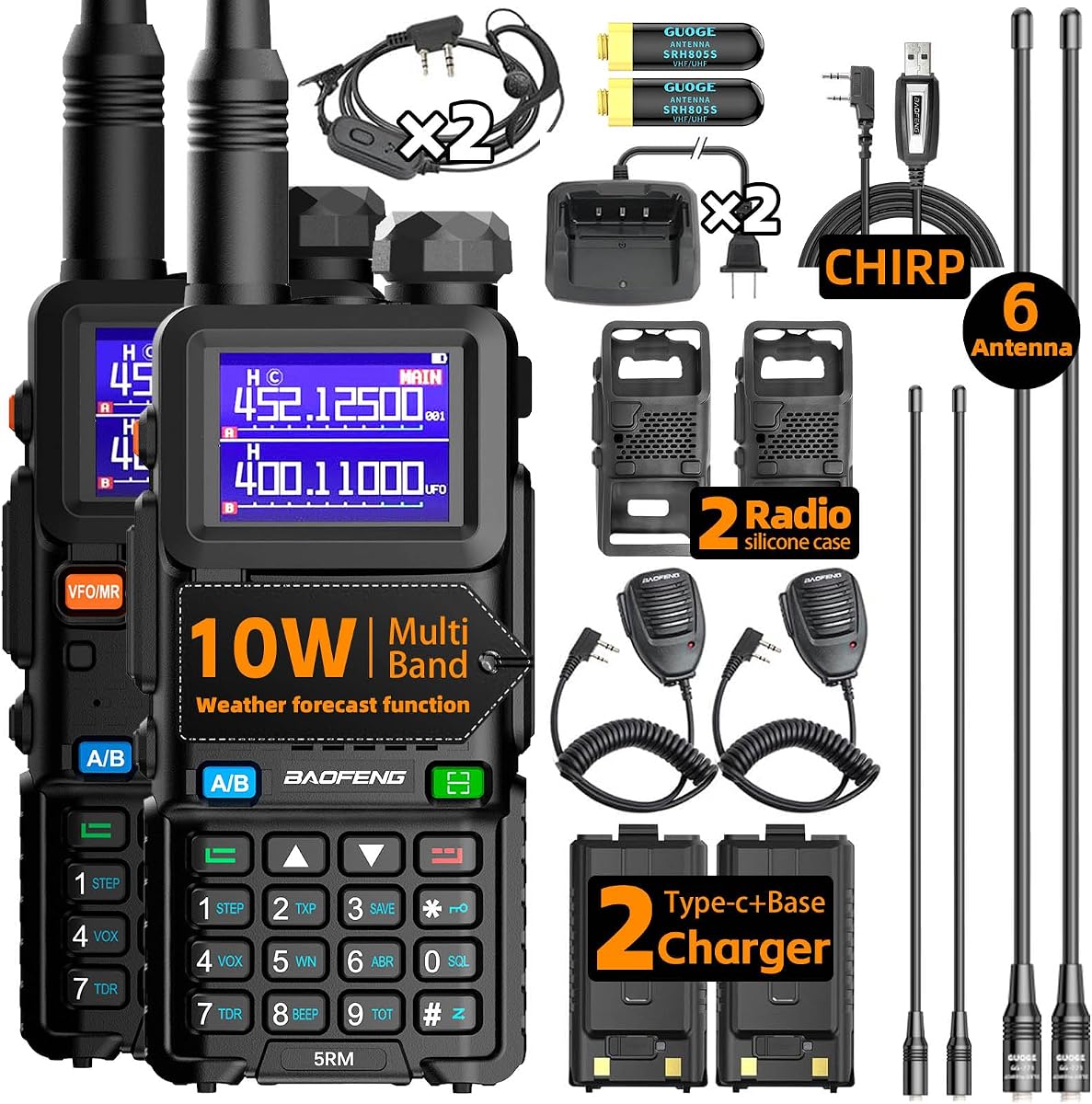
This two-pack of Baofeng radios provides excellent value for operators needing multiple units for team communication. The upgraded 10W power offers better range than standard handhelds. It pairs well with laptops for programming and logging in a home base setup.
We may earn a commission when you buy through this link, at no additional cost to you.
The included programming cable makes initial setup easier without buying extra tools. The 999 memory channels allow storing many frequencies for quick access. The weather receiver adds a safety layer during storms. Two units allow for team coordination.
The device is a handheld not a computer so it serves as an accessory. Basic audio can be noisy in high-interference areas. These limitations are minor given the price and utility. It is a solid addition to any gear kit.
We recommend this pack for group operators or families wanting backup comms. It is an affordable way to ensure multiple team members have reliable handheld tools for coordination.
Having two radios allows for direct communication between team members reducing reliance on mobile phones during critical events.
The included programming cable saves time and money allowing quick frequency loading without extra accessories.
We may earn a commission when you buy through this link, at no additional cost to you.
This sticker pack adds personality to your laptop or radio gear. While not functional it helps identify equipment and celebrate the ham radio hobby. It is a great addition for operators who like to show their pride on their equipment.
We may earn a commission when you buy through this link, at no additional cost to you.
The stickers are waterproof and UV resistant ensuring they last in outdoor conditions. Designs include humor like When all else fails ham radio works which resonates with operators. It is a low-cost way to personalize expensive gear.
These are decorative items only and do not improve performance. Adhesive may wear over time on textured surfaces. These limitations are expected for stickers. They remain a fun way to decorate.
We recommend this as a gift for hobbyists or to mark your laptop. It helps identify your gear quickly at clubs or events.
Adding stickers helps you identify your equipment quickly in crowded field environments or group events.
The humorous designs celebrate the unique culture and humor of the ham radio community.
We may earn a commission when you buy through this link, at no additional cost to you.
The HP 17 inch Business Laptop rounds out our list as a reliable workhorse for those who need consistent performance. It matches similar specs to other business models but stands out for its screen size. It is designed for productivity which aligns well with station logging.
We may earn a commission when you buy through this link, at no additional cost to you.
Its large screen helps with multitasking while operating. The numeric keypad is a useful feature for data entry. Battery life ensures you can operate for several hours without a charger. Business reliability means fewer crashes.
It lacks the ruggedness of dedicated field units. The price is higher than basic consumer models. These factors are acceptable if you prioritize reliability and screen size over durability.
We recommend this for users who operate mostly from fixed locations. It provides a stable platform for running multiple applications simultaneously.
The business design ensures stable performance during long logging sessions without unnecessary interruptions.
The numeric keypad allows quick entry of coordinates and frequencies speeding up logging.
We may earn a commission when you buy through this link, at no additional cost to you.
Selecting the right laptop for ham radio operations requires balancing durability, connectivity, and performance to meet the specific needs of your operating style.
Ham radio operators often work in outdoor or mobile environments where laptops face dust, moisture, and physical impact. Look for devices certified to MIL-STD standards which ensure they can withstand drops and extreme temperatures. A rugged chassis is essential if you operate from field locations or vehicles regularly.
Prioritize laptops with protective port covers and solid hinges to prevent failure during travel. A durable build ensures your equipment remains functional when you need it most in emergency scenarios.
Connecting to radios often requires specific ports like serial RS-232 interfaces or USB-A for dongles. Ensure the laptop has enough physical ports to connect your radio and GPS without needing multiple hubs. USB-C is useful but verify compatibility with your legacy devices.
A laptop with diverse port options saves you from carrying extra adapters that can be lost or damaged. Check the spec sheet for Ethernet or serial ports if your radio setup requires direct connections.
Operating in the field means you may not have access to wall outlets for hours. A battery that lasts at least 8 hours ensures you can run logging software and maintain radio connections throughout the day. Look for fast charging capabilities to quickly top up power.
Consider models with hot-swappable battery options if you need uninterrupted power. Long battery life is critical for emergency communications when external power sources are unavailable.
Running multiple applications such as mapping software, digital mode decoders, and logging tools requires a capable processor. Aim for at least 16GB of RAM and a modern multi-core CPU to prevent slowdowns. Digital modes like FT8 demand significant CPU resources.
Higher memory capacity allows you to keep browser tabs and other tools open while operating. A strong processor ensures smooth performance even during complex signal processing tasks.
Reading logs and frequency charts requires a clear display that is visible in various lighting conditions. Anti-glare coatings are beneficial for outdoor use to reduce reflections from the sun. A 15-inch or larger screen provides better workspace for multitasking.
High resolution helps in reading small text without eye strain. Ensure brightness is sufficient for outdoor visibility so you can see the screen clearly in daylight.
Most ham radio software runs on Windows which offers the widest support for digital modes and logging programs. Ensure the laptop runs a supported version of Windows to install necessary drivers and tools. Linux is an option for some users but may require more setup.
Having a familiar operating system reduces the learning curve and setup time. Stick to mainstream OS options to guarantee compatibility with your existing software tools.
Built-in 4G or LTE modems allow you to stay connected to the internet even when Wi-Fi is unavailable. This is vital for uploading logs or accessing emergency networks from remote areas. Cellular data ensures you can share information effectively during disasters.
Verify that the laptop supports the network bands used in your region. A reliable connection option keeps you accessible when traditional infrastructure is compromised.
Rugged laptops are expensive but may not be necessary for all users. Determine if you truly need military-grade durability or if a standard business laptop with a protective case will suffice. Renewed models offer enterprise quality at a lower cost.
Balance your needs with your budget to find a device that provides the best value. Investing in a reliable machine saves money in the long run by reducing the need for replacements.
To maximize the lifespan of your laptop in field conditions, keep it in a padded case when not in use. Avoid exposing the device to extreme heat or cold for extended periods as this can damage internal components and reduce battery life.
Clean ports regularly using compressed air to remove dust and debris. Ensure all covers are sealed tightly before moving the laptop to prevent moisture or dirt from entering the sensitive connectors inside.
Update your software and drivers regularly to maintain security and performance. For radio operations, ensure your logging software and radio control drivers are configured to start automatically for quick access during emergencies.
A rugged laptop is highly recommended if you operate in outdoor or mobile environments where exposure to dust and drops is common. However if you mainly operate from a fixed station a standard business laptop may suffice. Assess your specific operating conditions before purchasing.
Most modern radios use USB connections which work with any laptop having USB ports. Older radios may require serial ports which are rare on new models so you might need adapters. Check your radio's interface requirements before choosing a device.
Digital modes like FT8 and FT4 require significant memory for decoding signals. We recommend at least 16GB of RAM to ensure smooth operation when running multiple applications simultaneously. More memory helps prevent lag during peak activity times.
Renewed laptops often offer high-quality enterprise hardware at a lower cost. They undergo testing and refurbishment to ensure full functionality. For emergency preparedness choosing a renewed unit from a reputable seller with a warranty is a reliable option.
Battery life is crucial for portable operations where you may be away from power sources for hours. Aim for a minimum of 8 hours to cover a full operating session. Consider models with replaceable batteries for extended use.
Windows is the most widely supported operating system for ham radio software including logging and digital modes. Linux can work for advanced users but may require configuration. Stick with Windows for ease of use and driver availability.
We have reviewed ten top options ranging from rugged industrial laptops to budget-friendly business models. The Panasonic Toughbook FZ-55 MK1 stands out for durability and connectivity while the Dell Latitude 5414 offers excellent value for legacy support.
When selecting a device prioritize build quality and connectivity options that match your operating environment. Ensure the laptop has enough ports and battery life to support your specific radio setup and logging needs effectively.
Remember to verify current pricing and availability before making a purchase as these factors can change frequently. Investing in the right hardware ensures you are always ready to communicate effectively when it matters most.