KDD 4-Slot Vertical Stand
4.6Editor score
Gravity locking design for secure hold
Six-in-one storage for various devices
Non-slip pads on base and slots
Finding the right laptop rack for multiple laptops is essential for modern workspaces. A good rack organizes devices, improves airflow, and saves valuable desk space while protecting your expensive hardware.
We compared ten top-rated vertical stands and charging stations based on capacity, material quality, adjustability, and user feedback. Each option serves different needs from home offices to busy classrooms.
Every pick here shows key strengths and weaknesses to help you decide. Prices fluctuate often so check current listings before buying to ensure you get the best value for your setup.
4.6Editor score

4.6Editor score

4.2Editor score
As an Amazon Associate we earn from qualifying purchases.
This side-by-side comparison highlights key specifications and features across all ten selected laptop racks to help you identify the best fit for your specific device count and workspace constraints.


The Ryvlan Vertical Laptop Stand ranks as our top choice for its versatile three-slot design. With a high rating and solid construction, it organizes laptops and tablets without cluttering your desk.
We may earn a commission when you buy through this link, at no additional cost to you.
This stand features adjustable width slots ranging from 0.47 inches to 1.2 inches allowing you to snugly fit both thin notebooks and thick gaming machines. The molded ABS body includes silicone padding on all walls and bases which protects devices from scratches and prevents sliding.
While the ABS construction is durable it does not offer the premium feel of aluminum. You also need a wrench included in the box to adjust slot widths which adds a minor step to setup but ensures stability.
It is ideal for home offices or classrooms needing a single stand to clear multiple devices. Its minimalist black finish complements most workspaces making it a practical and efficient storage solution for mixed tech setups.
Each slot adjusts individually so different laptops fit securely without wobbling which protects your devices and keeps them stable.
Measuring roughly 7.3 by 5.9 inches this stand fits small desks while holding multiple laptops and tablets vertically.
We may earn a commission when you buy through this link, at no additional cost to you.
This premium aluminum stand offers an industry-leading ten-slot capacity for those with large device fleets. Its solid build and cooling benefits make it a strong option for professional environments needing reliable vertical storage.
We may earn a commission when you buy through this link, at no additional cost to you.
Crafted from scratch-resistant aluminum alloy the stand provides superior cooling through passive thermal convection. The open-side design allows unobstructed access to charging ports while base screws let you stabilize dividers for a firm grip without tools.
The main trade-off is the higher cost compared to plastic alternatives. It also occupies more desk space which may be tight for smaller desks though the density of storage often justifies the area it uses.
Buy this if you need to dock an entire tech ecosystem including gaming laptops up to 17.3 inches. It delivers a professional look and stable storage that exceeds plastic options in durability and airflow.
The vertical design uses passive thermal convection to effectively solve heat dissipation issues compared to laying devices flat.
With ten slots it provides the industry-leading capacity to dock your entire tech ecosystem efficiently.
We may earn a commission when you buy through this link, at no additional cost to you.
This aluminum stand bridges the gap between premium quality and moderate capacity with its five-slot design. It is ideal for users who want the durability of metal without the high cost of larger 10-slot models.
We may earn a commission when you buy through this link, at no additional cost to you.
The stand features three sliding brackets adjustable for up to four different laptops with thicknesses from 12mm to 38mm. The closed design protects devices from spills and offers better cooling while the heavy base ensures no tipping during use.
While the aluminum is robust the closed nature of the slots means less access to ports compared to open designs. You also use screws on the bottom to adjust which is secure but slightly less convenient than twist knobs.
Choose this for its patent pending multifunctional design that organizes devices securely. It fits perfectly for clamshell setups and provides a durable alternative to plastic organizers for mixed thickness laptops.
The closed stand is crafted from solid aluminum alloy with a heavy and stable base that prevents tipping.
The vertical design saves desk space and protects devices from accidental spills while ensuring better cooling.
We may earn a commission when you buy through this link, at no additional cost to you.
This bamboo organizer brings a natural and elegant aesthetic to any workspace. With six removable slots it offers flexible storage for electronic devices while also functioning as a mail organizer for a comprehensive solution.
We may earn a commission when you buy through this link, at no additional cost to you.
Built from sturdy natural bamboo the organizer features non-slip rubber feet to protect desktops and prevent sliding. Its compact dimensions allow you to minimize space usage while enhancing visual appeal in home offices or expansive workstations.
The bamboo may be more prone to scratches than metal or plastic which could affect longevity with heavy daily use. Adjustments are also less precise due to the material nature compared to screw-based metal stands.
It is perfect for those seeking a vertical stand that matches warm wood decor. Use it to keep daily tech necessities like smartphones and laptops at hand in a tidy and organized way.
This wooden file organizer doubles as a wood mail organizer for magazines and letters beyond just electronic devices.
The natural wood color elegantly complements any desktop enhancing visual appeal while saving space.
We may earn a commission when you buy through this link, at no additional cost to you.
This charging station simplifies power and storage for classrooms and offices needing organized multi-device management. With built-in AC outlets and USB ports it solves the common issue of tangled cords and lack of power sources.
We may earn a commission when you buy through this link, at no additional cost to you.
The open rack design allows quick insertion and removal of laptops and tablets without cabinet doors. Integrated cable routing helps reduce clutter while the surge-protected power strip rated for 110V supports safer everyday charging for shared environments.
Because it includes power the unit is heavier and bulkier than simple storage racks. You may not want to move it frequently once set up on a counter or desk due to the power cord requirements.
Ideal for teacher workstations and libraries this device keeps tech ready to go. It is the top pick if you need reliable power alongside storage for your entire classroom or office device fleet.
The integrated charging system includes 6 AC outlets and 4 USB ports for various electronic devices.
It includes a pre-installed surge-protected power strip rated for 110V to support safer everyday charging.
We may earn a commission when you buy through this link, at no additional cost to you.
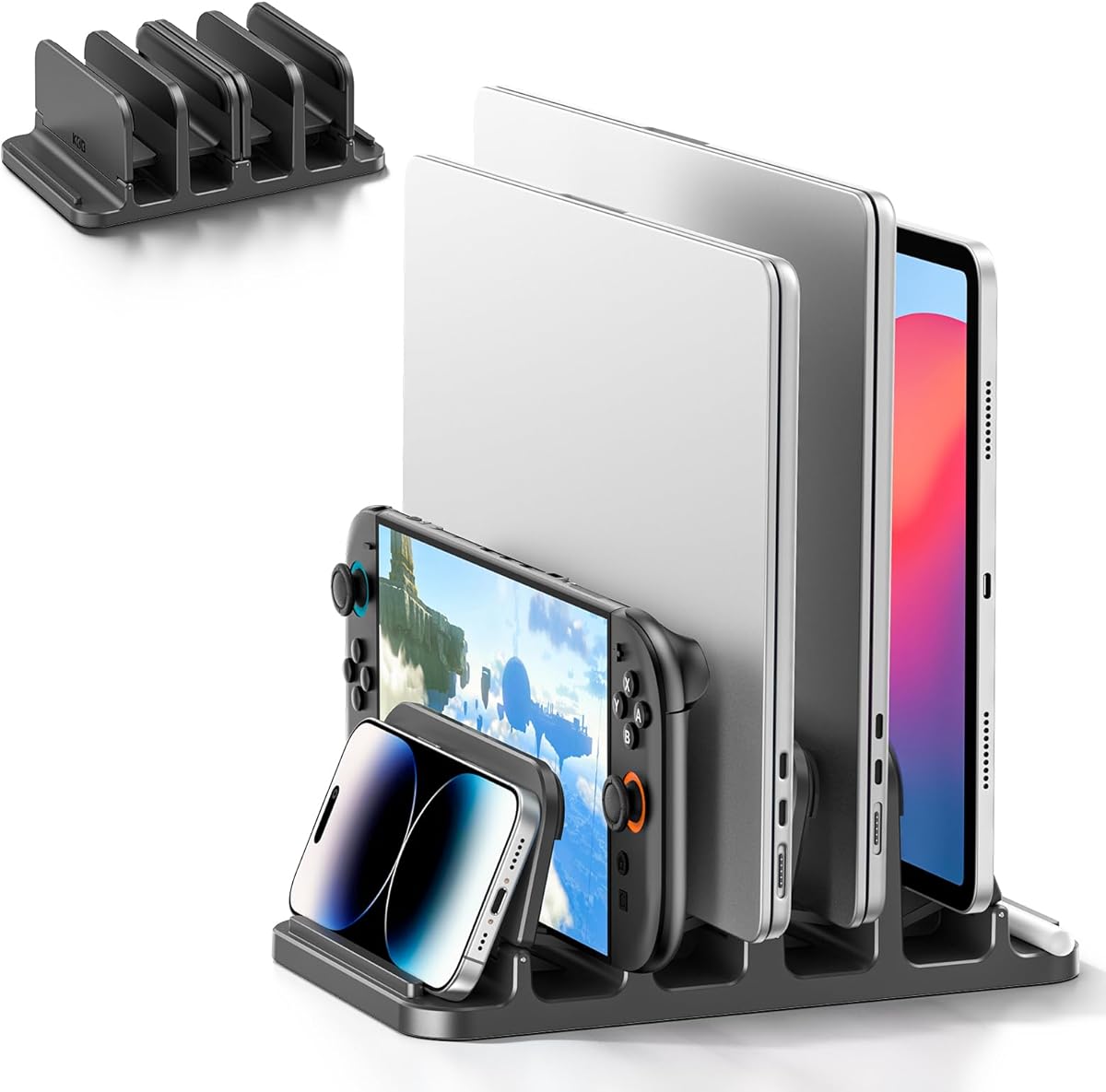
This stand offers excellent value with its six-in-one design that organizes laptops and gaming consoles. Its affordability and gravity locking mechanism make it a top choice for students and home offices on a budget.
We may earn a commission when you buy through this link, at no additional cost to you.
The gravity mechanism automatically locks devices into position without additional clamps ensuring steady storage. Silicone pads on both base and slots provide a secure grip preventing sliding on desktops while maintaining a neat working environment.
The plastic material is less robust than aluminum options which may limit long-term durability with heavy use. You must ensure your devices fit the width range properly for the gravity lock to work as intended.
Choose this for its universal compatibility with thicknesses from 0 to 1.1 inches. It delivers a convenient and reliable storage solution for mixed devices at an accessible price point.
Simply place your device into the stand and the gravity mechanism will automatically lock it into position.
The vertical layout design allows you to organize and store equipment upright maximizing desktop space.
We may earn a commission when you buy through this link, at no additional cost to you.
This portable holder stands out for its premium brushed and CNC-machined anodized aluminum alloy construction. It offers five slots for different devices and a sleek look that matches Apple and Microsoft hardware aesthetics perfectly.
We may earn a commission when you buy through this link, at no additional cost to you.
The vertical design increases airflow to let devices cool down easily preventing overheating. You can adjust the width of slots including the middle one using the included hex key to match devices from the smallest to 17.3 inch laptops.
The solid aluminum base combined with silicone pads keeps electronics safe and upright. While the build quality is high it costs more than plastic stands which may deter budget-conscious buyers.
Buy this for a tidy and organized desk space that looks professional. It is the perfect gift for professionals and students needing a high-quality and stable storage solution for multiple devices.
The vertical design of the aluminum laptop storage increases airflow to your devices letting them cool down easily.
Non-slip silicone pads protect devices from scratches and keep the stand in place on your desk.
We may earn a commission when you buy through this link, at no additional cost to you.
This charging station is designed for businesses needing organized charging for laptops and Chromebooks. It allows you to unbox and use it immediately with no assembly required making it ideal for quick setup in offices.
We may earn a commission when you buy through this link, at no additional cost to you.
The wide-angle slots are designed to accommodate laptops and tablets with cases up to 14 inches and 1.4 inches thick. High-quality materials ensure long-lasting performance in high-demand environments with built-in surge protection for safety.
While it holds eight devices its capacity is less than the 10-slot options so plan accordingly. You must place it near an outlet since it needs power to function which can limit desk placement options.
Ideal for schools and businesses it keeps devices neatly arranged and easily accessible. Use this if you need a reliable store and charge rack that is safe and properly manufactured for shared spaces.
No assembly needed means you can unbox this multiple laptop holder and use it immediately.
Built with high-quality materials ensuring long-lasting performance for daily use in high-demand environments.
We may earn a commission when you buy through this link, at no additional cost to you.
This steel rack stands out for its robust long-lasting durability and two-tier design for high-capacity needs. It allows you to charge multiple devices including laptops and tablets while keeping the desk clear.
We may earn a commission when you buy through this link, at no additional cost to you.
Equipped with universal wheels two with brakes it lets you move and lock the rack in desired areas easily. The open design facilitates rapid access and unrestricted air circulation to maintain device coolness during charging.
Because it stands on the floor it occupies different real estate than a desk stand which might not suit all room layouts. You must ensure the height matches your needs since it is not adjustable for seating height.
Buy this for schools needing high-density charging on the floor. It delivers a robust solution that withstands wear and deformation guaranteeing long-lasting durability for daily student use.
Equipped with four universal wheels two with brakes this product lets you easily move and lock it.
The open design allows unrestricted air circulation to maintain device coolness during the charging process.
We may earn a commission when you buy through this link, at no additional cost to you.
This organizer offers efficient storage without taking up excessive desktop space making it ideal for conference rooms and home workspaces. It features five dedicated slots that neatly store devices to keep your workspace clutter-free.
We may earn a commission when you buy through this link, at no additional cost to you.
Crafted from high-quality bamboo it provides a secure and stable platform for your valuable devices. The four integrated rubber feet prevent sliding and protect your surfaces from scratches which preserves both the unit and your desk.
A note is that devices with thick cases may not fit within the 1-inch slot gaps due to fixed spacing. If your laptops have bulky cases you may need to remove them or choose a stand with wider slots.
Choose this if you need a tidy environment and high user ratings. It is perfect for various settings like classrooms and offices where devices need to be organized and easily accessible.
Measuring 10 by 6.5 by 7 inches this organizer offers efficient storage without taking up excessive desktop space.
The four integrated rubber feet prevent sliding and protect your surfaces from scratches.
We may earn a commission when you buy through this link, at no additional cost to you.
Selecting the right rack depends on your device count space and environment needs. Understanding key factors will help you avoid clutter and ensure your devices stay safe and cool.
Consider how many devices you need to store at once. Most stands hold between three and ten slots so match the rack to your current tech ecosystem and future growth.
Select a capacity that accommodates all your devices plus any tablets or accessories you use daily.
Metal options like aluminum offer better cooling and durability than plastic or bamboo. Plastic stands are lighter and cheaper while bamboo provides a natural look for home decor.
Choose metal for offices needing long-term use and bamboo for home spaces focused on aesthetics.
Adjustable slots are crucial for mixed device thicknesses. Look for models that allow you to widen or narrow slots so both thin ultrabooks and thick gaming laptops fit securely.
Ensure the rack supports devices from 12mm to 38mm or more to avoid wobbling.
A weighted base and non-slip pads prevent tipping or sliding. Heavier materials like aluminum or steel provide more stability than lighter plastics.
Check for rubber feet and heavy bases to keep your rack secure on smooth surfaces.
Vertical racks generally improve airflow compared to flat storage. Some premium models use passive thermal convection to dissipate heat more effectively.
Prioritize stands with open designs that allow air circulation to prevent overheating during charging.
Open-side designs let you access charging ports without removing the device. Closed designs protect from spills but may restrict cable management.
Consider your workflow to decide if port accessibility or spill protection is more important.
Some racks include built-in power strips with AC and USB ports. This simplifies charging but adds bulk and requires outlet access.
Choose powered stations for classrooms and basic stands for personal desks to save space.
Lightweight stands are easy to move between rooms while floor racks with wheels suit large shared spaces. Consider where you will store the rack when not in use.
If you need to move the rack often look for handles or lightweight materials.
To set up your rack place it on a stable flat surface and adjust the slots to match your device thicknesses. Insert each device gently until it locks or rests securely to ensure stability.
Clean the stand regularly with a damp cloth to remove dust and debris. Avoid harsh chemicals that might damage the surface or protective padding on the slots.
Avoid overloading the rack beyond its rated capacity to prevent tipping. If using a powered station ensure the power strip is not covered and has adequate ventilation to prevent overheating.
Yes most racks are designed with adjustable slots that can accommodate laptops with protective cases. Just ensure the total width falls within the adjustable range of the stand you choose.
Many of the listed racks have dedicated smaller slots or wide enough spaces to fit tablets and phones alongside laptops. Check the specific slot dimensions before purchasing.
When used correctly and stored vertically with soft padding the rack will not damage your screen. Ensure the device is fully supported to avoid pressure on the display area.
Most of these racks are ready to use out of the box with minimal to no assembly. Some models may require tightening a few screws for adjustment but no tools are usually included.
Aluminum is the best material for cooling as it conducts heat away from devices. Vertical design also aids airflow making metal stands more efficient than plastic ones.
Yes many models support gaming laptops up to 17.3 inches and handle their weight. Ensure the stand has enough slots and stability for thicker gaming units.
Powered charging stations allow you to charge devices while stored. Standard racks do not include power so you will need separate power sources for charging.
Look for racks with rubber feet and weighted bases to prevent sliding. Ensure the surface you place it on is clean and dry for maximum stability.
The Ryvlan Vertical Laptop Stand and Elestoria Aluminum racks offer top performance for different needs. These options provide excellent storage and organization for both home and office environments.
Prioritize capacity and adjustability to ensure your rack grows with your tech needs. Metal stands provide durability while bamboo offers a unique aesthetic for personal spaces.
Remember to check current prices and availability before making your purchase. Small price differences can impact your overall value so comparison shop to find the best deal.