
AJAZZ AK029 Magnetic Switch One Handed Gaming Keyboard
4.5Editor score
Hall Effect switches
8KHz polling rate
Compact 29 key layout
This guide compares the top left handed gaming keyboards for 2026 focusing on ergonomics and performance for left-handed gamers seeking comfort.
Left handed gamers need specialized hardware to reduce strain and improve accuracy. Finding the right device ensures your hand stays comfortable during long sessions without sacrificing performance or control.
We evaluated ten top rated models based on build quality, connectivity options, and ergonomic design. Our analysis covers everything from budget friendly keypads to high end mechanical solutions.
Each pick highlights unique features like magnetic switches and custom layouts to help you choose wisely. Prices and availability can change so verify details before making your final purchase decision.
4.5Editor score

4.6Editor score

4.6Editor score
This side by side comparison highlights key specifications for every model listed to help you decide which device fits your specific gaming or typing needs best.


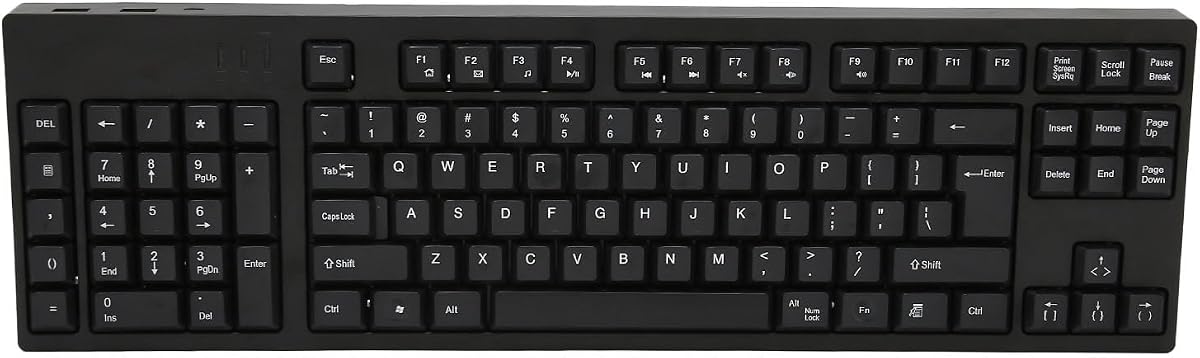
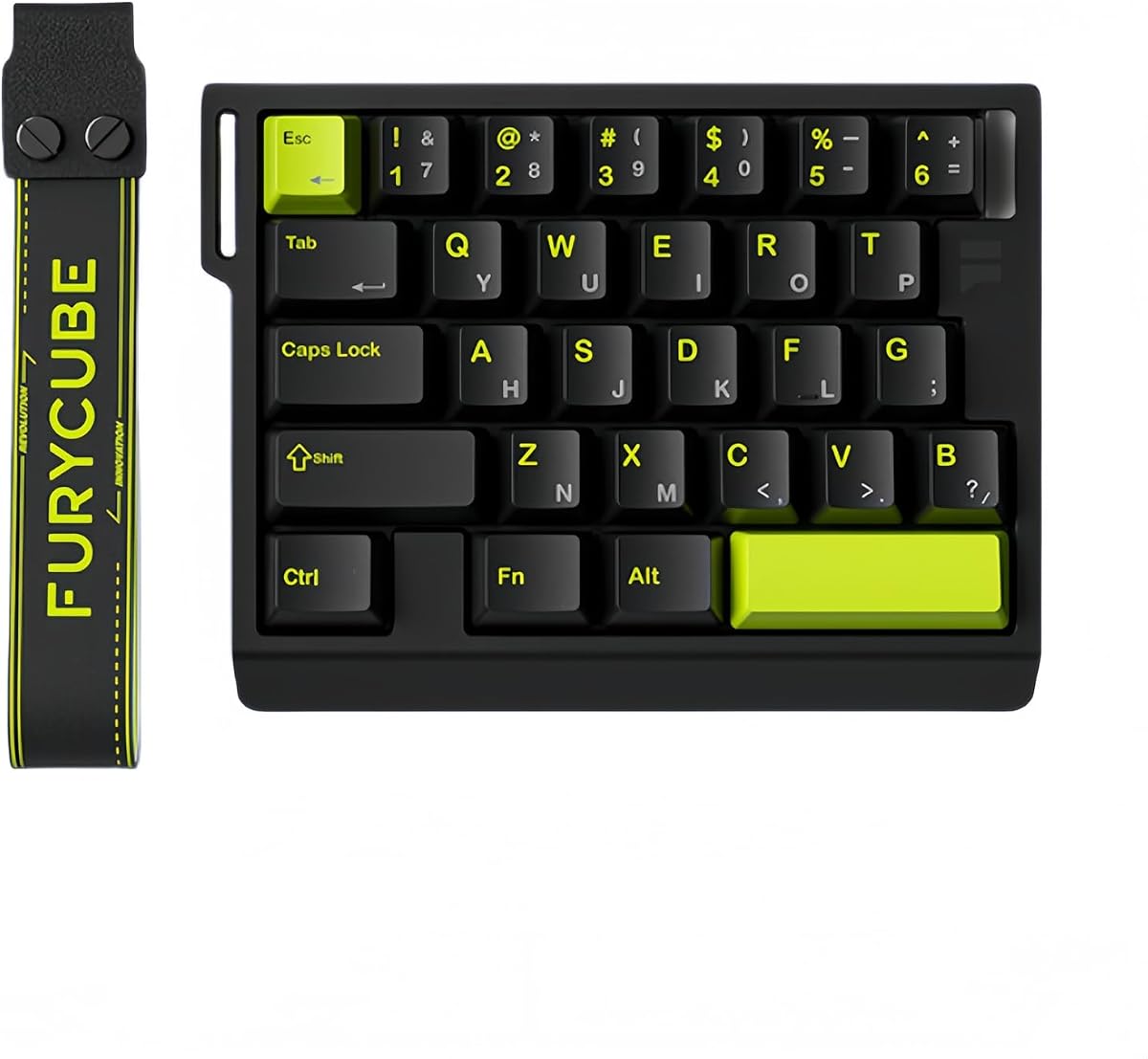

This keyboard offers a rare left handed layout with southpaw numpad support and excellent build quality. It holds a high rating for comfort and versatility making it ideal for long sessions.
We may earn a commission when you buy through this link, at no additional cost to you.
The gasket structure provides a soft typing feel while the five layer sound dampening ensures quiet operation. You can switch between Bluetooth 2.4GHz and wired modes effortlessly.
While it is bulkier than mini keypads the battery life and mechanical features justify the size. The hot swappable design allows easy customization of switches without soldering.
It suits left handed gamers who need a full keyboard experience with ergonomic advantages. We recommend it for those wanting comfort without sacrificing typing performance.
Relocating the numpad frees up space on the right for mouse movement and improves comfort.
The gasket mounted structure and PBT keycaps deliver a durable and smooth typing feel.
We may earn a commission when you buy through this link, at no additional cost to you.
The AJAZZ AK029 delivers high end magnetic switch tech at a budget price. It features rapid trigger technology that resets keys instantly for faster movement in competitive games.
We may earn a commission when you buy through this link, at no additional cost to you.
With an 8KHz polling rate and zero latency design this keypad ensures your inputs register without delay. The aluminum build and acoustic layers provide a stable and quiet feel.
Its compact 29 key layout saves desk space allowing more room for mouse flicks. However it lacks wireless connectivity which might limit portability for some users.
This is a great pick for FPS gamers needing speed without spending much. We suggest it for those prioritizing performance and value over extra features.
Magnetic switches allow instant resets enabling smoother strafing and quicker double taps.
The 29 key design minimizes footprint while keeping essential gaming controls accessible.
We may earn a commission when you buy through this link, at no additional cost to you.
The AZERON Keyzen stands out with its analog thumbstick and full key mappability. It is built for users who demand total control over their gaming inputs and ergonomics.
We may earn a commission when you buy through this link, at no additional cost to you.
Its 3D printed body and modular components allow you to replace parts easily. The Hall Effect joystick offers drift free analog movement that is rare in this category.
While the price is high the build quality and flexibility justify the investment. You can store multiple layouts onboard so switching setups is quick and easy.
This device is ideal for hardcore gamers or streamers who need deep customization. We recommend it if budget is secondary to performance and flexibility.
The 360 Hall Effect joystick provides precise analog control for movement in compatible games.
Replaceable parts and 3D printing make repairs and upgrades simple without tools.
We may earn a commission when you buy through this link, at no additional cost to you.
This compact keypad is a budget friendly option for left handed gaming tasks. It features 35 keys with anti ghosting and RGB lighting to keep your setup lively.
We may earn a commission when you buy through this link, at no additional cost to you.
Macro recording keys let you execute complex commands with a single press which is useful for MMOs. The ergonomic design and wrist rest help maintain comfort during play.
It lacks mechanical switches and advanced connectivity but performs well for casual use. The plug and play nature means no drivers are needed to start using it.
Ideal for students or travelers needing a simple backup device. We suggest it for users wanting basic functionality without breaking the bank.
Two sets of macro keys allow you to record and replay sequences for efficiency.
Its small size makes it easy to carry and store in a laptop bag.
We may earn a commission when you buy through this link, at no additional cost to you.
The Azeron Cyborg II replaces the keyboard for left hand use while keeping the mouse on the right. It features a Hall Effect thumbstick for analog movement and directional mapping.
We may earn a commission when you buy through this link, at no additional cost to you.
Its 3D printed build and adjustable parts ensure it fits your hand comfortably. The software allows deep customization including RGB lighting and diagonal keybinds for precision.
This device is complex to set up compared to standard keyboards but offers unique advantages. The analog stick can even function as a mouse in certain scenarios.
Best for gamers wanting a completely different control scheme. We recommend it for those willing to invest time in learning a new setup.
The analog stick supports WASD or 360 movement allowing for nuanced control.
Adjustable parts ensure a perfect fit for hand sizes ranging from 6.3 to 7.5 inches.
We may earn a commission when you buy through this link, at no additional cost to you.
This keyboard is designed specifically for left handed users needing ergonomic relief. It features a patented key shape to reduce strain and improve posture during long work hours.
We may earn a commission when you buy through this link, at no additional cost to you.
Eight multimedia hotkeys and a numeric keypad on the left help boost productivity. The design allows you to keep your right hand free for mouse usage or drawing.
While not built for gaming it offers great value for accounting or business tasks. Compatibility with older systems via PS2 adds to its versatility for niche needs.
It suits professionals seeking comfort over speed. We recommend it for office workers prioritizing health and efficiency.
The natural_A shape reduces shoulder and back strain by optimizing hand position.
Eight hotkeys provide quick access to functions without leaving your workspace.
We may earn a commission when you buy through this link, at no additional cost to you.
The Keychron C0 HE offers advanced magnetic switches with a browser based configurator. It supports rapid trigger and high polling rates for competitive gaming performance.
We may earn a commission when you buy through this link, at no additional cost to you.
It works seamlessly on both Windows and macOS without needing to install extra drivers. The 35 key layout keeps essential commands accessible while saving desk space.
The lack of dedicated software might limit advanced users but simplifies setup for others. The RGB lighting and magnetic tech provide a modern feel at a reasonable cost.
Perfect for users switching between operating systems frequently. We suggest it for those wanting easy configuration and reliable hardware.
No software installation is required to customize keys and lighting via the browser.
An 8K polling rate ensures near zero latency for quick competitive inputs.
We may earn a commission when you buy through this link, at no additional cost to you.
This device offers a full 109 key layout designed for left handed business users. It includes extra USB ports which help connect peripherals easily without a hub.
We may earn a commission when you buy through this link, at no additional cost to you.
The ergonomic layout and durable ABS material ensure reliable typing comfort. Plug and play functionality makes it ready to use straight out of the box.
While it uses Micro USB instead of USB C it remains a sturdy choice for office needs. The high rating suggests users appreciate its straightforward design and build.
Best for left handers who need a complete typing solution. We recommend it for office environments requiring durability and connectivity.
Two additional USB interfaces let you connect peripherals directly to the keyboard.
All standard keys are available so no learning curve is needed for typing.
We may earn a commission when you buy through this link, at no additional cost to you.
The FKZ M30HE offers adjustable actuation points and rapid trigger for competitive play. It supports full segment sensitivity adjustments allowing you to tailor each key to your style.
We may earn a commission when you buy through this link, at no additional cost to you.
Dynamic keystrokes let one key bind four operations which enhances movement capabilities. The RGB lighting and hot swap design add flexibility for customization enthusiasts.
It is a solid mid range option but may lack the polish of top tier models. The 30 key layout keeps it compact but limits use to gaming or specific tasks.
Good for users wanting adjustable actuation at a reasonable price. We suggest it for gamers focusing on speed and customization.
Adjustable actuation points let you fine tune triggers from 0.1 to 3.4 mm.
Hot swap support lets you change switches without soldering to personalize feel.
We may earn a commission when you buy through this link, at no additional cost to you.
The A4tech model provides an ergonomic layout aimed at reducing strain for left handers. It features multimedia keys and a shape designed to improve posture during long use.
We may earn a commission when you buy through this link, at no additional cost to you.
This keyboard is built for office productivity rather than gaming. Its simple USB connection and hotkeys help streamline tasks without complex software or drivers.
While it lacks advanced gaming features it delivers reliable performance for daily work. The affordable price makes it accessible for those needing ergonomic support on a budget.
Ideal for budget conscious professionals needing ergonomic relief. We recommend it for basic office tasks and data entry.
The patented natural shape reduces shoulder and back strain while typing.
Eight hotkeys offer quick access to media and system functions without delays.
We may earn a commission when you buy through this link, at no additional cost to you.
Selecting the right device involves balancing ergonomics, performance, and your specific usage scenarios.
Decide if you need a full keyboard with a moved numpad or a mini keypad for gaming. Full layouts suit office work while mini keypads free up desk space.
Choose a layout that matches your primary tasks to maximize comfort and efficiency.
Mechanical switches offer durability and tactile feedback ideal for gaming. Magnetic switches provide adjustable actuation for competitive edge.
Select switch types based on whether you prefer clicky tactile or linear quiet responses.
Wireless options reduce cable clutter but wired connections ensure stable latency. Consider your workspace setup and whether mobility matters for your routine.
Prioritize wired if latency is critical or wireless if convenience is your main goal.
Macros and custom keymaps allow you to automate complex actions. Check for onboard storage so settings remain when switching computers.
Look for software or web based tools that allow easy reconfiguration of keys.
Materials like aluminum or 3D printed frames enhance durability and feel. A sturdy base prevents movement during intense gameplay.
Invest in robust construction to ensure long term reliability and comfort.
Adjustable angles and wrist rests help prevent fatigue and injury. Proper positioning aligns your hand to reduce strain over time.
Ensure the device supports your hand size and preferred sitting posture.
High polling rates like 8KHz reduce input lag significantly for competitive games. This ensures every keystroke registers instantly on screen.
Choose higher rates if you play fast paced titles where split seconds matter.
Prices vary widely from budget mini keypads to premium customizable devices. Determine your needs to avoid overspending on features you won't use.
Balance cost with performance to find the best value for your setup.
Position the keyboard so your dominant hand rests naturally with elbows at 90 degrees to prevent strain.
Use the software to map keys and adjust settings based on your preferred play style or workflow.
Keep the device clean by gently wiping it with a dry cloth to avoid dust buildup and extend its life.
Yes they reduce wrist strain and improve accuracy for left handed users. The ergonomic design helps prevent fatigue during long sessions making them a valuable addition for gamers.
Most can adapt to them especially models with standard layouts. However they are optimized for left hand use so right handed users might find them less intuitive.
They allow adjustable actuation and rapid trigger for faster key resets. This technology offers precision and speed ideal for competitive gaming performance.
Many models like Keychron support both systems natively. Always check compatibility details to ensure proper function with your operating system.
Use the provided software or web configurator to remap keys. Some units allow saving layouts directly onboard for instant switching.
Ergonomic designs aim to minimize strain which may help reduce symptoms. Maintaining proper posture is also essential for preventing repetitive stress injuries.
We highlighted ten top models ranging from budget mini keypads to premium mechanical layouts for every need.
Prioritize ergonomics and performance features like magnetic switches if gaming is your main focus.
Check current pricing and stock before buying since availability changes frequently on retailer sites.