
Linksys AC1900 Gigabit Range Extender
4.0Editor score
Certified refurbished product
Works with all Wi-Fi routers
Simple setup with push button
Compare the top Linksys WiFi Extender models to find the best range booster for your home network needs and coverage requirements in 2026.
Finding the right wireless booster can transform your home network by eliminating dead zones and improving signal strength throughout every room. Modern extenders support the latest standards for better performance.
This guide compares ten top-rated Linksys models and select alternatives based on their specifications and user feedback. We evaluated coverage area and speed capabilities to help you decide.
Each pick highlights key features and performance traits to guide your selection process. Prices and availability change frequently so please verify current details before purchasing your next network device.
4.0Editor score
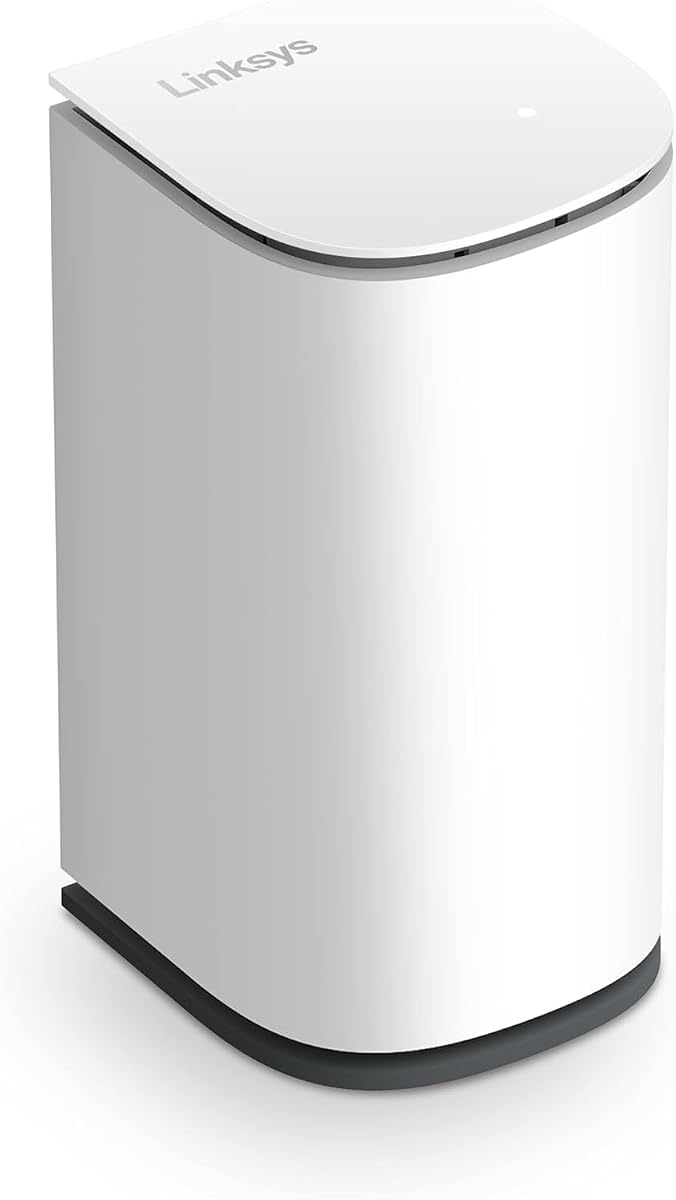
4.1Editor score

3.6Editor score
This side-by-side comparison highlights the key specifications and capabilities of each model to help you choose the right network booster for your specific coverage needs.


This modern range booster aims to bring next-generation connectivity to homes with its WiFi 6 support. It supports speeds up to 1.8Gbps and covers areas up to 2000 square feet. The unit focuses on delivering efficient and worry-free connections for multiple devices.
We may earn a commission when you buy through this link, at no additional cost to you.
Key strengths include Beamforming technology which directs signals to specific devices. This maximizes performance where you need it most. The Access Point Mode allows you to wire the extender directly to your router or switch for a more stable connection in areas with weak wireless signals.
While performance is strong, user reports indicate occasional connectivity quirks. These trade-offs are acceptable given the advanced feature set. The 18-month Amazon exclusive warranty provides additional peace of mind for new buyers.
This model is ideal for users seeking modern WiFi 6 capabilities without a full mesh replacement. It suits those who need extended coverage and faster speeds across larger homes with many connected devices.
Works with any router including those from service providers without modifying settings.
Beamforming technology focuses WiFi signals to your devices for optimal performance.
We may earn a commission when you buy through this link, at no additional cost to you.
This AC1900 gigabit range extender offers significant value for users looking to extend their home network coverage. It delivers speeds suitable for everyday streaming and browsing while covering up to 10000 square feet. The renewed status ensures it has been tested and upgraded by technicians.
We may earn a commission when you buy through this link, at no additional cost to you.
The Spot Finder Technology simplifies finding the optimal placement for peak performance. MU-MIMO support allows multiple users to enjoy multiple devices without lag or buffering. This makes it a strong choice for households with various connected devices needing reliable access.
As a refurbished product it may show limited wear but includes all original accessories. While it supports an older standard than the latest options it remains effective for many setups. The 90-day warranty adds confidence for buyers choosing this cost-effective solution.
Ideal for budget-conscious buyers who need robust coverage without breaking the bank. It works well in homes where cost efficiency and reliable performance are top priorities over having the absolute latest technology.
All Linksys Certified refurbished products are tested and certified by Linksys technicians.
Spot Finder Technology helps find the best spot for optimal performance and placement.
We may earn a commission when you buy through this link, at no additional cost to you.
This add-on node is designed to expand existing Linksys Cognitive Mesh WLAN Router networks seamlessly. It provides an additional 1500 square feet of coverage helping eliminate buffering and dropped connections in hard to reach areas. It supports dual band WiFi 6 for improved connectivity.
We may earn a commission when you buy through this link, at no additional cost to you.
The main advantage lies in its mesh integration which ensures smooth handoffs between nodes. This keeps devices connected as you move throughout your home. It is particularly useful for those who already own a Linksys Velop system and want to extend coverage further.
While it is not a standalone extender it shines as a mesh component. The trade-off is that it only works effectively within a Linksys mesh environment. For existing owners this is a logical and efficient upgrade path to maintain consistent performance.
This pick is best for existing Linksys mesh users wanting to scale their network. It delivers the modern speed and reliability of WiFi 6 in a form factor designed specifically to integrate with your current setup.
Simply add to your existing Linksys Cognitive Mesh WLAN Router for additional coverage.
Supports WiFi 6 for higher speeds and better device handling capability.
We may earn a commission when you buy through this link, at no additional cost to you.
This renewed dual-band WiFi 6 extender brings modern speeds to your existing network. It extends coverage up to 2000 square feet delivering up to 1.8 Gbps in areas your main router cannot reach. It includes a gigabit Ethernet port for wired connections.
We may earn a commission when you buy through this link, at no additional cost to you.
The ability to transmit on 2.4 GHz and 5 GHz simultaneously ensures a strong connection. The included gigabit port allows you to connect wired devices directly for maximum stability. The refurbished status ensures it has been tested to meet performance standards.
As a renewed product it may show minor wear but remains fully functional. While it relies on an older standard compared to newer models it offers solid performance. The 90-day warranty provides coverage for unexpected issues after purchase.
Buyers looking for a balance of modern WiFi 6 features and cost effectiveness will appreciate this option. It suits homes needing reliable extension with optional wired connectivity for stationary devices.
Convenient gigabit Ethernet port offers wired connection to your Wi-Fi network.
Extends coverage up to 2000 sq ft to provide speeds in unreachable areas.
We may earn a commission when you buy through this link, at no additional cost to you.
This AC1200 extender extends home network coverage with full speeds of 867 Mbps on 5 GHz and 300 Mbps on 2.4 GHz. Two adjustable external antennas provide optimal coverage eliminating dead zones for up to 32 devices. It supports EasyMesh for whole-home connectivity.
We may earn a commission when you buy through this link, at no additional cost to you.
Adaptive Path Selection automatically moves you to the strongest signal as you travel. This ensures uninterrupted coverage and optimal performance throughout your home. The fast ethernet port provides wired speed and reliability anywhere you place the device.
While it does not increase internet speed it improves signal reliability for better throughput. Users should note it is not compatible with some mesh systems like Deco. However it offers solid performance for standard router setups needing reliable dead zone elimination.
Ideal for everyday users seeking an affordable and reliable network extension solution. It works well in typical homes needing extra range without complex mesh requirements.
Two adjustable external antennas provide optimal Wi-Fi coverage and reliable connections.
Adaptive Path Selection moves you to the strongest signal automatically.
We may earn a commission when you buy through this link, at no additional cost to you.
This AX3000 extender delivers speeds up to 2404 Mbps on 5 GHz and 574 Mbps on 2.4 GHz for reliable 4K streaming. Two high-gain directional antennas with Beamforming enhance signal strength and reliability providing whole-home coverage for up to 64 devices.
We may earn a commission when you buy through this link, at no additional cost to you.
The gigabit Ethernet port allows wired connections for maximum reliability anywhere in your home. AP mode lets you turn any wired connection into a powerful Wi-Fi hotspot easily. It supports EasyMesh for seamless whole-home connectivity with compatible routers.
Actual speeds depend on conditions distance and obstacles but signal reliability is strong. Users should note it is not compatible with mesh WiFi systems like Deco. However it offers excellent features for modern homes needing high performance connectivity.
This pick is ideal for users needing fast reliable connectivity for multiple devices. It suits homes with many connected devices and demands for high speed streaming and gaming.
High-gain directional antennas with Beamforming enhance signal strength and range.
Gigabit ethernet port allows wired speed and reliability anywhere in your home.
We may earn a commission when you buy through this link, at no additional cost to you.
This AC750 range booster boosts Wi-Fi signal coverage up to 6500 square feet eliminating dead zones throughout your home. It supports Wi-Fi speeds up to N300 + AC433 Mbps for adequate performance. The renewed status ensures it has been tested and refurbished by the manufacturer.
We may earn a commission when you buy through this link, at no additional cost to you.
Push Button Connect and Spot Finder Technology simplify setup and optimal placement. This ensures you get the best performance without technical expertise. The 90-day warranty provides additional assurance for buyers purchasing refurbished hardware.
While it supports WiFi 5 it remains effective for many current devices and routers. The trade-off is it lacks the latest WiFi 6 features. For budget conscious buyers this offers a practical solution to dead zone problems.
Best for households needing extended range without needing advanced features. It delivers reliable coverage for everyday tasks like browsing and video streaming at an affordable price point.
Eliminates Wi-Fi dead zones throughout a home including patio and garage areas.
Simple setup with Push Button Connect and Spot Finder Technology.
We may earn a commission when you buy through this link, at no additional cost to you.
This AC1900 extender extends your home network with speeds up to 1300 Mbps on 5 GHz and 600 Mbps on 2.4 GHz. Three adjustable external antennas provide optimal Wi-Fi coverage and reliable connections eliminating dead zones for up to 32 devices.
We may earn a commission when you buy through this link, at no additional cost to you.
The gigabit Ethernet port provides wired speed and reliability for stationary devices. AP mode lets you turn any wired connection into a powerful Wi-Fi hotspot. It supports EasyMesh for seamless whole-home connectivity with compatible routers.
While it does not increase internet speed it improves signal reliability which can boost throughput. Users should note it is not compatible with some mesh systems. However it offers solid performance for standard setups needing reliable dead zone elimination.
Ideal for users needing robust connectivity for multiple devices. It works well in homes requiring extra range with the option for wired connections for stationary devices like TVs.
Three adjustable external antennas provide optimal Wi-Fi coverage and reliable connections.
Access Point Mode turns any wired connection into a powerful Wi-Fi hotspot.
We may earn a commission when you buy through this link, at no additional cost to you.
This dual-band Wi-Fi 6 extender brings higher speeds for more devices to your home network. It extends coverage up to 2000 square feet delivering speeds up to 1.8 Gbps in areas your main router cannot reach. Transmits on 2.4 GHz and 5 GHz simultaneously.
We may earn a commission when you buy through this link, at no additional cost to you.
The gigabit Ethernet port provides a reliable wired connection to your Wi-Fi network. This allows you to connect devices like gaming consoles or desktop PCs directly. Dual band transmission ensures you get the strongest connection possible for your devices.
While specifications are impressive real world performance may vary by environment. Users should ensure proper placement for optimal results. The gigabit port adds flexibility for devices that need stable wired connections.
Best for modern homes needing WiFi 6 support without a full mesh upgrade. It suits users with compatible devices looking to extend range while maintaining high speed capabilities.
Delivers speed up to 1.8 Gbps for modern network demands.
Convenient gigabit Ethernet port offers wired connection to Wi-Fi network.
We may earn a commission when you buy through this link, at no additional cost to you.
This AC1200 MAX Wi-Fi gigabit range extender offers reliable performance for homes needing reliable connectivity. It supports Wi-Fi speeds up to 1200 Mbps and includes a gigabit Ethernet port for wired connections. The renewed status ensures it meets Linksys quality standards.
We may earn a commission when you buy through this link, at no additional cost to you.
Dual band support ensures you can choose the best frequency for your devices. The gigabit port adds flexibility for connecting desktop computers or gaming consoles for stable performance. It remains a practical solution for users needing reliable extended network.
As a renewed product it offers savings but may show minor wear. While it lacks the latest features it performs well for everyday tasks. Users should verify compatibility with their existing router before purchase.
Best for budget-conscious users needing a reliable Linksys extender. It suits homes requiring gigabit Ethernet connectivity without needing the latest wireless standards.
Linksys AC1200 MAX Wi-Fi Gigabit Range Extender provides reliable network extension.
Includes a gigabit Ethernet port for stable wired connections to your network.
We may earn a commission when you buy through this link, at no additional cost to you.
Selecting the right extender involves evaluating several key factors to ensure it meets your specific network needs and home layout requirements effectively.
Determine how much additional square footage you need to cover with your extender. Models range from 1000 to 10000 square feet depending on the device. Select one that matches your home size to avoid signal gaps or wasted capacity.
Choose a model with coverage area sufficient for your needs to ensure full home connectivity.
Newer models support WiFi 6 offering better speed and device handling. Older WiFi 5 models may suffice for basic usage. Ensure your devices and router can take advantage of the latest standards for best results.
Select WiFi 6 for modern homes needing better performance and WiFi 5 for budget setups.
Dual-band extenders transmit on 2.4 GHz and 5 GHz simultaneously for stronger connections. This allows you to connect devices to the optimal frequency. It improves performance in busy networks with many connected devices.
Prioritize dual-band support for better flexibility and connection strength across devices.
Some extenders include gigabit Ethernet ports for wired connections to stationary devices. This provides more stable speeds for gaming or streaming compared to wireless. Check if your setup needs these wired connections before purchasing.
Look for gigabit Ethernet ports if you need reliable wired connections for specific devices.
Some models work with mesh systems or offer EasyMesh compatibility for whole-home networks. This allows seamless integration with existing setups. Ensure compatibility with your current router or mesh system before buying.
Check mesh compatibility to ensure the extender integrates well with your existing network.
Look for units with simple setup features like Push-Button Connect or mobile apps. This reduces technical hurdles and ensures optimal placement. Easy setup helps you get the most out of your network device quickly.
Choose models with intuitive setup options like push buttons or app control for convenience.
Warranty terms vary especially for refurbished units. Some models include extended warranties while others offer basic 90-day coverage. This provides peace of mind against potential issues after purchase.
Prioritize extended warranty coverage for refurbished units to protect your investment.
Beamforming directs signals toward specific devices rather than broadcasting broadly. This improves signal strength and performance for connected devices. It is a valuable feature for maintaining speeds at a distance.
Look for beamforming technology to maximize signal strength for connected devices.
Place the extender halfway between your router and dead zone for optimal signal capture. Ensure it is within reach of a power outlet and not obstructed by walls or metal objects. This placement allows it to receive a strong signal from your main router.
Use the included Spot Finder Technology or app to determine the best location. This tool helps you find the spot with the best signal strength before final installation. It saves time troubleshooting connectivity issues after setup.
Keep the firmware updated using the manufacturer app or web interface. Updates often include security patches and performance improvements. Check regularly for new versions to ensure your network stays secure and running at peak capacity.
WiFi extenders are designed to increase coverage rather than boost raw internet speed. They improve signal reliability which can affect overall throughput. Actual speeds may be lower than your main router depending on distance and obstacles.
Yes most Linksys extenders are universal and compatible with all standard Wi-Fi routers. They work with routers from various service providers without requiring router setting modifications. Always check compatibility details before purchasing for peace of mind.
WiFi 6 extenders offer faster speeds and better performance with multiple connected devices. They support modern features like improved MU-MIMO and OFDMA. WiFi 5 models work well for basic usage but lack latest optimizations.
No extenders are one-time purchases with no subscription requirements. Some include optional security software but core functionality works without extra fees. Verify any included features to understand what needs payment.
Most units allow setup using Push-Button Connect or mobile apps. Follow on-screen prompts to sync the extender with your router. Ensure you place it in a location with strong signal for best results.
Warranty terms vary by model and whether it is new or refurbished. New models typically include standard manufacturer warranties while renewed products often offer 90-day coverage. Always check specific details for your chosen model.
This guide reviewed ten top models ranging from budget refurbished units to modern WiFi 6 boosters. Each pick addresses different needs from basic coverage to advanced mesh integration. The best choice depends on your home size and device requirements.
Prioritize features like coverage area and Ethernet ports based on your household priorities. Ensure compatibility with your existing router to avoid setup issues. Selecting the right features ensures you get the performance you need.
Remember that prices and availability change frequently so verify current details before purchasing. Use this guide to narrow down your options based on your specific needs. Your home network will benefit from the extra reliability and coverage these devices provide.