
JARLINK Magnifying Glasses with LED Light, 14 Lenses, Hands Free, Black
3.9Editor score
14 interchangeable lenses included
Hands-free headset design
Built-in adjustable LED lights
Ideal for small electronics work
Finding the right magnifier for electronics is essential for anyone working with small components, circuit boards, or intricate soldering tasks. Whether you are a hobbyist or a professional technician, clear vision ensures accuracy and prevents damage to sensitive parts during delicate assembly processes.
We evaluated ten top-rated tools based on magnification power, lighting quality, ergonomic design, and overall versatility. Our comparison includes digital microscopes with screens, hands-free headband magnifiers, and traditional handheld lenses to cover every possible workflow and budget range available today.
Each pick highlights specific strengths like portability, display clarity, or hands-free operation to help you decide quickly. Note that prices and availability can change frequently, so verify current details before purchasing to ensure you get the best deal for your specific needs and projects.
3.9Editor score

4.5Editor score

4.4Editor score
As an Amazon Associate we earn from qualifying purchases.
The following table provides a side-by-side comparison of all ten products reviewed in this guide to help you quickly identify the key specifications and features that matter most for your electronic repair and inspection tasks.





The Elikliv Microscope stands out as a top choice for electronics enthusiasts due to its combination of digital clarity and portability. With a 4.3-inch screen and up to 1000x magnification, it allows users to inspect circuit boards with precision without needing to hunch over a small desk.
We may earn a commission when you buy through this link, at no additional cost to you.
Its 8 LED lights provide excellent illumination for detailed work, and the ability to connect to a PC means you can share live images with others or save findings for later analysis. The height-adjustable stand ensures stable viewing angles for various task requirements.
While the microscope offers impressive capabilities, note that the actual magnification depends on screen size and camera distance. Also, remember to purchase a memory card separately if you plan to store photos or videos on the device.
If you need a versatile tool for both hobby projects and serious repairs, this digital microscope delivers strong value. Its ergonomic design reduces eye strain during long sessions, making it a reliable partner for electronics work.
The high-definition screen allows you to see tiny components clearly, reducing the risk of missing solder defects or short circuits during inspection.
Built-in battery life lets you work away from power outlets, which is ideal for field repairs or when moving between different workspaces.
We may earn a commission when you buy through this link, at no additional cost to you.
The TOMLOV DM9 is designed for users who demand high-end features for detailed electronics work. Its 7-inch screen offers a comfortable viewing experience that reduces eye fatigue during extended soldering or inspection sessions.
We may earn a commission when you buy through this link, at no additional cost to you.
With 1200x magnification and a 12MP camera, you can capture precise photos of your work for documentation or sharing. The included 16GB memory card ensures you have space to store all your findings without extra accessories.
The sturdy metal base provides stability for hands-on tasks, and the flexible gooseneck lights allow you to position illumination exactly where needed. However, the larger size may not be ideal for users with limited workspace or those needing portability.
For professionals or serious hobbyists who want the best visual fidelity and storage options, this microscope is a solid investment. Its robust build quality and comprehensive feature set justify the premium cost for many users.
The 12MP sensor captures fine textures and solder joints with high fidelity, making it easier to analyze repairs later or show clients.
The solid metal base minimizes vibration, which is crucial when performing delicate soldering tasks that require steady hands and clear focus.
We may earn a commission when you buy through this link, at no additional cost to you.
This handheld digital microscope offers a compelling balance of features and cost, making it accessible for beginners or casual electronics users. The 3-inch HD screen provides clear real-time viewing, while the auto focus ensures sharp images with minimal manual adjustment.
We may earn a commission when you buy through this link, at no additional cost to you.
The dual-lens design lets you switch between microscopic magnification and regular shooting, adding versatility for different tasks. USB connectivity enables easy data transfer and real-time display on your computer for further analysis or documentation.
Keep in mind that while 500x magnification is sufficient for many electronics inspections, it may not match the extreme detail of higher-end models. Also, a TF card is needed for local storage but is not included in the package.
If you want a reliable tool without breaking the bank, this option delivers strong performance for the price. It is a great starting point for those exploring digital microscopy for hobby electronics or light repair work.
Automatic focusing saves time and effort, allowing you to concentrate on the task rather than constantly adjusting settings for sharpness.
Switching between modes lets you handle different object sizes easily, from tiny components to larger PCB layouts without changing devices.
We may earn a commission when you buy through this link, at no additional cost to you.
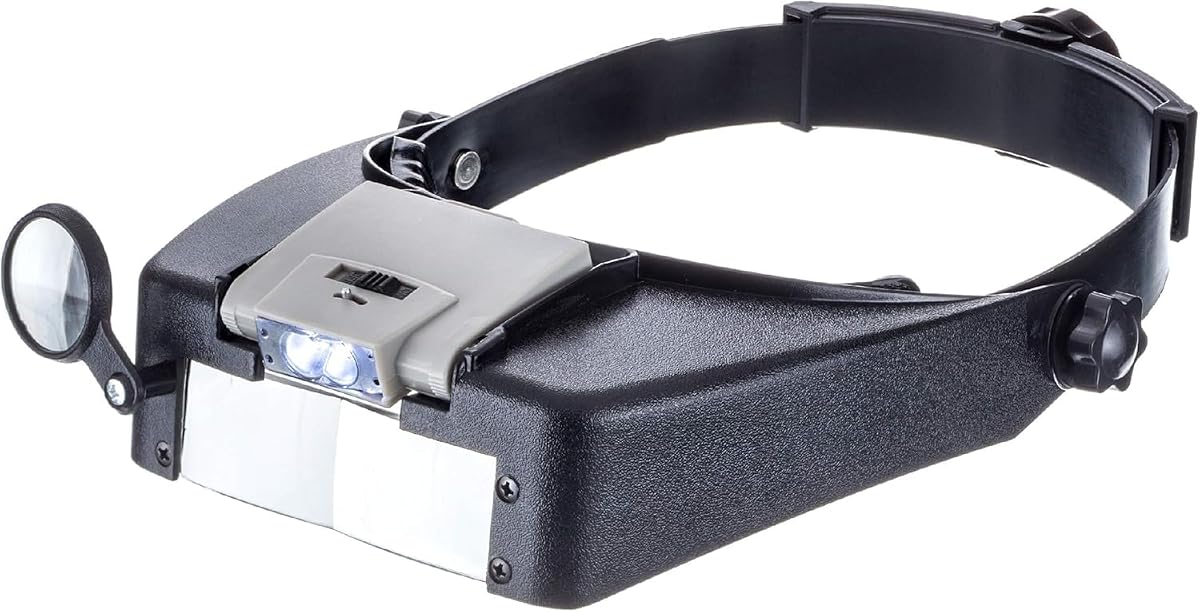
JARLINK's set provides a versatile and budget-friendly solution for close-up work without needing a digital screen. With 14 lenses ranging from 3X to 15X, you can select the exact magnification needed for specific tasks like soldering or wire inspection.
We may earn a commission when you buy through this link, at no additional cost to you.
The hands-free headset design keeps both hands free to manipulate tools and components, which significantly improves workflow efficiency. Integrated LED lights ensure the work area is well-lit, reducing shadows that could obscure fine details.
This model is intended for single-eye viewing, which some users may find limiting compared to binocular options. Additionally, higher magnification lenses require you to work very close to the object, so maintaining proper focus distance is important.
For those who need flexibility and affordability, this magnifier set is an excellent choice. It is widely used by jewelers and electronics technicians for tasks where digital tools are unnecessary or too expensive.
Having multiple lenses in one package saves money compared to buying individual magnifiers for different jobs around the workshop.
Keeping your hands free allows for greater precision when using soldering irons or tweezers, reducing the risk of slips or errors.
We may earn a commission when you buy through this link, at no additional cost to you.
This headband magnifier prioritizes comfort and ease of use, making it ideal for long sessions of close work. The padded leather cover and soft sponge ensure a comfortable fit that reduces fatigue during extended use.
We may earn a commission when you buy through this link, at no additional cost to you.
It offers four replaceable lenses from 1.5X to 3.5X, which is sufficient for many electronics tasks like component inspection or wire stripping. The rechargeable LED lights provide adjustable illumination and can be charged via a standard Type-C cable.
While it does not offer the high magnification of digital microscopes, its hands-free design and compatibility with prescription eyeglasses make it practical for daily use. The light angle can be adjusted to reduce shadows and improve visibility.
If comfort and simplicity are your priorities for routine inspection tasks, this magnifier is a strong contender. It is easy to set up and wear, allowing you to focus on your project without distraction.
The padded headband design distributes weight evenly, so you can wear it for hours without discomfort or pressure points.
Magnification levels up to 3.5X cover most standard electronics inspection needs without the complexity of digital setups or screens.
We may earn a commission when you buy through this link, at no additional cost to you.
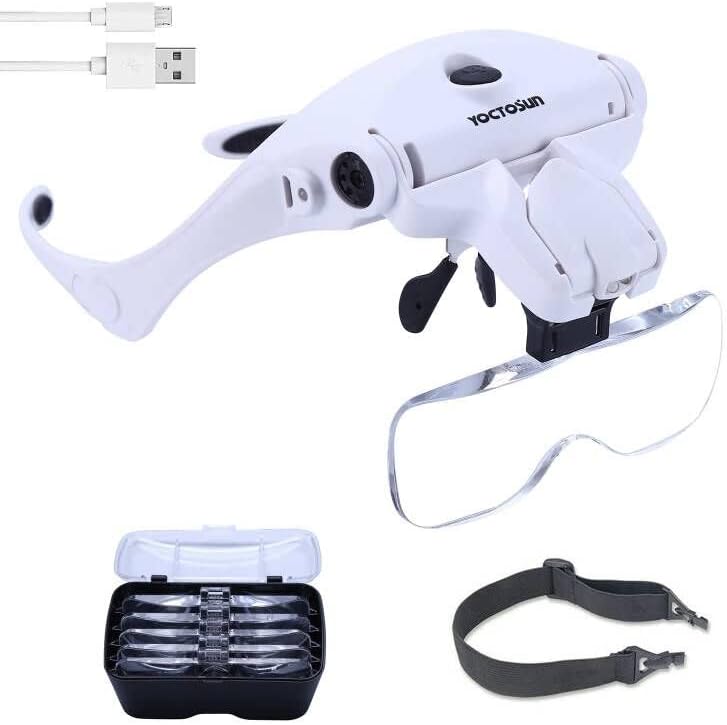
The YOCTOSUN model offers a versatile user experience with both glasses and headband wearing options. Its scratch-resistant acrylic lenses keep the unit lightweight while delivering clear magnification up to 3.5X for detailed inspection.
We may earn a commission when you buy through this link, at no additional cost to you.
Adjustable brightness levels give you control over lighting conditions, ensuring clear visibility whether you are working in dim or bright environments. The built-in lithium battery is rechargeable via USB, eliminating the need for disposable batteries.
Some users may find the fit slightly tight depending on head size, and the charging port differs from modern Type-C standards. However, the overall design is ergonomic and the lens options cover a wide range of common tasks.
For users who want adaptability and reliable brightness control, this magnifier is an excellent choice. It strikes a good balance between functionality and comfort for daily use.
Switch between wearing it as glasses or attaching the headband to adapt to different postures and comfort preferences throughout the day.
Two brightness settings allow you to adjust light intensity based on ambient conditions to avoid glare or insufficient illumination.
We may earn a commission when you buy through this link, at no additional cost to you.
This handheld magnifier is designed for users who prefer a simple, intuitive tool without digital complexity. The 3.15-inch lens provides a wide field of view, while the 18 LEDs offer bright illumination to enhance contrast on small components or text.
We may earn a commission when you buy through this link, at no additional cost to you.
Three lighting modes allow you to switch between cold, warm, and mixed light to reduce visual fatigue and suit different lighting conditions. The unit is fully assembled and easy to operate with a simple on/off switch.
Since it runs on three AAA batteries, you need to replace them periodically, but this avoids charging hassles. The handheld design means you must hold it steady, which might be challenging for users with shaky hands or limited mobility.
If you need a straightforward magnifier for reading or quick electronics inspections, this is a solid option. Its large lens and adjustable lighting make it accessible for many users, including those with vision impairments.
Adjusting light color temperature helps reduce eye strain, making it easier to see fine details for longer periods of time.
With no complex settings, the device is ready to use out of the box, which is perfect for users who want immediate functionality.
We may earn a commission when you buy through this link, at no additional cost to you.
The SE Dual Lens magnifier offers a unique advantage with stereo lenses that provide realistic depth perception. This is particularly valuable when working with three-dimensional objects like circuit components or wires where spatial accuracy matters.
We may earn a commission when you buy through this link, at no additional cost to you.
The flip-in design allows you to easily move the lens out of the way when not in use, keeping the field of view clear. The integrated LED light ensures the work area is well-lit, and the headband is adjustable for a secure fit.
Fixed at 4.5x magnification, it may not suit tasks requiring lower or higher power. Also, flip mechanisms can be prone to wear over time if handled roughly. However, the stereo vision benefits make it a specialized tool worth considering.
For professionals who need to judge depth and position accurately, this magnifier is a practical choice. It combines convenience with optical performance that supports precise manual tasks effectively.
Two lenses work together to create a 3D effect, helping you judge distances and placement accurately when soldering or assembling.
The headband design keeps your hands free for tools while providing a stable viewing angle without the need for holding a separate lens.
We may earn a commission when you buy through this link, at no additional cost to you.
The Satechi ReadMate is a desktop-oriented magnifier designed for users who prefer a stationary tool for reading or inspecting objects. Its 5X magnification provides a clear view of small text and components without the complexity of digital interfaces.
We may earn a commission when you buy through this link, at no additional cost to you.
A single touch activates the LED lights, making it quick and easy to use in low-light environments. The included carrying case and cleaning cloth protect the lens when not in use, adding to the unit's overall convenience.
Since it is handheld or placed on a surface, it does not free up both hands like headband models. Also, it requires battery installation before first use, but once ready, it functions reliably for daily tasks.
If you need a reliable magnifier for quick inspection or reading small labels on electronics parts, this is a great option. Its straightforward design and included case make it practical for travel or home use.
A simple touch of the magnifier turns on the lights instantly, reducing fumbling for switches when you need immediate illumination.
The included case keeps the lens scratch-free when stored, ensuring your tool remains clear and usable for the long term.
We may earn a commission when you buy through this link, at no additional cost to you.
This LED magnifier offers high magnification up to 20x with replaceable lenses, making it suitable for detailed soldering or component inspection. The glasses-style frame is lightweight and comfortable, allowing for hands-free use during precise tasks.
We may earn a commission when you buy through this link, at no additional cost to you.
Dual LED lights with adjustable angles help reduce shadows and glare, ensuring the work area is well-lit from multiple directions. The lenses are designed to minimize distortion, so you can see parts clearly without visual artifacts.
While it lacks digital features, the optical clarity and hands-free benefit are significant advantages for manual work. Note that higher magnifications require steady hands and precise focus, so it may take practice to use effectively.
If you need a powerful tool for delicate electronics assembly, this magnifier is a strong choice. Its combination of optical quality and comfort supports extended sessions without compromising visibility or accuracy.
Magnification up to 20x reveals fine details like cracks or solder bridges that lower power lenses might miss completely.
Dual lights with adjustable angles illuminate the work area from different sides to minimize shadows that could hide defects.
We may earn a commission when you buy through this link, at no additional cost to you.
Selecting the right magnifier depends on your specific tasks, budget, and comfort preferences. This guide outlines key factors to consider before making a purchase.
Magnification ranges from low (1.5x) to high (20x+). Lower powers are better for general assembly, while higher powers suit detailed inspection. Choose based on the size of components you handle most often.
Aim for a range that matches your typical workflow to avoid unnecessary complexity or limited visibility.
Hands-free options like headbands keep both hands available for tools, improving efficiency. Handheld units offer more flexibility but require holding steady.
Consider how often you need to manipulate tools simultaneously to decide which design suits your workflow best.
Bright LED lights are crucial for clear visibility in low-light environments. Adjustable intensity and multiple modes help reduce eye strain and shadows.
Look for models with flexible positioning to illuminate your work area effectively from any angle.
Digital microscopes offer screens and PC connections for sharing and saving images. They are great for documentation but add cost and complexity.
Decide if you need these features or if traditional optics are sufficient for your current needs.
Comfortable headbands or lightweight frames reduce fatigue during long sessions. Padded materials and adjustable straps enhance usability.
Prioritize comfort to ensure you can work for extended periods without discomfort or distraction.
High-quality optical lenses minimize distortion and ensure clear images. Acrylic or glass options vary in durability and clarity.
Check product descriptions for lens material claims to confirm optical performance aligns with expectations.
Battery-powered models use AAA or rechargeable lithium cells. Rechargeable options reduce waste but require charging cycles.
Select a power source that fits your usage frequency and convenience preferences.
Compact and lightweight units are easier to transport between workspaces. Consider size and weight if you move tools often.
Choose a design that balances performance with ease of transport for your specific work environment.
Before each use, ensure lenses are clean and free of dust or smudges to maintain clarity. Wipe gently with a soft cloth to avoid scratches.
Adjust magnification and lighting to suit the task and ambient conditions. Test focus on a sample object to confirm settings are optimal.
After use, store your magnifier in a protective case to prevent lens damage or scratches. Avoid leaving it in direct sunlight or extreme temperatures.
For general electronics repair, magnification between 2x and 10x works best for most components. Higher magnification up to 20x is useful for inspecting tiny solder joints or surface details.
A digital microscope is ideal if you want to capture photos, share views with others, or save findings for later. For quick manual inspections, traditional magnifiers are simpler and often more affordable.
LED lights are highly recommended because they provide bright, consistent illumination without heat. They help reduce shadows and improve contrast for detailed work in any environment.
Clean lenses gently with a soft, lint-free cloth. Avoid harsh chemicals or rough materials that could scratch the surface. Regular cleaning ensures clear visibility and extends product life.
Headband magnifiers are hands-free, allowing both hands for tools, while handheld units offer more flexibility. Choose headband for long sessions or intricate work requiring steady hands.
Battery life varies by model, ranging from 4 to 6 hours on rechargeable units to months with AAA batteries. Check product specs for expected runtime before purchasing.
Many headband magnifiers are designed to fit over prescription eyeglasses comfortably. Ensure the frame is adjustable and lightweight for a secure fit without pressure.
Always avoid pointing bright LED lights directly at your eyes to prevent strain. Ensure proper ventilation if using in confined spaces to avoid heat buildup from devices.
Whether you prefer a digital microscope with a screen or a simple hands-free headband magnifier, there are excellent options available for every need and budget. The Elikliv Microscope, TOMLOV DM9, and JARLINK Magnifying Glasses stand out as top picks for overall value and performance.
Consider your primary tasks, such as soldering or inspection, and prioritize features like magnification range, lighting, and comfort to find the right tool. These factors will impact your efficiency and accuracy during electronics work significantly.
Prices and availability can change quickly, so verify current offers on retailer websites before buying to secure the best deal. With the right magnifier, you will enhance your precision and confidence in all your electronics projects.